If your TV or monitor gets the picture right but the sound wrong, the right adapter can make setup simple. HDMI audio extractors split audio from video so you can feed speakers, soundbars, or older receivers without replacing your display.
In this roundup, we focus on practical options for 4K streaming, gaming, ARC/eARC systems, and mixed analog-digital audio needs. The goal is to help you match the right extractor to your gear and avoid compatibility headaches.
Best 10 Hdmi Audio Extractors Picks for 2026
Balanced 4K Extractor
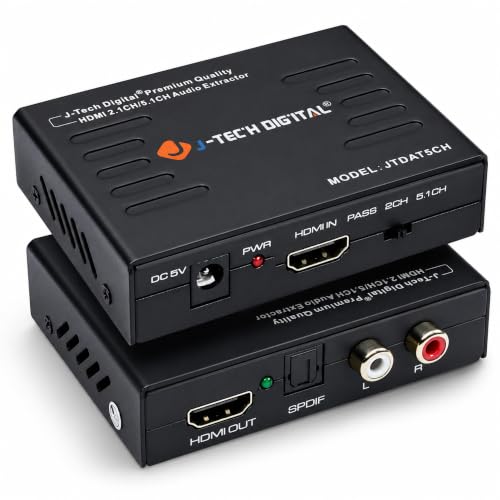
- 2CH stereo and 5.1CH surround output options
- 4K@30Hz pass-through with EDID support
- Handles DTS, Dolby Digital, and LPCM audio
Best For: compact home theater setups needing simple surround extraction
Simple Budget HDMI Splitter

- Optical and 3.5mm AUX audio outputs
- 2.0CH, 5.1CH, and PASS operating modes
- Powered from a USB 5V source
Best For: basic optical or stereo audio extraction on a budget
Budget 4K/30Hz Pick
Amazon Basics HDMI Audio Extractor
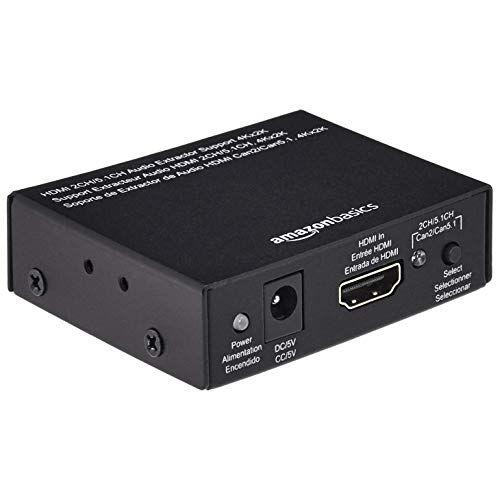
- SPDIF optical and stereo output
- Up to 4K at 30Hz with 3D support
- Metal housing for basic durability
Best For: Simple setups that only need stereo audio extraction from 4K/30Hz HDMI sources
Premium 8K Pass-Through Choice

- Pass-through up to 8K at 60Hz and 4K at 120Hz
- Optical, 3.5mm, and HDMI ARC outputs
- Supports Dolby Atmos, DTS:X, and HDR formats
Best For: Advanced AV and gaming setups that need high-bandwidth video with extracted audio
Compact No-Adapter Option

- HDMI pass-through with 3.5mm and RCA stereo out
- Up to 4K at 30Hz with EDID detection
- Plug-and-play with USB backup power
Best For: Compact basic setups that need easy stereo audio breakout
4K HDR Pass-Through Choice
OREI 4K@60Hz HDMI Audio Converter Extractor

- 4K/60 passthrough with HDR10 and Dolby Vision
- Optical SPDIF plus 3.5mm stereo outputs
- Supports Dolby Digital, DTS, Atmos, and DTS:X pass-through
Best For: Home theater users needing simple 4K audio extraction with optical and analog outputs
ARC and EDID Flex Pick
J-Tech Digital 4K 60Hz HDMI Audio Extractor

- RCA and optical outputs for stereo and 5.1 setups
- ARC support plus EDID modes for compatibility
- 4K/60 at 4:2:0 and 4K/30 at 4:4:4 support
Best For: Users who want ARC support and flexible output options for TVs, consoles, and Blu-ray players
Budget 4K Audio Splitter
J-Tech Digital 4K 60Hz HDMI Audio Extractor
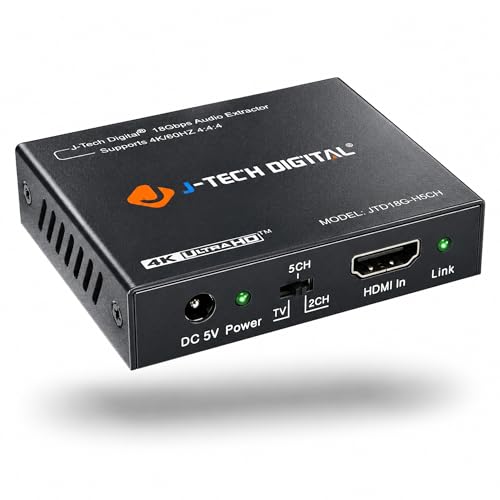
- 4K/60 passthrough with HDR10 support
- SPDIF and 3.5mm outputs for audio extraction
- Dolby Digital and DTS pass-through support
Best For: Users wanting basic 4K HDMI audio extraction with optical and analog outputs
Versatile HDMI Audio Splitter – avedio links 4K HDMI Audio Extractor
If you need one of the more flexible HDMI audio extractors for a mixed home setup, this avedio links model gives you multiple ways to separate sound from HDMI while keeping video on your display. It supports HDMI to HDMI pass-through plus optical, RCA L/R, and 3.5mm output options, making it easier to connect to speakers, soundbars, amplifiers, or a home theater system.
Best For: Users who want broad analog and digital audio output options from HDMI sources like consoles, streaming devices, and Blu-ray players.
Pros:
- Outputs audio through SPDIF, RCA L/R, or the included RCA-to-3.5mm cable.
- Supports PASS, 2CH, and 5.1CH modes for different audio setups.
- Handles up to 4K@30Hz video with HDMI 1.4b and HDCP 1.4 support.
- Wider port spacing makes cable plugging and unplugging easier.
Cons:
- ARC is not supported.
- Limited to 4K@30Hz rather than higher refresh-rate formats.
- Best suited to HDMI source devices rather than TV audio return setups.
This is a practical pick if you want a straightforward extractor with more connection flexibility than a basic optical-only unit. The mix of digital and analog outputs makes it especially useful for older audio gear or simple desktop and living-room installations.
TV ARC/eARC Specialist – VPFET HDMI eARC Audio Extractor
Among HDMI audio extractors, this VPFET unit is built for a very specific job: pulling audio from a TV’s HDMI ARC/eARC port and sending it out through optical or coaxial. If your TV app audio needs to reach a soundbar, amplifier, DAC, or headphone amp, this is the type of converter that fits that workflow.
Best For: TV owners who need ARC/eARC audio output to optical or coaxial gear without using standard HDMI source devices.
Pros:
- Designed specifically for HDTV ARC/eARC ports.
- Dual digital outputs: Toslink optical and coaxial.
- Supports up to 24-bit/192 kHz sampling rates.
- Includes an ARC/eARC status indicator for mode visibility.
Cons:
- Only works with the TV’s ARC/eARC port, not regular HDMI inputs.
- No CEC support.
- Requires checking TV settings and proper 19+1 HDMI cabling for best results.
This is a focused solution rather than an all-purpose extractor, but that specialization is its strength. If your main challenge is getting TV app audio out to legacy audio equipment, the dual-output design and high sampling support make it a strong fit.
Balanced 4K Extractor – J-Tech Digital JTDAT5CH
If you’re shopping HDMI audio extractors for a straightforward home theater or media room setup, the J-Tech Digital JTDAT5CH is built around reliable HDMI audio separation with a simple mode structure. It takes HDMI input and provides either 2-channel analog stereo or 5.1-channel audio output, while keeping video pass-through up to 4K@30Hz.
Best For: People who want a compact HDMI audio extractor with clear 2CH and 5.1CH output options for TVs, players, and receivers.
Pros:
- Converts HDMI audio to 2-channel stereo or 5.1-channel output.
- Supports 4K@30Hz video with HDCP and EDID pass-through.
- Offers Pass, 2CH, and 5.1CH audio EDID settings.
- Works with compressed and uncompressed audio formats like DTS, Dolby Digital, and LPCM.
Cons:
- ARC functionality is not supported.
- Limited to 4K@30Hz rather than newer high-refresh formats.
- More geared toward HDMI source extraction than TV audio return.
The J-Tech unit is a sensible middle-ground choice if you want dependable format support without extra complexity. It is especially appealing when you need both stereo and surround options and prefer a no-fuss plug-and-play box.
Simple Budget HDMI Splitter – VPFET 4K HDMI Audio Extractor
This VPFET model is one of the more straightforward HDMI audio extractors for basic extraction from HDMI source devices to optical or 3.5mm audio. It supports pass-through video up to 4K@30Hz and gives you a simple way to send sound to an AV receiver, speaker system, or other compatible audio gear.
Best For: Buyers who want a simple, low-power HDMI audio extractor for optical or analog stereo output.
Pros:
- Provides optical and 3.5mm AUX audio outputs.
- Offers 2.0CH, 5.1CH, and PASS modes.
- Supports up to 4K@30Hz with HDMI 1.4 and HDCP 1.4.
- Low-power design can run from a USB 5V source.
Cons:
- ARC and eARC are not supported.
- 3.5mm output is limited to PCM 2.0.
- Notes indicate some devices only support 1080p signals with this unit.
This is a good fit when you just need the core extractor function without extra features. Its low energy requirement and simple output choices make it practical for basic living-room or desk setups, especially if your audio system is built around optical input or stereo AUX.
Budget 4K/30Hz Pick – Amazon Basics HDMI Audio Extractor
Amazon Basics 4K@30Hz HDMI to HDMI and Audio (RCA Stereo or Spdif) Extractor Converter, Black
Check Price On AmazonIf you need one of the simplest HDMI audio extractors for a basic TV, streaming box, or disc player setup, this Amazon Basics model keeps the focus on straightforward audio breakout. It passes HDMI video while sending stereo audio through SPDIF optical or two-channel left/right output, and it supports up to 4K at 30Hz.
Best For: Budget-conscious buyers who want a basic HDMI-to-audio solution for 4K/30Hz systems.
Pros:
- Extracts audio to SPDIF optical or stereo left/right output.
- Supports up to 4K at 30Hz, plus 1080p and 3D formats.
- Compatible with common sources like Apple TV, Fire TV, Blu-ray players, consoles, and PCs.
- Metal housing adds a durable feel for everyday use.
Cons:
- Limited to 2-channel stereo audio output.
- Does not offer the higher-bandwidth 4K/120Hz or 8K pass-through found on premium units.
- No warranty is listed in the supplied details.
Overall, this is a practical pick if your priority is reliable HDMI audio extraction without needing advanced gaming or home theater bandwidth. It fits best in simpler setups where 4K at 30Hz is enough.
Premium 8K Pass-Through Choice – OREI 8K HDMI Audio Extractor
For buyers looking at higher-end HDMI audio extractors, this OREI model is built around modern bandwidth and format support. It extracts audio to optical or 3.5mm stereo while passing video up to 8K at 50/60Hz and 4K at 120Hz, making it a strong fit for newer consoles and advanced displays.
Best For: Users who need 8K-capable pass-through with ARC support and broad format compatibility.
Pros:
- Supports video pass-through up to 8K at 50/60Hz and 4K at 120Hz.
- Offers optical S/PDIF, 3.5mm stereo, and HDMI ARC outputs.
- Handles a wide range of audio formats, including Dolby Atmos, DTS:X, and DTS-HD Master Audio.
- Includes metal enclosure, power supply, user manual, and lifetime tech support.
Cons:
- Does not support eARC.
- Volume cannot be controlled using the TV’s remote.
- Requires an HDMI 2.1 cable for the highest-bandwidth use cases.
This is the most feature-rich option in the group, especially if you want an HDMI audio extractor that keeps up with 8K and 4K/120Hz gear. It is better suited to advanced AV setups than basic stereo breakout boxes.
Compact No-Adapter Option – VPFET 4K HDMI Audio Extractor
If you want a compact HDMI audio extractor that keeps wiring simple, the VPFET model is built around plug-and-play use and separate audio breakout. It sends HDMI video through while providing 3.5mm and RCA stereo output, and it supports up to 4K at 30Hz with EDID-based audio detection.
Best For: Users who want a small, easy-to-install extractor for basic 4K/30Hz HDMI setups.
Pros:
- Provides HDMI pass-through plus 3.5mm and RCA stereo audio output.
- Supports up to 4K at 30Hz, 1080p, 3D, and lower HD resolutions.
- Plug-and-play design with no external power adapter required for normal use.
- Includes a USB cable for devices with low-power HDMI ports.
Cons:
- Limited to 4K at 30Hz rather than newer high-refresh-rate standards.
- Some devices may require USB power for stable operation.
- The notes specify PCM output settings for proper audio handling.
As a compact entry-level choice, this extractor is a sensible fit when you just need to separate stereo audio from HDMI without adding much bulk. It is best for simpler home theater, console, or monitor setups.
4K HDR Pass-Through Choice – OREI 4K@60Hz HDMI Audio Converter Extractor
If you need one of the more straightforward hdmi audio extractors for a 4K HDR setup, this OREI unit keeps the video signal moving while splitting audio to optical and 3.5mm outputs. It’s a practical pick for home theater or mixed-device setups where you want Dolby Digital and DTS support without adding extra complexity.
Best For: Users who want a plug-and-play HDMI audio extractor with 4K/60 passthrough, optical output, and analog stereo for home theater gear.
Pros:
- Passes up to 4K at 50/60Hz with HDR10 and Dolby Vision support
- Supports LPCM, Dolby Digital, DTS, Dolby Atmos, and DTS:X over HDMI pass-through
- Includes optical SPDIF and 3.5mm stereo outputs for flexible audio connections
- HDMI 2.0b, HDCP 2.2, and CEC bypass support for broad compatibility
Cons:
- Does not support ARC
- Not compatible with 1440p/120Hz, 4K/30Hz, or 1080p/120Hz modes
- Analog output is limited to stereo
Overall, this is a solid choice if your priority is preserving high-resolution video while extracting reliable audio for a soundbar, receiver, or older stereo gear. The feature set is strong, but the resolution limits mean it’s best matched to standard 4K/60 sources.
ARC and EDID Flex Pick – J-Tech Digital 4K 60Hz HDMI Audio Extractor
This J-Tech Digital model is one of the more versatile hdmi audio extractors if you want to pull sound from HDMI sources or use ARC from a smart display. It sends audio to RCA and optical outputs, and its EDID modes help when you’re working through source-and-display compatibility issues.
Best For: Buyers who want HDMI audio extraction with ARC support, EDID switching, and both RCA and optical output options.
Pros:
- Supports HDMI audio extraction to both RCA and optical outputs
- Includes ARC functionality for compatible smart displays
- EDID toggle offers TV, 2CH, and 5CH modes to improve compatibility
- Supports 4K/60Hz at 4:2:0 and 4K/30Hz at 4:4:4
Cons:
- Does not support eARC
- RCA output is stereo only and does not downmix 5.1 to analog
- Requires the source to match the supported 4K format for proper processing
For users balancing compatibility and flexibility, this extractor stands out because it adds ARC and EDID controls without losing the basics. It’s a good fit for living rooms, displays, and mixed audio setups, as long as you stay within its HDMI 1.4 / HDCP 1.4 limits.
Budget 4K Audio Splitter – J-Tech Digital 4K 60Hz HDMI Audio Extractor
If you’re looking for a no-frills hdmi audio extractor that focuses on core playback, this J-Tech Digital unit keeps things simple with SPDIF and 3.5mm outputs while supporting 4K/60 video passthrough. It’s aimed at users who already have PCM-ready sources and want a basic way to separate audio from HDMI.
Best For: People who need a simple HDMI-to-audio splitter for 4K sources and are comfortable using PCM for analog output.
Pros:
- Passes 4K at 60Hz and supports HDR10
- Includes both SPDIF and 3.5mm outputs
- Supports Dolby Digital and DTS pass-through
- Works with HDMI 2.0 and HDCP 2.2 sources
Cons:
- Analog output requires the HDMI source to be set to PCM
- Does not decode Dolby Digital or DTS for analog output
- Not compatible with some older devices and specific set-top boxes
This is a sensible pick when you need reliable 4K video passthrough and simple audio extraction more than advanced format handling. Just make sure your source settings match the unit’s limitations, especially if you plan to use the analog output.
How We Picked the Best Hdmi Audio Extractors
We looked for models that solve real-world connection problems: sending audio to optical, coaxial, RCA, or 3.5mm outputs while keeping HDMI video stable. Priority went to units with broad format support, clear device compatibility, and sensible port layouts for TVs, consoles, streaming boxes, and receivers.
We also favored Hdmi Audio Extractors with support for common standards such as HDMI 2.0, HDCP, ARC, and multichannel audio formats like Dolby Digital and DTS where relevant. For buyers, that means fewer handshake issues and better odds of plug-and-play setup.
Quick Comparison Tips
The main choice is usually between digital-only outputs and models that also provide analog audio. Optical and coaxial are ideal for soundbars and AV receivers, while RCA and 3.5mm are better for older speakers, desktop audio, or simple stereo use. If you need to keep higher refresh rates or newer video features, check the extractor’s bandwidth and pass-through limits before buying.
Another practical difference is whether you need ARC/eARC support. Those models are useful when you want to pull audio back from a TV’s apps or tuner instead of only extracting sound from an HDMI source device.
Key Buying Factors for Hdmi Audio Extractors
Video Resolution and Refresh Rate
Match the extractor to your display and source. Many buyers only need 4K at 60Hz, but gamers and home theater enthusiasts may need support for higher refresh rates or newer HDMI standards. If your setup includes a PS5, Xbox Series X, or a high-refresh PC, verify the passthrough specifications carefully.
Audio Output Type
Choose optical or coaxial for cleaner digital audio to receivers and soundbars. Choose RCA or 3.5mm if your speakers or headphones need analog output. Some Hdmi Audio Extractors include both, which adds flexibility if your setup might change later.
Format and Device Compatibility
Look for support for the audio formats your devices actually use. Dolby Digital, DTS, and PCM cover most common home setups, but ARC/eARC compatibility matters if you want to extract audio from the TV itself. HDCP support is also important for protected streaming content and many modern media devices.
Ease of Setup
Simple power requirements, clear input/output labeling, and reliable EDID behavior can save a lot of troubleshooting. If your system includes mixed-brand components, a straightforward extractor often works better than a feature-heavy model with poor handshake behavior.
Who Should Buy Which Hdmi Audio Extractors?
Choose a basic 4K extractor if you just need to split audio from a streaming box, Blu-ray player, or console into speakers or a receiver. Pick an ARC/eARC-capable model if your TV is the audio source. Go with a higher-bandwidth unit if you need to preserve advanced video features or plan to keep the extractor in a future-proof setup.
If you rely on older speakers or a compact desk system, an extractor with RCA or 3.5mm outputs makes the most sense. For a more traditional home theater, prioritize optical or coaxial connections and strong support for common surround formats. In short, the best Hdmi Audio Extractors are the ones that match your exact display, source, and speaker chain without forcing extra adapters.