Want to play old tapes on the go, preserve their recordings, or both? A USB label alone does not tell you what a cassette player can do: some models transfer audio to a computer, while others save files without one.
These 10 selections span simple tape-to-MP3 converters and feature-rich players. Use the guide below to match the connection and recording method to your tapes, devices, and listening habits.
Best 10 Portable Cassette Players with USB Picks for 2026
Most Versatile
Gracioso Bluetooth Cassette Converter

- Direct tape-to-USB MP3 recording
- Bluetooth transmit and receive modes
- Records onto blank cassettes
Best For: All-in-one tape conversion and wireless listening
Best Pocket Conversion Kit

- Converts tapes to SD-stored MP3s
- Card, reader, and earphones included
- USB-C rechargeable
Best For: Compact tape digitization with included accessories
Best Compact Voice Recorder

- Tape-to-MP3 conversion on SD card
- Built-in microphone for voice notes
- Includes earphones and USB-C cable
Best For: Portable tape playback and voice recording
Best Radio Boombox

- AM/FM, Bluetooth, and USB playback
- Records USB or radio audio to tape
- AC or C-cell battery power
Best For: Multi-source boombox listening and cassette recording
Best Without a Computer

- Records MP3s directly to a USB drive
- Auto-reverse and optional track splitting
- Includes headphones and carry bag
Best For: Computer-free cassette digitizing
Best Computer Transfer Kit

- USB transfer to a laptop or PC
- Software, guide, and USB power cord included
- 3.5mm output for headphones or AUX
Best For: Computer-based transfers with an included kit
Best Audacity Bundle
DigitNow USB Cassette Converter
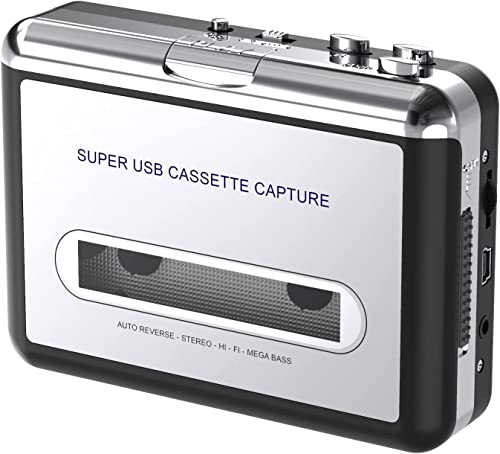
- USB cassette capture via computer
- Software CD, cable, and earphones included
- Check compatibility with newer systems
Best For: Audacity-based tape digitizing
Computer-Based Transfer
Tinxumb Cassette-to-MP3 Player

- Converts tapes through a computer
- Software offers editing and trimming
- USB or two-AA-battery power
Best For: Computer-based tape transfers with basic audio editing
No-PC Recording
DIGITNOW BR607 USB Cassette Player
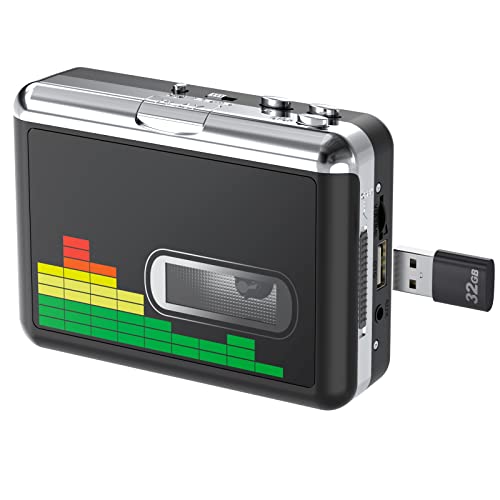
- Records MP3s to a USB flash drive
- Auto-reverse switches tape sides
- Manual or automatic song splitting
Best For: Direct-to-flash-drive transfers without a computer
Transfer Kit
Reshow Cassette-to-Digital Player

- USB transfer through a computer
- Software, guide, and power cord included
- 3.5 mm connection for listening
Best For: Computer-based transfers with an included setup kit
Most Versatile – Gracioso Bluetooth Cassette Converter
Among portable cassette players with usb, this Gracioso model offers an unusually broad mix of playback and recording options. It converts tapes directly to MP3 files on a USB drive without a computer, while Bluetooth transmitter and receiver modes connect it to headphones, speakers, or a phone.
Best For: Listeners who want to digitize tapes, stream wirelessly, and make new cassette mixtapes with one device.
Pros:
- Records tape audio directly to a USB drive without software.
- Bluetooth transmitter and receiver support both wireless listening and phone-to-player playback.
- Can record audio onto blank cassettes; includes a 6W speaker and rechargeable battery.
Cons:
- USB recording requires a supported FAT32-formatted, 4–32GB drive.
- Claimed tape playback time is up to six hours, less than the stated 10 hours in Bluetooth mode.
Choose this one if you will use its recording flexibility. The direct-to-USB workflow is particularly handy when you would rather not connect a computer to digitize tapes.
Best Pocket Conversion Kit – KLIM K7 with 16GB Card
If you are comparing portable cassette players with usb for easy tape digitization, the KLIM K7 takes a different approach: it saves MP3 recordings to an included 16GB SD card. The package also supplies an SD card reader and a USB-C charging cable, so USB is used for charging rather than direct recording to a flash drive.
Best For: People who want a compact, ready-to-use kit for converting cassettes to SD-stored MP3 files.
Pros:
- Includes a 16GB SD card, card reader, earphones, and USB-C cable.
- Converts tapes without an app or additional recording device.
- Built-in microphone and speaker allow standalone audio recording and playback.
Cons:
- Does not record onto cassette tapes.
- Stores conversions on an SD card, not directly on a USB flash drive.
This is a practical pick when you want the conversion accessories in the box. If direct USB-drive recording or making new tapes matters more, look for a different recording setup.
Best Compact Voice Recorder – KLIM K7 Cassette Player
This KLIM K7 is a compact option for shoppers browsing portable cassette players with usb, but its USB-C connection is for charging; tape-to-MP3 conversion saves to the included 16GB SD card. A built-in microphone also lets you record thoughts or meetings directly to the card.
Best For: Anyone seeking a portable tape player that also captures voice notes and digitizes cassettes without an app.
Pros:
- Includes a 16GB SD card and reader for tape conversions.
- Built-in microphone records directly to the SD card.
- Rechargeable battery, integrated speaker, and included earphones support listening on the go.
Cons:
- Cannot record onto cassette tapes.
- Does not save recordings directly to a USB flash drive.
Pick this listing for its combination of tape conversion and simple voice recording. Check its card-based workflow against your needs if direct USB storage is a priority.
Best Radio Boombox – KLIM Cassette Player with USB
For shoppers who prefer a handled boombox to a pocket player, this KLIM model brings radio and Bluetooth to portable cassette players with usb. Its USB port plays media from a drive, and the recorder can put audio from USB, radio, or the built-in microphone onto cassette tape.
Best For: Home or portable listening that combines cassettes, AM/FM radio, USB playback, and recording onto tape.
Pros:
- Plays cassettes, AM/FM radio, Bluetooth audio, and files from a USB drive.
- Records USB audio, radio, or microphone input onto cassette.
- Works with the included AC cord or four C-cell batteries.
Cons:
- C-cell batteries are not included.
- The described recording direction is onto cassette, not tape-to-USB digitization.
This is the stronger fit when you want an easy-to-carry radio and tape recorder with multiple listening sources. For archiving old cassettes as digital files, choose a model that explicitly supports tape-to-digital conversion.
Best Without a Computer – USB Cassette to MP3 Converter
Among portable cassette players with USB, this model stands out for recording tapes directly to a USB flash drive—no computer required. It offers manual recording or automatic track splitting, plus auto-reverse for converting both sides of a tape.
Best For: Anyone digitizing cassettes without connecting a player to a computer.
Pros:
- Records MP3 files directly to a USB flash drive.
- Auto-reverse and optional automatic track splitting simplify longer transfers.
- Includes headphones and a carry bag; the 3.5mm jack also supports listening through other compatible audio devices.
Cons:
- Requires a compatible FAT or FAT32 USB drive for recording.
- USB power is recommended over AA batteries for more stable operation.
The direct-to-drive workflow is its strongest reason to buy. If you want portable tape playback and computer-free conversion in one device, this is the most straightforward fit of the three.
Best Computer Transfer Kit – Reshow Cassette Tape Player
If you’re comparing portable cassette players with USB for computer-based transfers, the Reshow connects to a laptop or PC by USB cable to convert tapes to MP3. It also works as a compact cassette player with a 3.5mm jack for headphones or a compatible car stereo input.
Best For: Buyers who want a tape player and a supplied software kit for computer-based conversion.
Pros:
- Converts cassette audio to MP3 through a USB connection to a computer.
- Includes converter software, a guide, and a 5V DC USB power cord.
- 3.5mm output supports standard headphones and compatible AUX inputs.
Cons:
- Conversion requires a computer rather than recording directly to a flash drive.
- The supplied notes do not specify automatic track splitting or auto-reverse.
This is a practical choice when you already plan to manage recordings on a computer. Its included transfer materials are useful, but buyers seeking standalone USB-drive recording should choose a different workflow.
Best Audacity Bundle – DigitNow USB Cassette Converter
For shoppers looking at portable cassette players with USB, this DigitNow model pairs cassette playback with computer-based MP3 capture. It connects by USB and includes a software CD for using Audacity, along with earphones for listening through its 3.5mm jack.
Best For: Buyers comfortable using a computer and Audacity to digitize old tapes.
Pros:
- USB connection supports cassette-to-MP3 capture on a computer.
- Includes a software CD, USB cable, earphones, and user manual.
- Compact design and 3.5mm output allow portable listening.
Cons:
- MP3 conversion depends on computer software rather than direct recording to a USB drive.
- The listed compatibility names older Windows versions and Macs older than version 10.5; current-system support is not specified.
The included accessories make it a convenient starting bundle if its software fits your setup. Check computer compatibility before buying, especially if you use a recent operating system.
Computer-Based Transfer – Tinxumb Cassette-to-MP3 Player
Among portable cassette players with USB, this Tinxumb model is suited to transferring tapes through a laptop or desktop computer. Its included conversion software offers tools to edit, trim, and enhance recordings after capture.
Best For: People who want to digitize tapes on a computer and tidy up the resulting audio files.
Pros:
- Transfers cassette audio to MP3 through a USB connection to a computer.
- Includes software tools for editing and trimming recordings.
- Runs on USB power or two AA batteries and has a 3.5 mm jack for listening.
Cons:
- MP3 conversion requires a laptop or computer.
- AA batteries are not included.
This is the pick if you value computer-based editing more than standalone recording. The battery option makes it portable, but plan on using a computer to create the MP3 files.
The DIGITNOW BR607 stands out among portable cassette players with USB because it records MP3 files directly to a USB flash drive—no computer needed. It also plays tapes through the included earphones or a 3.5 mm audio connection.
Best For: Digitizing cassettes directly to a flash drive without setting up a computer.
Pros:
- Saves MP3 recordings to a FAT32 USB drive of up to 128 GB.
- Auto-reverse switches tape sides without manual intervention.
- Offers manual or automatic song splitting and runs on USB power or two AA batteries.
Cons:
- USB flash drive and AA batteries are not included.
- Requires a FAT32-formatted drive for direct recording.
Choose this model if a computer-free workflow matters most. Its auto-reverse and file-splitting options are useful for longer transfer sessions, provided you have a compatible flash drive ready.
For shoppers comparing portable cassette players with USB, this Reshow player offers a computer-connected way to convert tapes to MP3 files. It comes with conversion software, a guide, and a 5V DC USB power cord to help you get started.
Best For: Listeners who want a compact cassette player with the supplied basics for computer-based transfers.
Pros:
- Converts cassette audio to MP3 through a USB connection to a computer.
- Includes converter software, a guide, and a USB power cord.
- Works with standard headphones or a 3.5 mm AUX connection.
Cons:
- Digital conversion relies on a laptop or personal computer.
- The supplied notes do not specify a battery-power option.
This is a straightforward choice for playing tapes and making computer-based copies. If you need to save files straight to a USB flash drive, look instead for a model that explicitly supports that workflow.
How We Picked These Portable Cassette Players with USB
We organized the selections around the jobs buyers actually need done: listening to tapes, transferring recordings to a computer, and saving digital files without a computer. We also considered the features stated in the product listings, including speakers, headphone jacks, radio, Bluetooth, microphones, included storage, and power options. Listing details do not establish transfer quality or long-term durability, so check the current specifications and seller information before ordering.
Quick Comparison: Start with the Transfer Method
Computer-based converters are the starting point if you already have a laptop and are comfortable capturing audio with software. Check operating-system compatibility and whether a recording program is included or required. Direct-to-file converters suit buyers who want to save recordings without running a computer during playback; confirm where files are stored and what storage is included. Multifunction players emphasize listening features such as speakers, radio, or Bluetooth, but those extras do not automatically mean they can digitize tapes.
Key Buying Factors for Portable Cassette Players with USB
Know What the USB Port Does
USB may carry audio to a computer, accept a flash drive, or provide power. It is not proof that the player records MP3 files directly to a USB stick. Look for an explicit recording workflow and supported file destination. If a listing mentions a card, check whether it uses microSD or another format and whether the card is included.
Check Playback and Power
For private listening, look for a headphone jack; for sharing tapes without extra equipment, consider a built-in speaker. Check whether the player uses replaceable batteries, a rechargeable battery, an AC adapter, or USB power, and whether the required cable or adapter comes in the box. If you plan to use it while traveling, size and power flexibility matter more than a long list of stationary features.
Set Realistic Digitizing Expectations
Cassette transfers generally happen as the tape plays, so a 60-minute recording takes about 60 minutes to capture. Sound quality depends heavily on the tape’s condition and the player’s transport. For important recordings, test a short section first, listen for speed problems or missing channels, and keep the original tape after making your digital copy.
Who Should Buy Which Portable Cassette Players with USB?
For a simple computer workflow: choose a USB-to-PC converter and budget time to install and learn the capture software. For transfers away from a computer: choose a model that explicitly records to included or compatible storage. For regular listening: prioritize comfortable controls, your preferred output, and convenient power; treat conversion as a separate feature to verify. For an all-in-one tabletop option: a boombox-style player with a speaker and radio may be more useful than a compact converter. If two listings appear to describe the same model, compare the exact seller package rather than assuming they include the same accessories.