When it comes to achieving perfect sound control in your studio, choosing the right monitor controller is essential. In 2025, you’ll find a range of options designed to enhance audio quality and streamline your workflow. From versatile connectivity to user-friendly features, these controllers cater to both professionals and casual listeners. Curious about which models stand out and what factors you should consider? Let’s explore the top ten choices that could elevate your sound experience.
Mackie Big Knob Passive Studio Monitor Controller

If you’re looking for a reliable and robust solution to manage your studio monitors, the Mackie Big Knob Passive Studio Monitor Controller is an excellent choice. This passive 2×2 controller features mono, mute, and dim buttons, ensuring pristine audio quality through its passive audio path. You can easily switch between two sources and two monitor pairs. With its sturdy, metal construction, it’s perfect for both home studios and larger editing suites. Weighing just 2.2 pounds, it’s compact yet built to last. Users appreciate its functionality, though some note minor issues at lower volumes. Overall, it’s a solid investment for sound control.
Best For: The Mackie Big Knob Passive Studio Monitor Controller is best for home studio owners and audio professionals seeking a durable and effective monitor management solution.
Pros:
- Sturdy metal construction ensures durability and longevity.
- Easy switching between multiple audio sources and monitor pairs.
- Compact design allows for convenient tabletop placement.
Cons:
- Some users experience channel imbalance at lower volume settings.
- Occasional noise can be introduced at higher volume levels.
- Volume knob may lack tactile resistance, affecting user experience.
PreSonus Monitor Station V2 Desktop Studio Control Center (MONITO STAT V2)

The PreSonus Monitor Station V2 Desktop Studio Control Center is an ideal choice for audio engineers and musicians seeking extensive sound control in their studio setup. With four stereo input pairs and a S/PDIF digital input, you can easily manage multiple sources. It offers three individually selectable stereo outputs and dedicated level controls, ensuring precise monitoring. The large main level control and features like mute, mono, and dim switches enhance your workflow. Plus, with four headphone amplifiers and built-in talkback functionality, communication is seamless. This controller provides everything you need for superior sound management in your studio.
Best For: Audio engineers and musicians seeking comprehensive sound control and monitoring capabilities in their studio setup.
Pros:
- Versatile input options with four stereo pairs and a S/PDIF digital input for managing multiple sources.
- Three individually selectable stereo outputs with dedicated level controls for precise monitoring.
- Built-in talkback functionality and four headphone amplifiers for seamless communication and collaboration.
Cons:
- May be considered overkill for casual users or home studios with minimal monitoring needs.
- Limited to a desktop setup, which might not be suitable for mobile or on-the-go recording situations.
- The built-in microphone for talkback may not provide the same audio quality as dedicated external options.
Behringer XENYX CONTROL2USB Studio Control and Communication Center

For musicians and audio engineers seeking seamless communication and precise sound control, the Behringer XENYX CONTROL2USB Studio Control and Communication Center stands out as an essential tool. Weighing just 5.29 pounds, its compact design houses a master volume controller, source selector, and built-in talkback microphone. You’ll love the VCA control for precise level adjustments and dual LED meters that track your input/output levels. With multiple outputs for three sets of studio monitors, it’s perfect for any setup. User feedback highlights its reliable performance and durability, making it a fantastic value at around $149 for professional audio use.
Best For: Musicians and audio engineers looking for a reliable and versatile studio control center for effective audio management and communication.
Pros:
- Versatile Functionality: Combines master volume control, source selection, and talkback features in one compact device.
- High-Quality Performance: Offers ultra-low noise operation and solid build quality, suitable for professional setups.
- Multiple Outputs: Supports three sets of studio monitors, providing flexibility for various audio routing needs.
Cons:
- Potential Noise Issues: Some users report occasional noise problems in certain setups.
- Button Wear Over Time: A few users have noted wear on buttons after extended use.
- Size Considerations: The unit’s dimensions may be cumbersome for smaller studio environments.
PMC-2 Premium Passive 2 x 2 Studio Monitor Volume Controller
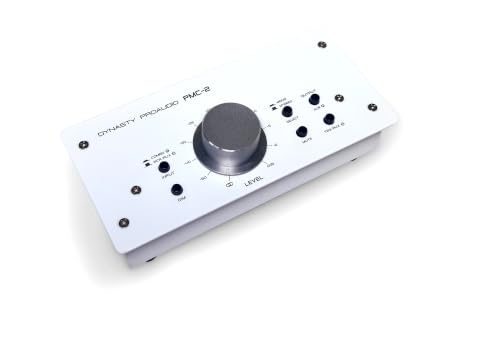
Designed specifically for home studio enthusiasts, the PMC-2 Premium Passive 2 x 2 Studio Monitor Volume Controller offers precise volume control without the noise or distortion that can plague other devices. This passive controller connects seamlessly between your analog signal sources and active speakers, ensuring maximum audio resolution. With balanced combo XLR/Phone Jack, RCA, and Mini Jack TRS inputs, it supports various devices. Users appreciate the large rotary volume knob for accurate adjustments and the solid metal chassis for durability. It’s an excellent choice for small studios seeking functionality without unnecessary features, maintaining a smooth and transparent audio experience.
Best For: Home studio enthusiasts seeking a reliable and straightforward volume control solution without unnecessary features.
Pros:
- Smooth volume control without noise or distortion.
- Durable metal chassis ensures long-lasting performance.
- Large rotary volume knob allows for precise adjustments.
Cons:
- Some users report static after extended use.
- Limited input/output options may require specific audio cables.
- Lack of position markers on the volume knob can make adjustments less intuitive.
PreSonus MicroStation BT 2.1 Monitor Controller with Bluetooth Connectivity

Wireless connectivity is a standout feature of the PreSonus MicroStation BT 2.1 Monitor Controller, making it a perfect choice for musicians and producers who value both sound quality and convenience. You can easily connect via Bluetooth, adding wireless capability to your speakers. The controller also offers balanced ¼” and stereo ⅛” TRS inputs, ensuring compatibility with various audio devices. With full-range outputs for professional monitors and a headphone output for personal use, it delivers high-quality audio performance. Its compact design and user-friendly interface make operation seamless, whether you’re at home or in the studio. Enjoy versatile sound control with ease!
Best For: Musicians, producers, and casual listeners seeking high-quality sound with convenient wireless connectivity.
Pros:
- Compact design makes it suitable for both studio and home use.
- Bluetooth connectivity allows for easy pairing with wireless devices, enhancing convenience.
- User-friendly interface ensures seamless operation for all skill levels.
Cons:
- Limited to Bluetooth range, which may affect connectivity in larger spaces.
- Not all audio devices may be compatible, requiring potential additional adapters.
- Potential latency issues with Bluetooth may affect real-time audio monitoring.
Mackie Big Knob Studio Monitor Controller

The Mackie Big Knob Studio Monitor Controller stands out as an ideal choice for audio professionals seeking precise sound control. This versatile 4×3 studio monitor controller features a 192kHz USB I/O, allowing for high-resolution recording and playback. With its flexible 2×4 USB interface and two Onyx mic preamps, you’ll achieve excellent sound quality. You can effortlessly select from four sources and three monitor pairs, thanks to the classic Big Knob volume control. Plus, the front panel 1/8” input lets you connect your smartphone easily. It’s compatible with all major DAWs on both Mac and Windows, making it a must-have for any studio.
Best For: Audio professionals and studio owners looking for a reliable and versatile monitor controller with high-resolution audio capabilities.
Pros:
- High-resolution 192kHz/24-bit recording and playback ensures exceptional sound quality.
- Flexible source and monitor selection allows seamless integration of multiple audio sources and monitor pairs.
- Compatible with all major DAWs on both Mac and Windows, making it versatile for various recording setups.
Cons:
- Limited to 4 source inputs and 3 monitor outputs, which may not suffice for larger studio setups.
- Physical size may be cumbersome in smaller studio spaces.
- No onboard effects processing, which may limit its functionality for some users.
PreSonus Eris 3.5 Studio Monitors (Pair)

For budding music producers and casual listeners alike, the PreSonus Eris 3.5 Studio Monitors deliver exceptional sound clarity that enhances any audio experience. These powered monitors feature woven-composite woofers for tight bass and 1-inch silk-dome tweeters for superior treble response. With a compact design, they fit easily on desks or bookshelves, making them perfect for any setup. You’ll appreciate the customizable audio output via high- and low-frequency tuning controls. Plus, connectivity options like ¼-inch TRS inputs and a front-panel aux input guarantee you can connect your devices seamlessly. Rated 4.6 stars, they’re ideal for studio-quality sound in your home.
Best For: Budding music producers and casual listeners seeking high-quality audio performance in a compact design.
Pros:
- Studio-quality sound with woven-composite woofers and silk-dome tweeters for clear audio across frequencies.
- Versatile connectivity options including ¼-inch TRS inputs and front-panel aux input for easy device connection.
- Compact design and customizable audio output make them suitable for various setups and environments.
Cons:
- Some users report latency issues with Bluetooth connections, making wired setups preferable for music production.
- Limited bass response may not satisfy those looking for a heavy bass experience.
- May require additional speaker placement adjustments to optimize sound quality in different room sizes.
Passive Monitor Volume Controller for Studio Home Audio System

Looking for a straightforward solution to manage audio levels in your studio home audio system? The Passive Monitor Volume Controller by MICNAUX is your answer. This compact, plug-and-play device boasts balanced XLR inputs and outputs, ensuring high-quality sound with minimal distortion. Weighing just one pound, it’s easily portable, making it perfect for various setups. Its 70mm extended stroke fader allows for precise volume adjustments, while the durable metal construction provides stability and longevity. Although some users mention limitations with input flexibility, its sturdy design and smooth sliders make it a reliable choice for controlling your audio experience.
Best For: Those seeking a reliable, high-quality volume control solution for their studio home audio systems without the need for external power.
Pros:
- Sturdy and lightweight build for easy portability.
- Smooth and functional sliders for precise volume adjustments.
- Supports stereo input/output for versatile audio setups.
Cons:
- Bottom input lock may interfere with some XLR cables.
- Limited flexibility due to specific input requirements.
- Some users find sliders less robust compared to overall build quality.
PMC-1 Premium Passive Stereo Monitor Volume Controller
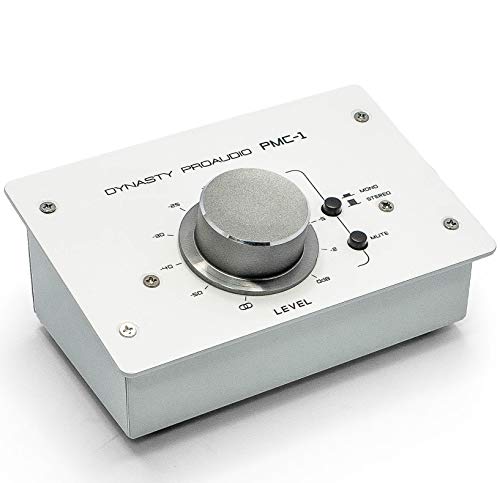
Designed with precision in mind, the PMC-1 Premium Passive Stereo Monitor Volume Controller is perfect for audio enthusiasts seeking flawless sound control in small studio environments. Its solid metal chassis guarantees durability while the large rotary knob allows for easy volume adjustments. Connecting seamlessly between your audio sources and active speakers, it features balanced combo XLR/TRS inputs and TRS outputs, minimizing noise interference. Users appreciate its smooth operation and clear sound quality, though some note minor static after extended use. Priced competitively, the PMC-1 offers excellent value, making it an ideal choice for those wanting minimalistic yet effective audio solutions.
Best For: Audio enthusiasts and small studio owners looking for a reliable and minimalistic volume control solution.
Pros:
- Durable construction: Solid metal chassis ensures longevity and reliable performance.
- Smooth operation: Large rotary knob allows for easy and precise volume adjustments without any static.
- Great sound quality: Clear audio output with minimal noise interference, enhancing the listening experience.
Cons:
- Static noise issue: Some users report experiencing static noise after prolonged use.
- Cable compatibility: Requires specific audio cables for optimal performance, which may not be included.
- Limited features: Minimalistic design may lack additional functionalities that some users might prefer.
PreSonus Central Station Plus: Studio Control Center with Remote Control

The PreSonus Central Station Plus stands out as an ideal choice for audio engineers and producers who value precise sound control in their studio setups. With three sets of stereo analog inputs and two sets of 192 kHz S/PDIF digital inputs, you’ve got flexibility at your fingertips. It features three stereo speaker outputs, complete with select switches and trim pots for effective output management. The transparent passive audio path guarantees pure sound without interference from op amps. Plus, the onboard talkback microphone and included remote control enhance communication and convenience, while dual 30-segment LED metering provides clear visual feedback on your levels.
Best For: The PreSonus Central Station Plus is best for audio engineers and producers seeking precise sound control and flexible routing in their studio environments.
Pros:
- Offers a transparent passive audio path, ensuring high-quality sound without interference.
- Includes an onboard talkback microphone and remote control for enhanced communication and convenience.
- Features dual 30-segment LED metering for clear visual feedback on audio levels.
Cons:
- Limited to three sets of stereo speaker outputs, which may not suffice for larger studio setups.
- The reliance on analog inputs may not appeal to those preferring fully digital systems.
- The remote control, while useful, could be an additional component to manage in a complex studio environment.
Factors to Consider When Choosing a Studio Monitor Controller
When you’re choosing a studio monitor controller, several key factors come into play. You’ll want to contemplate the connectivity options, audio quality, and overall build design that suit your studio setup. Don’t forget to evaluate the control features and how user-friendly the interface is for your workflow.
Connectivity Options Available
Choosing the right studio monitor controller hinges on understanding the various connectivity options available. You’ll find that many controllers offer multiple input options, including stereo pairs and digital inputs like S/PDIF, making it easy to connect various audio sources. Look for controllers that support a range of output configurations, allowing you to switch between different monitor setups for versatile audio monitoring. Balanced (XLR/TRS) and unbalanced (RCA) inputs help maintain audio fidelity and minimize noise over long cable runs. If you prefer wireless convenience, some controllers come with Bluetooth connectivity for streaming from compatible devices. Additionally, features like headphone outputs with independent source selection offer flexibility for monitoring without interfering with the main audio output.
Audio Quality Performance
To achieve the best audio quality, it is vital to prioritize certain factors when selecting a studio monitor controller. Look for models that maintain a transparent passive audio path, ensuring maximum resolution without distortion or noise. Controllers featuring balanced designs with XLR and TRS inputs/outputs minimize interference, preserving sound quality over long cable runs. Evaluate audio performance ratings; higher-rated models typically exhibit less noise and better fidelity, fundamental for accurate monitoring. Additionally, choose controllers with features like mono, mute, and dim functions, as they enhance your control over audio levels during mixing. By focusing on these elements, you’ll greatly improve your audio experience and achieve the perfect sound control you’re aiming for in your studio.
Build Quality and Design
While selecting a studio monitor controller, the build quality and design can greatly impact your overall experience. Look for a controller with a solid metal chassis, as this guarantees durability in demanding studio environments. Consider the dimensions and weight; a compact, lightweight design makes transport and placement easier, especially in small setups. High-quality components, like smooth rotary knobs, should minimize static or noise interruptions. A sturdy design often includes anti-slip pads, enhancing stability and preventing movement during use. Finally, evaluate the aesthetic and layout of controls; an intuitive design can streamline your workflow and make operation more efficient. Prioritize these factors to find a controller that meets your needs and enhances your sound control experience.
Control Features Provided
A studio monitor controller’s control features play a significant role in enhancing your mixing and monitoring experience. Look for controllers that provide multiple input and output options, including stereo pairs and digital inputs, ensuring compatibility with various audio sources and monitor setups. Dedicated controls for features like Mono, Mute, and Dim can greatly improve flexibility in your environment. It’s also essential to have independent volume controls for each output, allowing precise adjustments for different speakers or headphones. Additional functionalities like built-in talkback microphones or headphone amplifiers can streamline communication during recordings. Finally, opt for controllers with clear interfaces, featuring large level controls and visual metering, making your sessions more efficient and enjoyable.
User-Friendly Interface
How can you guarantee that your studio monitor controller is easy to use? Look for a user-friendly interface with clearly labeled controls that make operation intuitive, even if you’re not a tech expert. Verify the volume knobs and buttons offer tactile feedback, allowing precise adjustments during critical listening sessions. A compact design with easily accessible controls can help reduce clutter and streamline your workflow in tight studio spaces. Visual indicators like LED lights or meters are essential for quickly evaluating levels and making necessary tweaks while recording or mixing. Additionally, dedicated buttons for functions like mute, mono, and dim provide convenient access, letting you make quick changes without interrupting your audio flow.
Compatibility With Devices
An intuitive user interface is just one part of the equation when choosing a studio monitor controller; compatibility with your devices is equally important. Make certain the controller has the right input and output connections, like XLR, TRS, and RCA, for seamless integration with your audio gear. It’s also wise to take into account whether it supports both analog and digital audio inputs, enhancing versatility. Verify compatibility with your computer’s operating system, whether it’s Mac or Windows, to guarantee peak functionality with your digital audio workstation (DAW). If you plan to connect wireless devices, look for Bluetooth capability. Finally, check for additional features like headphone outputs or talkback functionality that could be essential for your studio setup.
Price and Value Consideration
When considering a studio monitor controller, understanding price and value is essential to making an informed decision. Prices can range from around $50 for budget options to over $500 for high-end models, reflecting differences in features and build quality. Evaluate the value of features against their cost, including input/output options, audio clarity, and extras like Bluetooth connectivity. Durability matters too; many users prefer controllers described as “built-like-a-tank,” justifying a higher price. Check customer ratings, usually between 4.2 and 4.6 stars, to gauge satisfaction. Finally, compare the cost with best sellers rank—top-ranking models often indicate excellent value for the price you pay, ensuring you make a solid investment in your audio setup.