The right video switcher for events can simplify multi-camera production, live streaming, presentations, and venue displays without requiring a full broadcast truck.
These 10 models cover compact HDMI setups, SDI workflows, 4K inputs, PTZ control, multiview monitoring, recording, and direct streaming. Use the guide below to match features to your crew, cameras, and event format.
Best 10 Video Switcher for Events Picks for 2026
Best Overall

- Six SDI plus two 4K HDMI inputs
- 17.3-inch monitor with streaming and recording
- PTZ control, XLR audio, and USB capture
Best For: Professional multi-camera event production
Best Touchscreen Workflow

- Four HDMI and one SDI input
- 10.1-inch touchscreen multi-view display
- T-bar switching with USB 3.0 streaming
Best For: Medium event productions and live streaming
Best for Recording

- Four-channel 1080p60 HDMI switching
- USB recording and UVC streaming
- 10 scene presets with XLR audio inputs
Best For: 1080p events needing recording and streaming
Best Compact Option

- Four HDMI inputs with built-in 4-inch screen
- 30 transitions and four scene presets
- PTZ control plus customizable AUX output
Best For: Portable small-event and online video setups
Best All-in-One Pick

- Handles HDMI, USB, webcam, and optional NDI sources
- Records to USB and SD simultaneously
- Adds audio mixing, PTZ control, effects, and remote operation
Best For: Multi-camera weddings, concerts, and streaming events
Best for Everyday Use
RGBlink Mini V3 4K Video Switcher

- Four HDMI inputs in a lightweight 0.49 kg unit
- Includes touch screen, T-bar, and dual HDMI outputs
- UVC streaming and advanced features support smaller productions
Best For: Portable, entry-level multi-camera event streaming
Best for Large Productions
FoMaKo M6 4K HDMI and SDI Switcher

- Combines four HDMI and four SDI inputs
- Offers multiview, PTZ control, layered graphics, and media playback
- Records to SD and USB while supporting dual network streams
Best For: Churches, studios, broadcasts, and larger mixed-interface events
Most Flexible Hybrid Inputs
Touch-S 10.1-inch Video Switcher
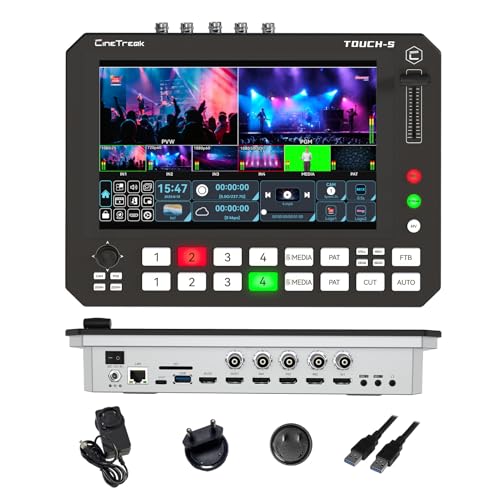
- Four HDMI and four SDI inputs
- Touchscreen plus physical shortcut keys
- Super Source and multimedia input support
Best For: Flexible multi-camera event productions
Best Compact 4K Control

- Four 4K HDMI inputs
- Streams to up to four platforms
- Built-in PTZ control and SSD recording
Best For: Portable HDMI event and streaming rigs
Best for Professional Hybrid Productions
Tenveo PC500 Event Video Switcher

- Four HDMI and four SDI inputs
- PTZ, NDI|HX3, and browser control
- Network streaming plus dual recording
Best For: Large, mixed-source live event productions
Best Overall – AVMATRIX Shark S6 Plus
For demanding productions, the AVMATRIX Shark S6 Plus is a feature-rich video switcher for events with a built-in 17.3-inch Full HD display. Its combination of SDI and HDMI inputs, streaming, recording, audio mixing, PTZ control, and USB capture makes it suited to mobile crews and larger multi-camera setups.
Best For: Professional event teams, field production, PTZ workflows, and multi-camera productions using both SDI and HDMI sources.
Pros:
- Supports six 3G-SDI and two 4K HDMI inputs, with multiple program outputs.
- Built-in monitoring, RTMP streaming, USB/SD recording, and USB-C UVC capture.
- Includes XLR/TRS inputs with 48V phantom power plus advanced keying, PIP, DSK, logos, and macros.
- Controls up to six PTZ cameras through LAN or serial connections.
Cons:
- Its professional feature set may be more than smaller event productions require.
- The recorded output is specified up to 1080p60, despite support for 4K HDMI inputs.
The Shark S6 Plus is the strongest all-in-one choice here for productions that need flexible connectivity and on-site control. It is especially compelling when SDI cameras, professional microphones, PTZ cameras, and direct streaming all need to work from one portable unit.
Best Touchscreen Workflow – FEELWORLD L4
The FEELWORLD L4 is a practical video switcher for events that combines four HDMI inputs, one SDI input, and a 10.1-inch touchscreen. Its large multi-view display and physical T-bar make it useful for operators who want both visual monitoring and hands-on switching at weddings, churches, concerts, and other live events.
Best For: Medium-sized event productions using HDMI cameras, an SDI source, presentation computers, or PTZ systems.
Pros:
- Offers four HDMI inputs and one SDI input for flexible source selection.
- Large 10.1-inch touchscreen supports input preview and setup.
- Physical buttons and T-bar enable quick switching and transitions.
- USB 3.0 output supports live streaming to popular platforms and software.
Cons:
- The supplied notes do not specify onboard recording or direct RTMP streaming.
- Its input capacity is smaller than the AVMATRIX model for larger camera counts.
The L4 strikes a useful balance between straightforward operation and event-production flexibility. Choose it when a large touchscreen, mixed HDMI/SDI connectivity, and computer-based USB streaming matter more than extensive built-in encoding features.
Best for Recording – FoMaKo KC601 Pro
The FoMaKo KC601 Pro is a versatile video switcher for events built around four HDMI inputs, a 5.5-inch FHD monitor, USB recording, and computer-based streaming. It is designed for 1080p productions and adds scene recall, audio connections, and live-production effects for repeatable event workflows.
Best For: Weddings, worship services, corporate events, education, sports, and other 1080p HDMI productions that need recording and streaming.
Pros:
- Integrates switching, monitoring, encoding, USB recording, and UVC streaming.
- Supports 1080p60 video and simultaneous streaming to up to three destinations.
- Provides XLR and mic/line audio inputs, plus monitoring and sound-system outputs.
- Stores and recalls up to 10 customizable scenes for faster setup and switching.
Cons:
- Does not support 4K input or production.
- Its 5.5-inch screen is smaller than the displays on several competing models.
For teams working entirely in 1080p, the KC601 Pro offers an appealing mix of recording, streaming, audio, and scene-management tools. It is a particularly practical fit when consistent setups and direct USB recording are priorities.
Best Compact Option – Mixer Plus Compact Switcher
The Mixer Plus is a compact video switcher for events with four HDMI inputs and a built-in 4-inch screen. Its portable design, multi-view monitoring, scene presets, PTZ support, and customizable AUX output make it a convenient choice for small productions, online classes, presentations, and mobile event setups.
Best For: Portable four-camera HDMI productions, online classes, small events, YouTube streams, OBS, and Zoom workflows.
Pros:
- Compact design includes a built-in 4-inch multi-view display.
- Supports four HDMI sources, zero-latency switching, 30 transition effects, and four scene presets.
- Includes chroma key, luma key, PIP, DSK, logo overlay, and VISCA-over-IP PTZ control.
- Customizable AUX HDMI output can route inputs, program, preview, clean feeds, patterns, or multi-view.
Cons:
- It accepts HDMI sources only and does not list SDI connectivity.
- The 4-inch display is less spacious for monitoring than the larger screens on the other options.
- The supplied notes do not mention onboard recording or direct streaming.
The Mixer Plus makes the most sense when portability and HDMI-based flexibility outweigh the need for a large monitor or integrated recording. Its AUX routing and production effects add useful control for compact event rigs.
Best All-in-One Pick – FoMaKo M1 4K HDMI Video Mixer
The FoMaKo M1 is a flexible video switcher for events that combines multi-camera switching, recording, streaming, audio mixing, and PTZ control in one unit. It accepts 4K and 1080p HDMI sources, supports USB and SD recording, and can stream through USB or over a network.
Best For: Weddings, concerts, music videos, and event productions needing integrated switching, recording, audio control, and PTZ support.
Pros:
- Supports multiple HDMI, USB, webcam, and optional NDI sources.
- Records simultaneously to USB and SD cards.
- Includes audio delay, automatic level control, noise reduction, chroma key, PIP, DSK, and up to 30 transitions.
- Offers browser-based remote control and PTZ camera support.
Cons:
- NDI functionality requires an upgrade.
- Its broad feature set may require setup time for first-time operators.
The M1 is a strong choice when an event team wants one compact system to handle video, audio, recording, streaming, and camera control. Its remote-management options are especially useful for productions where the operator needs flexibility around the venue.
Best for Everyday Use – RGBlink Mini V3 4K Video Switcher
The RGBlink Mini V3 is a compact video switcher for events with four HDMI inputs, dual 1080p HDMI outputs, a 2.1-inch touch screen, and a professional T-bar. It also supports UVC webcam operation, making it practical for smaller multi-camera setups and live streams.
Best For: Portable event productions, entry-level multi-camera streaming, and operators who want a small HDMI switcher with a built-in display.
Pros:
- Compact 0.49 kg design with four HDMI inputs.
- Provides program and preview output options through dual HDMI outputs.
- Supports UVC streaming, USB recording, PIP layouts, chroma key, and 15 transitions.
- Includes a touch screen and T-bar for hands-on control.
Cons:
- Recording and selected advanced features require optional TAO Cloud activation.
- Stable operation requires a 35W or higher USB-C power adapter.
- Camera compatibility and setup should be checked against the manual.
The Mini V3 is appealing for mobile crews and smaller venues where portability matters. Before buying, account for the optional licensing model and confirm that the available HDMI connections fit the event’s cameras and displays.
Best for Large Productions – FoMaKo M6 4K HDMI and SDI Switcher
The FoMaKo M6 is a professional video switcher for events that need both HDMI and SDI connectivity, a large multiview screen, and advanced directing tools. It combines four HDMI inputs, four SDI inputs, PTZ control, layered graphics, network streaming, and simultaneous recording.
Best For: Churches, studios, schools, broadcasts, houses of worship, and larger live events using mixed HDMI and SDI camera systems.
Pros:
- Accepts four HDMI inputs and four 3G SDI inputs, including 4K HDMI sources.
- Provides up to eight PGM layers with PIP, logo overlays, and DSK subtitles.
- Supports dual RTMP/SRT streaming, multiview monitoring, and web-based remote access.
- Includes PTZ joystick control, presets, media playback, and recording to SD card and USB storage.
Cons:
- NDI capability is optional and not included.
- The extensive control and production features may be more than smaller events require.
The M6 is the most production-oriented option in this group, particularly for venues transitioning between HDMI and SDI equipment. Its 10.1-inch touchscreen, PTZ controls, layered output, and dual-network streaming make it suitable for complex productions with a dedicated operator.
Most Flexible Hybrid Inputs – Touch-S 10.1-inch Video Switcher
If you need a video switcher for events that can handle varied camera and display setups, the Touch-S combines four HDMI and four SDI inputs with touchscreen and physical-key control. Its customizable input routing, Super Source layouts, recording, and portrait or landscape support make it adaptable for conferences, webinars, education, and mobile productions.
Best For: Event teams needing flexible HDMI/SDI connectivity, multi-source layouts, and quick hands-on switching.
Pros:
- Combines a 10-inch touchscreen with physical shortcut keys.
- Provides four HDMI and four SDI inputs with user-defined channel selection.
- Supports up to four simultaneous Super Source/PIP windows.
- Accepts network, NDI, USB webcam, and stored media through its multimedia channel.
Cons:
- Its broad feature set may require more setup and operator familiarity.
- Output resolution and compatibility should be checked against the event’s cameras and displays.
The Touch-S is a strong choice when an event production needs flexible signal access and configurable monitoring rather than a basic input switcher. Its auxiliary outputs and built-in media channel are especially useful for complex live layouts.
Best Compact 4K Control – RGBlink Mini-pro V3
The RGBlink Mini-pro V3 is a compact video switcher for events built around four 4K HDMI inputs, direct streaming, recording, and PTZ control. Its small touchscreen, joystick, dual HDMI outputs, and support for OBS and vMix suit operators who want substantial production control in a portable unit.
Best For: Portable event, worship, conference, wedding, and gaming setups using HDMI cameras and PTZ systems.
Pros:
- Offers four 4K HDMI inputs and dual HDMI outputs for multiview and monitoring.
- Can stream to up to four platforms simultaneously through RTMP(S) over Ethernet.
- Includes VISCA PTZ control with lens movement, focus, zoom, and presets.
- Supports USB 3.0 output, direct streaming, and recording to an external SSD up to 2TB.
Cons:
- Requires a 35W or higher USB-C power adapter for stable performance.
- Firmware should be updated before use, adding a setup step.
- Its inputs are HDMI-based, so SDI sources require appropriate conversion.
The Mini-pro V3 offers a practical balance of portability and control for HDMI-centered productions. It is particularly compelling when direct multi-platform streaming and PTZ operation matter as much as basic source switching.
Best for Professional Hybrid Productions – Tenveo PC500 Event Video Switcher
The Tenveo PC500 is a professional video switcher for events that need HDMI and SDI connectivity, integrated encoding, PTZ or NDI control, recording, and network streaming. It supports multiple input types, customizable outputs, and browser-based control, making it suited to conferences, stage shows, worship services, sports, and other larger productions.
Best For: Production teams managing mixed HDMI/SDI sources, PTZ cameras, network workflows, and recorded backups.
Pros:
- Combines four HDMI inputs, four SDI inputs, USB input, and NDI|HX3 support.
- Supports HDMI and SDI program outputs, a customizable HDMI AUX output, and USB 3.0 streaming.
- Handles SRT, RTMP, RTSP, NDI|HX3, and UVC streaming workflows.
- Provides PTZ control, presets, cruise tracks, dual recording, and instant replay-style media use.
Cons:
- Its professional feature set may be more than small events require.
- Although it accepts 4K60 and 1080p60 inputs, the listed program output is 1080p60.
- Network, PTZ, and recording workflows require careful configuration before an event.
The PC500 stands out when an event needs more than straightforward switching. Its hybrid inputs, network protocols, customizable outputs, and recording options provide useful redundancy and workflow flexibility for demanding live productions.
How We Picked the Best Video Switcher for Events
We focused on practical capabilities that matter during live production: input type and count, supported resolution and frame rates, multiview monitoring, switching speed, streaming and recording options, PTZ control, output flexibility, and portability. The selection includes compact mixers for solo operators as well as larger HDMI/SDI units for conferences, worship services, performances, classrooms, and hybrid events.
Specifications should be checked against your exact camera and display setup. In particular, confirm connector standards, HDMI signal compatibility, output resolution, and whether a feature such as chroma key or recording is available at the same time as streaming.
Quick Comparison
- Best for portable SDI/HDMI production: AVMATRIX Shark S6 Plus and Touch-S.
- Best for touchscreen operation: FEELWORLD L4 and the FoMaKo 10.1-inch models.
- Best for compact HDMI setups: Mixer Plus, RGBlink Mini V3, and RGBlink Mini-pro V3.
- Best for 4K camera inputs: the FoMaKo 4K and Tenveo models.
- Best for integrated PTZ workflows: AVMATRIX, Touch-S, RGBlink Mini-pro V3, and compatible FoMaKo or Tenveo configurations.
Key Buying Factors for a Video Switcher for Events
Inputs, Outputs, and Signal Type
Count every source, including cameras, laptops, playback devices, and presentation feeds. HDMI is common for short cable runs and consumer or mirrorless cameras, while SDI is better suited to longer runs and more installation-oriented systems. Also check whether you need USB 3.0 output for a computer, HDMI program output for a venue display, or separate multiview output.
Resolution and Frame-Rate Compatibility
A switcher may accept 4K inputs but output or stream at 1080p. That can be perfectly suitable for live events, but your cameras should be configured consistently to avoid format-conversion problems. Match frame rates across cameras whenever possible, especially for fast-moving performances.
Monitoring and Operator Control
An integrated screen or multiview layout makes it easier to preview sources, watch the program feed, and identify audio or framing issues. Touchscreens can speed up operation, while physical controls may be preferable when an operator needs tactile feedback during a busy show.
Streaming, Recording, and PTZ Features
Built-in RTMP streaming reduces equipment count, while recording lets you capture a program master or backup. PTZ control is valuable when cameras are installed around a venue, but verify supported protocols, camera brands, and control connections before buying.
Who Should Buy Which Video Switcher for Events?
Choose a compact HDMI model if you produce online classes, small presentations, interviews, or simple two- to four-camera events. A touchscreen model is a strong fit for operators who want quick source selection and visual control from one panel. Choose an SDI-capable switcher when cameras are positioned far from the production table or when your venue already uses professional cabling.
For 4K cameras and future expansion, select a model with 4K input support and enough inputs for laptops and backup sources. For larger productions, prioritize six or more inputs, SDI connectivity, multiview monitoring, reliable recording, and PTZ control. Finally, leave at least one spare input whenever possible; live events are easier to manage when an unexpected source can be added without rebuilding the entire setup.