Choosing a dac preamp for active monitors is about more than just sound quality. You want clean conversion, sensible input options, and a volume stage that makes powered speakers easy to live with.
In this roundup, we focus on models that balance clarity, convenience, and connection flexibility so you can build a desktop or living-room setup without unnecessary complexity.
Best 10 Dac Preamp for Active Monitors Picks for 2026
Best for Feature-Packed All-in-One Control
WiiM Ultra Music Streamer & Digital Preamp
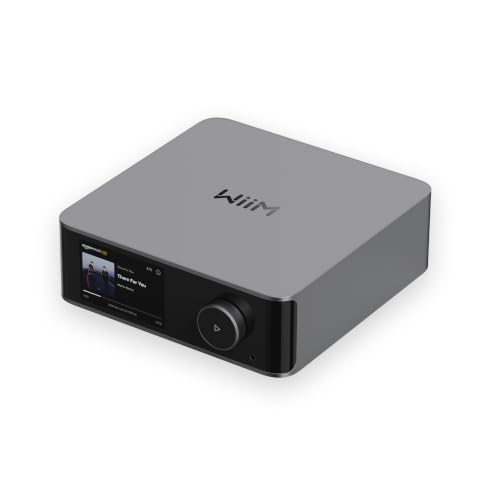
- ESS ES9038 Q2M DAC with strong clarity specs
- Wide input/output support including HDMI ARC and phono
- Streaming, EQ, and room correction in one app
Best For: Buyers who want one central box for streaming, DAC duties, and easy volume control with active monitors.
Best for Source Switching

- Three RCA inputs for quick source changes
- Adjustable 3/6/9 dB gain for better level matching
- Bass and treble controls with remote included
Best For: Powered-speaker users who want simple source switching and tone control in a compact preamp.
Best for Small Spaces
Audioengine D1 Desktop DAC/Preamp

- Compact footprint for tidy desks
- DAC and preamp support for active monitors
- Quick switching between speakers and headphones
Best For: Desktop users who want a compact DAC/preamp for active monitors and headphones.
Best for Preamp Control

- Remote-controlled preamp volume for powered speakers
- Up to PCM 768kHz and DSD512 via USB
- USB, coaxial, and optical inputs in a compact chassis
Best For: Desktop listeners who want simple volume control feeding active monitors or a power amp.
Best for Streaming Flexibility
Fosi Audio S3 Streamer DAC Preamp
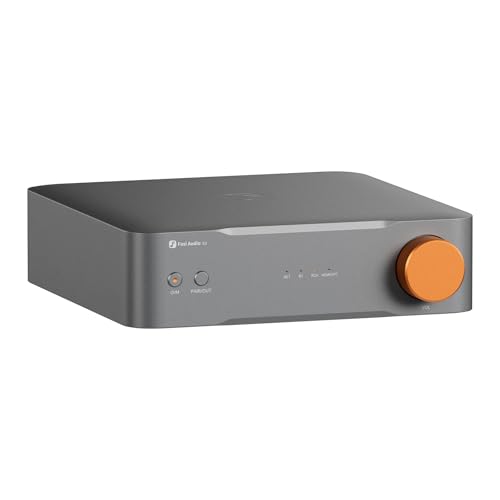
- Balanced XLR output for active monitors
- Wi‑Fi 6, Bluetooth 5.3, and major streaming apps
- HDMI eARC plus SUB OUT for 2.1 setups
Best For: People who want one compact hub for active monitors, streaming, and TV audio.
Best for Analog + Digital Flexibility
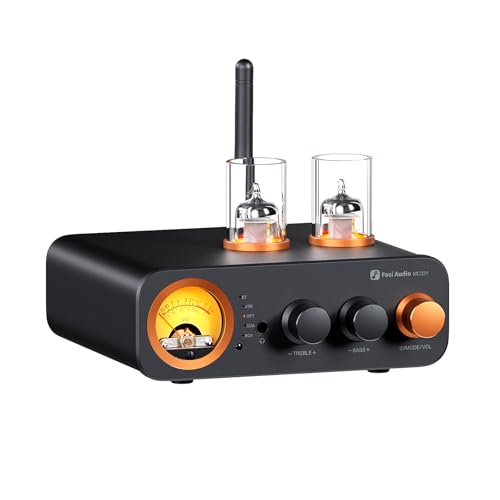
- All-in-one DAC, preamp, amp, and headphone stage
- Bluetooth, USB, optical, coaxial, and RCA inputs
- Pre-out plus remote control for easier system handling
Best For: Users who want a compact all-in-one hub for multiple sources and small speaker systems.
Best for DSP Tweaks

- Balanced TRS/RCA outputs for active monitors and line-level gear
- 10-band PEQ with app and desktop control
- USB, optical, coaxial, and Bluetooth input flexibility
Best For: Desktop listeners who want EQ shaping and balanced connectivity for active monitors.
Best for Balanced Desktop Systems
Fosi Audio ZH3 DAC/Headphone Amp
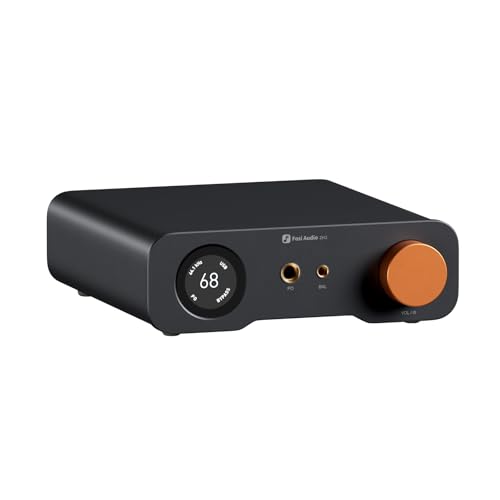
- Balanced XLR/RCA outputs for active monitors
- AKM4493SEQ + XMOS XU316 for hi-res playback
- Strong headphone amp with gain control and remote
Best For: Desktop users who want one box for active speakers and headphones.
Best for Desktop Digital Sources

- USB-C, optical, and coaxial inputs for flexible source hookup
- RCA out plus sub-out for powered speakers and a subwoofer
- High-res AKM/XMOS design with strong measured performance
Best For: Desktop listeners who want a compact DAC front end for active monitors and simple speaker systems.
Best for HDMI ARC Systems
Fosi Audio ZD3 Desktop DAC Preamp

- HDMI ARC support for easy TV integration
- Balanced XLR/RCA outputs for active monitors
- Remote, OLED display, and trigger ports for convenience
Best For: TV-and-desktop setups needing a flexible DAC preamp for active monitors.
Best for Feature-Packed All-in-One Control – WiiM Ultra Music Streamer & Digital Preamp
If you want a dac preamp for active monitors that does more than just convert signal, the WiiM Ultra is a strong all-in-one option. It combines a capable ESS DAC, digital and analog inputs, HDMI ARC, and app-based control, so it fits neatly into desktop speaker setups, streaming rigs, and compact home audio systems.
Best For: Buyers who want one central box for streaming, DAC duties, and easy volume control with active monitors.
Pros:
- Built-in ESS ES9038 Q2M DAC with strong measured audio specs
- Flexible connections for USB, optical, coaxial, RCA, phono, and HDMI ARC
- Works with Spotify, TIDAL, Amazon Music, Google Cast, and Alexa
- Room correction, EQ, and multiroom control through the WiiM app
Cons:
- No AirPlay receiver support
- Feature set may be more than you need for a simple stereo setup
For active monitor systems, the WiiM Ultra stands out because it blends streaming convenience with real preamp flexibility and clean conversion in one compact unit. If you want a dac preamp for active monitors that can also handle TV audio, subwoofer integration, and wireless playback, this is an especially practical pick.
Best for Source Switching – Fosi Audio P4 Mini Preamp
If you want a flexible dac preamp for active monitors, the Fosi Audio P4 is built around simple source switching, gain control, and tonal adjustment. It works well in desktop and compact home setups where you need to route multiple RCA sources into powered speakers or a subwoofer without adding clutter.
Best For: Listeners who want a compact RCA preamp with easy source selection, remote control, and basic bass/treble tuning for active speakers or a small stereo rig.
Pros:
- Three RCA inputs make it easy to switch between multiple sources
- 3/6/9 dB gain options help match output levels to your system
- Bass and treble controls add useful room and speaker tuning
- Compact design is a good fit for desktop and shelf setups
Cons:
- RCA-only design means no balanced outputs for pro-style monitors
- Not a full-featured DAC, so it depends on an external source for digital playback
Overall, the P4 is a practical pick if you want a straightforward dac preamp for active monitors with easy switching and tone controls rather than a feature-heavy audio processor. It is most compelling for people building a tidy, analog-centered setup around powered speakers.
Best for Small Spaces – Audioengine D1 Desktop DAC/Preamp
If you need a compact dac preamp for active monitors, the Audioengine D1 is a simple desktop-friendly option that handles USB playback and line-level output without taking up much space. It works well for PC, Mac, gaming, and music setups where you want cleaner sound and easy switching between speakers and headphones.
Best For: Desktop listeners who want a small DAC/preamp for active monitors plus occasional headphone use.
Pros:
- Compact 4 x 3 inch footprint keeps the desk uncluttered
- Acts as both a DAC and preamp for speakers and active monitors
- Easy headphone/speaker switching for mixed-use setups
- Supports 32-bit, 24-bit, and CD-quality audio
Cons:
- Single-input design is best for simple one-source systems
- Not a feature-rich controller for advanced studio workflows
- Best suited to desktop setups rather than rack-style installs
For buyers comparing a dac preamp for active monitors, the D1 stands out more for convenience and size than for extra connectivity. It is a practical pick if you want a straightforward desktop DAC/preamp that keeps active speakers easy to drive and easy to swap with headphones.
Best for Preamp Control – Topping E30II Lite DAC Preamp
If you want a compact dac preamp for active monitors, the Topping E30II Lite is a strong match thanks to its clean AK4493S conversion, built-in volume control, and RCA preamp output. It is designed to sit between your source and powered speakers, giving you simple level control without adding much clutter to the desktop.
Best For: Desktop and home audio setups that need a straightforward DAC with remote volume control for active monitors or a power amp.
Pros:
- Built-in preamp mode with remote volume adjustment from -99dB to 0dB
- Clean high-resolution support up to PCM 768kHz and DSD512 over USB
- Flexible inputs for USB, coaxial, and optical sources
- Compact, no-fuss design that suits desktop audio setups
Cons:
- RCA only, so it is not ideal for balanced monitor connections
- Optical and coax inputs are limited to 24-bit/192kHz
- Best value is strongest when you actually need DAC plus preamp features
As a dac preamp for active monitors, this model stands out more for control and clarity than for extra features. If your priority is a clean signal path with easy volume management, the E30II Lite is an easy pick.
Best for Streaming Flexibility – Fosi Audio S3 Streamer DAC Preamp
If you want a dac preamp for active monitors that also doubles as a modern streaming hub, the Fosi Audio S3 is built to cover a lot of ground in one compact unit. It combines DAC, digital transport, and preamp duties with Wi‑Fi 6, Bluetooth 5.3, AirPlay 2, Spotify Connect, TIDAL Connect, and HDMI eARC, so it fits both desktop audio and TV-based setups.
Best For: Listeners who want one box to feed active monitors, stream music wirelessly, and add a subwoofer or TV input later.
Pros:
- AK4493SEQ DAC with balanced XLR outputs for cleaner connections to active monitors
- Built-in Wi‑Fi streaming plus Bluetooth 5.3 for flexible source options
- HDMI eARC and SUB OUT make it easy to build a 2.1 desktop or living-room system
- 5-band EQ in the app helps fine-tune speaker and room balance
Cons:
- More feature-rich than a basic DAC, so simple setups may not use everything
- Best value depends on how much you need the streaming and TV integration
- Compact size is great for desks, but the feature set can feel overkill for minimal systems
Overall, the S3 is a strong choice if you need a dac preamp for active monitors and want streaming, balanced output, and TV connectivity in a single, tidy component.
Best for Analog + Digital Flexibility – Fosi Audio MC331 Tube DAC Amp
If you want a dac preamp for active monitors that also doubles as a compact amp for passive speakers, the Fosi Audio MC331 is built around flexibility. It combines DAC, preamp, headphone amp, Bluetooth, and multiple wired inputs in one small chassis, so it works well in mixed desktop or living-room setups where source switching matters.
Best For: Buyers who want one compact unit to handle digital sources, analog inputs, and volume control without cluttering the desk.
Pros:
- Built-in DAC, preamp, headphone amp, and speaker amp in one box
- Bluetooth, USB, optical, coaxial, and RCA inputs for broad compatibility
- Pre-out and 3.5mm headphone output add setup flexibility
- Remote control makes bass and treble adjustments easy from your seat
Cons:
- Primarily an integrated amp, so it may be more than some active-monitor users need
- Tube selection is random, so you can’t choose the exact shipped tubes
As a dac preamp for active monitors, the MC331 makes the most sense if you also want an all-in-one hub for headphones and passive speakers. It’s not the most minimalist choice, but its input variety and pre-out help it fit into a lot of small systems.
Best for DSP Tweaks – Topping E50 II DAC Preamp
If you want a flexible dac preamp for active monitors, the Topping E50 II stands out for its balanced TRS output, preamp mode, and built-in 10-band PEQ. It pairs clean conversion with wireless and wired input options, making it easy to feed desktop speakers, studio monitors, or a compact hi-fi setup.
Best For: Users who want a clean desktop DAC/preamp with EQ control for active monitors and fast source switching.
Pros:
- Balanced TRS and RCA outputs work well with active monitors and other line-level gear
- 10-band PEQ with app and desktop software support for custom tuning
- USB, optical, coaxial, and Bluetooth inputs cover most desktop and streaming setups
- AK4497S DAC performance with very low distortion and high-resolution playback support
Cons:
- EQ and app features may be more than casual listeners need
- Best value is in system tuning, not raw output power
For buyers building a refined desktop chain, this is a strong dac preamp for active monitors because it combines precise output, flexible connectivity, and real EQ control in one compact unit. It is especially appealing if you want to fine-tune speaker response without adding extra boxes.
Best for Balanced Desktop Systems – Fosi Audio ZH3 DAC/Headphone Amp
If you need a dac preamp for active monitors that can also drive headphones cleanly, the Fosi Audio ZH3 is a strong all-in-one desktop option. It combines USB, optical, coax, and RCA inputs with balanced XLR and RCA outputs, so it can sit at the center of a simple nearfield setup without adding extra boxes.
Best For: Listeners who want a desktop DAC/preamp with balanced outputs, headphone power, and flexible switching for active speakers.
Pros:
- Balanced XLR and RCA outputs make it easy to feed active monitors or an external amp.
- AKM4493SEQ DAC and XMOS XU316 support high-resolution playback up to PCM 768kHz/32bit and DSD512.
- Strong headphone section with 6.35mm and 4.4mm outputs plus gain switching for a wide range of cans.
- EQ, filter options, and remote control add useful desktop convenience.
Cons:
- RCA and XLR output levels differ, so setup needs a little attention.
- EQ only applies to headphone output, not the preamp outputs.
- More features than a basic DAC, which may be overkill for minimal systems.
For buyers comparing a dac preamp for active monitors, the ZH3 stands out because it does preamp duty, headphone amplification, and source switching in one compact unit. It is especially appealing if you want balanced connectivity and tuning options without jumping to a much pricier desktop stack.
Best for Desktop Digital Sources – Fosi Audio Q6 Mini DAC
The Fosi Audio Q6 is a compact option if you want a dac preamp for active monitors without cluttering your desk. With USB-C, optical, and coaxial inputs plus RCA and sub-out, it’s built to bridge computers, TVs, streamers, and CD players to powered speakers with minimal fuss.
Best For: Anyone who wants a small, high-spec DAC for active monitors, desktop speakers, or a simple two-channel setup with subwoofer support.
Pros:
- AKM AK4493S, XMOS XU316, and OPA1612 for high-resolution playback up to 32-bit/768kHz and DSD512
- RCA output plus sub-out makes it easy to build a neat desktop speaker system
- Strong measured performance with 121dB SNR and very low distortion
- Small aluminum chassis fits cleanly into tight desktop setups
Cons:
- No balanced outputs for users with more advanced monitor chains
- Designed as a DAC front end, so it won’t replace a full preamp with extensive control features
For shoppers comparing a dac preamp for active monitors, the Q6 stands out for its straightforward connectivity, compact footprint, and serious audio specs at a practical price point. It’s a strong pick when you mainly need clean digital-to-analog conversion and simple speaker integration.
Best for HDMI ARC Systems – Fosi Audio ZD3 Desktop DAC Preamp
If you want a dac preamp for active monitors that also plugs cleanly into a TV-based setup, the Fosi Audio ZD3 stands out for its HDMI ARC support, balanced outputs, and flexible desktop-friendly design. It works well as a control hub for powered speakers, giving you multiple digital inputs plus simple volume control from one unit.
Best For: TV-and-desktop listeners who want a compact DAC/preamp with balanced XLR output for active monitors, along with Bluetooth and USB for everyday use.
Pros:
- HDMI ARC makes it easy to connect a TV to powered speakers
- Balanced XLR and RCA outputs suit a wide range of active monitors
- High-end ES9039Q2M-based design with USB, optical, coax, and Bluetooth inputs
- Remote, OLED display, and trigger I/O improve day-to-day usability
Cons:
- More features than some basic monitor setups actually need
- Best value if you will use the balanced output and ARC connectivity
For buyers comparing a dac preamp for active monitors, the ZD3 is appealing because it combines serious input flexibility with balanced output options and an easy TV hookup. It is a strong fit if you want one compact box to manage music, streaming, and desktop listening without clutter.
Once you’ve narrowed the list, the best Dac Preamp for Active Monitors is the one that fits your source devices, cabling, and listening habits. Some buyers need a simple USB DAC with a good volume knob, while others want balanced outputs, Bluetooth, or streaming built in.
How We Picked the Best Dac Preamp for Active Monitors
We prioritized products that are relevant to powered speaker setups: clean line-level output, practical input selection, dependable volume control, and low-noise performance. We also looked for models that offer enough flexibility for desktop use, TV audio, or a more complete stereo setup.
Quick Comparison
For the simplest setup, a compact desktop DAC with USB and RCA output is usually enough. If your monitors support balanced connections, a balanced DAC/preamp can help with longer cable runs and cleaner integration. If you want fewer boxes on the desk, streamer-DAC preamps add network playback and app control. If you’re building around multiple sources, choose a preamp with several analog and digital inputs.
Key Buying Factors for a Dac Preamp for Active Monitors
Outputs and Signal Type
Check whether your active monitors accept RCA, XLR, or both. Balanced XLR is helpful for reducing noise in longer runs, but RCA is perfectly fine for shorter desktop setups.
Volume Control and Gain
A good preamp should give you fine volume adjustment without channel imbalance at low levels. If the speakers are sensitive, look for a unit with usable gain steps or a low-noise volume circuit.
Input Flexibility
USB is essential for computer use, but optical, coaxial, Bluetooth, and analog inputs can make the system much more versatile. More inputs also make it easier to connect a TV, console, or streamer.
DAC Performance and Features
Modern DAC chips matter less than the overall implementation, but support for hi-res playback, stable USB operation, and low distortion are all welcome. Features like PEQ, subwoofer output, or remote control can be especially useful in everyday listening.
Who Should Buy Which Dac Preamp for Active Monitors?
If you want the cleanest and easiest desktop solution, choose a straightforward DAC preamp with USB input and RCA outputs. If your monitors are in a larger room or farther from the source, a balanced model is usually the smarter choice. If you want a more modern all-in-one system, a streamer DAC preamp may be the best fit. And if your priority is simply adding volume control and source switching to powered speakers, a basic stereo preamp can be the most practical option.
In short, the best choice depends on your space, source gear, and how much control you want over playback. Match the outputs to your monitors first, then choose the feature set that actually improves your setup rather than complicating it.