As you look to elevate your lighting displays in 2025, it’s crucial to explore the top DMX lighting software options available. With a range of user-friendly tools and advanced features, you’ll find something that fits your needs, whether you’re a novice or a pro. From versatile controllers to powerful software, the choices can be overwhelming. Let’s take a closer look at the best solutions and what makes each one stand out.
SoundSwitch Control One – Professional DMX DJ Lighting Controller

If you’re a DJ looking to elevate your performances, the SoundSwitch Control One is your ideal DMX lighting controller. It offers 1:1 control for SoundSwitch software, making it easy to sync your lighting with the beat. With dual DMX universes and seamless connectivity to Engine DJ devices, you can easily integrate it into your setup. The controller features customizable RGB performance pads and tactile controls, allowing you to fine-tune your light shows. Plus, with increased capacity and enhanced editing options, you can create stunning visual displays that captivate your audience. Get ready to transform your gigs with the SoundSwitch Control One!
Best For: DJs seeking to enhance their performances with synchronized lighting effects and customizable controls.
Pros:
- 1:1 control for seamless integration with SoundSwitch software, allowing easy synchronization of lighting to music.
- Customizable RGB performance pads and tactile controls provide precise adjustments for dynamic light shows.
- Supports multiple DMX universes and connections to various Engine DJ devices, ensuring flexibility in setup.
Cons:
- May require additional setup time to fully integrate with existing DJ equipment and software.
- Limited software access duration (3 months) may necessitate future purchases for continued use.
- Can be complex for beginners unfamiliar with DMX lighting control systems.
American DJ myDMX 5 Express DMX Lighting Control Software/Hardware

American DJ myDMX 5 Express is an ideal choice for event planners and DJs looking for a user-friendly DMX lighting control solution. It features 256 channels, upgradable to 512, and supports macOS and Windows. With 99 scenes and a compact 3-button hardware interface, you can easily manage your lighting setups. The Smart Upgrade Technology allows for seamless shows without a computer, thanks to its 50k standalone memory. Weighing only 5.9 ounces, it’s portable yet powerful. Customers rate it 4.4 out of 5 stars for its functionality and performance, making it a top pick for stunning light displays in 2025.
Best For: Event planners and DJs seeking a user-friendly and portable DMX lighting control solution for seamless shows.
Pros:
- Easy to Use: User-friendly interface simplifies lighting setup management.
- Portable Design: Lightweight at 5.9 ounces, making it easy to transport for events.
- Standalone Functionality: 50k memory allows for computer-free production with a single button click.
Cons:
- Limited Channels Without Upgrade: Default 256 channels may not suffice for larger setups without an upgrade.
- Additional Warranty Information Required: Warranty details are not readily available, requiring users to inquire.
- Niche Market Appeal: Primarily geared toward DJs and event planners, which may not appeal to all users.
ENTTEC DMX USB Pro 512-Ch USB DMX Interface

The ENTTEC DMX USB Pro 512-Ch USB DMX Interface stands out as an excellent choice for school theaters and small productions seeking reliable and efficient lighting control. Weighing only 3.49 ounces and measuring compactly at 3 x 2.25 x 1.6 inches, it’s easy to handle. With compatibility across Windows, OSx, and Linux, it works seamlessly with various lighting software. You’ll appreciate its fast performance, pushing up to 850 frames per second without lag. The plug-and-play feature simplifies setup, though be aware of potential build quality concerns. Overall, this interface is a solid investment for your lighting needs.
Best For: The ENTTEC DMX USB Pro 512-Ch USB DMX Interface is best for school theaters, small productions, and live bands looking for reliable lighting control.
Pros:
- Plug-and-play setup; no drivers needed.
- Excellent performance with no lag or flicker reported.
- Built-in feature maintains last DMX data during PC reboots.
Cons:
- Concerns over build quality; some users experienced failures after a few months.
- Plastic casing perceived as fragile; risk of damage if stepped on.
- Higher price point compared to DIY alternatives.
Enttec Open DMX USB Lighting Interface (Entry Level Model)
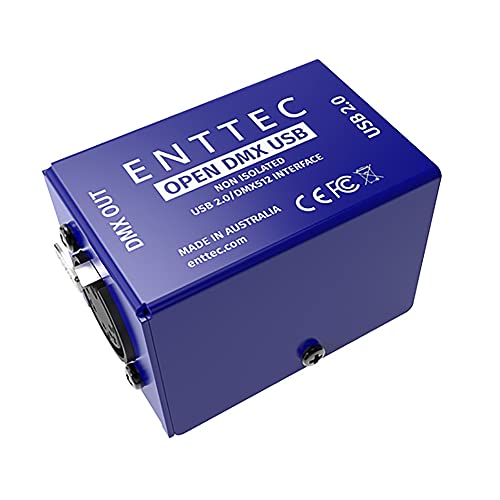
For those just starting in lighting control, the Enttec Open DMX USB Lighting Interface stands out as an ideal entry-level model. Weighing just 4.9 ounces, its compact design fits easily into any setup. This open-source interface connects via micro USB and supports a 5-pin DMX output, making it compatible with various software, including LightKey 2. Users appreciate its plug-and-play functionality and reliability, rating it 4.3 out of 5 stars. While some have noted occasional component failures, the overall value and ease of use make it a solid choice for small lighting configurations in personal or club settings.
Best For: Beginners in lighting control looking for a reliable and affordable DMX interface for small setups.
Pros:
- Easy plug-and-play functionality with various compatible software, including LightKey 2.
- Compact and lightweight design makes it ideal for personal or small club setups.
- High customer satisfaction with a 4.3 out of 5-star rating based on 348 reviews.
Cons:
- Some users report component failures within a year, leading to flickering lights.
- Not compatible with certain software like MadMapper or Resolume Arena, limiting options for advanced users.
- Reliability issues may arise for those seeking long-term use in more demanding environments.
ADJ Products Mydmx Go, App, Wireless DMX Lighting Controller

Looking for a user-friendly lighting control solution? The ADJ Products Mydmx Go is your answer. This wireless DMX lighting controller works seamlessly with iPads and Android tablets, offering over 15,000 compatible fixtures and 256 DMX channels, upgradeable to 512. With zero programming required, you can create stunning effects using speed, color palette, size, and fade controls. The compact design mounts easily, making it perfect for any setup. While user reviews highlight its ease of use and advanced features, some have faced connectivity issues, particularly with Apple devices. Overall, it’s a solid choice for effortless lighting displays.
Best For: Those seeking an easy-to-use wireless DMX lighting controller for iPads and Android tablets without the need for complex programming.
Pros:
- User-friendly interface allows for effortless operation without any programming skills.
- Extensive fixture library with over 15,000 compatible fixtures, making it versatile for various lighting setups.
- Compact and lightweight design facilitates easy mounting and transport.
Cons:
- Connectivity issues reported by some users, especially with Apple devices.
- Inconsistent performance when used with non-brand lights, affecting reliability.
- Limited customer support feedback, leading some to seek alternative solutions.
Sushi-Z1 DMX Lighting Controller

With its robust Smart Upgrade Technology (SUT) and support for up to 512 DMX channels, the Sushi-Z1 DMX Lighting Controller is an excellent choice for both novice and experienced lighting designers. Weighing just 0.08 kg, this compact USB DMX interface is easy to transport. You’ll appreciate the lifetime licenses for popular software like ESA2 and Daslight, alongside the ability to control your lights effortlessly through the Light Rider app. Although initial access is limited to 128 channels, the upgrade options offer flexibility. Just be aware of potential support challenges and the need for better documentation to maximize your experience.
Best For: The Sushi-Z1 DMX Lighting Controller is best for both novice and experienced lighting designers seeking a portable and versatile DMX interface.
Pros:
- Compact and lightweight design makes it easy to transport.
- Lifetime licenses for popular software provide robust control options.
- Supports up to 512 DMX channels with upgrade options for flexibility.
Cons:
- Initial access limited to 128 channels requires additional payment for full access.
- Mixed reviews on customer support and software access can be frustrating.
- Lack of comprehensive documentation and guides may hinder user experience.
ADJ MYDMX Buddy DMX Hardware Dongle

The ADJ MYDMX Buddy DMX Hardware Dongle stands out as an ideal choice for beginners and mobile performers seeking an accessible and portable lighting control solution. Weighing just 2.71 ounces, it’s easy to transport, making it perfect for gigs on the go. With compatibility for MyDMX 2.0 software, you get 256 live DMX channels and a library of over 10,000 fixtures. Its plug-and-play design simplifies setup, so you can focus on your performance. While some users note software stability issues, many appreciate its intuitive interface and extensive features. Overall, it’s a solid option for small-scale events and pre-programmed lighting displays.
Best For: The ADJ MYDMX Buddy is best for beginners and mobile performers looking for an easy-to-use, portable DMX lighting control solution.
Pros:
- User-friendly plug-and-play design simplifies setup and operation.
- Extensive fixture library with over 10,000 fixtures for versatile lighting options.
- Lightweight and portable, making it ideal for on-the-go performances.
Cons:
- Occasional software stability issues can lead to crashes, especially when offline.
- Limited live adjustment capabilities, as it’s more suited for pre-programmed scenes.
- Some users report disconnection issues, which can hinder performance.
Pknight ArtNet DMX Ethernet Lighting Controller Interface (1-Universe Bi-directional)

For those who need a reliable and compact solution for lighting control, the Pknight ArtNet DMX Ethernet Lighting Controller Interface stands out with its bi-directional capability and user-friendly OLED display. Weighing just 13.4 ounces and measuring 4.53 x 2.76 x 2.36 inches, it’s easy to transport. This controller supports 5V DC power input and allows seamless conversion of DMX signals to ArtNet. You can configure it effortlessly without external applications, thanks to its intuitive interface. Users appreciate its dependable performance with various software, though some noted initial setup challenges. Overall, it’s a solid choice for live performances and lighting setups.
Best For: The Pknight ArtNet DMX Ethernet Lighting Controller Interface is best for lighting professionals and enthusiasts seeking a compact and versatile solution for controlling DMX lighting during live performances.
Pros:
- Compact and portable design makes it easy to transport and set up in various environments.
- User-friendly OLED display and intuitive controls allow for quick configuration without the need for external applications.
- Reliable performance with compatibility across multiple lighting software and DMX fixtures, enhancing versatility.
Cons:
- Initial setup challenges may arise, particularly with network configurations for some users.
- Limited documentation and technical support can hinder advanced configuration efforts.
- Lack of RDM support, which may be a drawback for those requiring remote device management capabilities.
Rockville ROCKFORCE DMX Lighting Controller

Designed specifically for DJs, clubs, and stage lighting, the Rockville ROCKFORCE DMX Lighting Controller offers a robust control capability with 384 channels. You can effortlessly operate up to 24 intelligent lights, and MIDI control allows for seamless bank and chase management. With 30 banks of 8 scenes and 6 chases, it’s easy to create intricate light shows. The built-in microphone triggers automatic lighting modes, syncing perfectly to the beat. Its durable metal housing and 4-bit LED display guarantee reliability and visibility, even in dark settings. Plus, the universal power supply makes it adaptable for any venue.
Best For: The Rockville ROCKFORCE DMX Lighting Controller is best for DJs, clubs, and stage lighting professionals seeking a powerful and versatile lighting control solution.
Pros:
- Offers extensive control with 384 channels, allowing for detailed manipulation of up to 24 intelligent lights.
- Features music-triggered automatic lighting modes for dynamic and synchronized light shows.
- Durable construction and an LED display ensure reliable performance and visibility in various environments.
Cons:
- May have a learning curve for users not familiar with DMX lighting systems.
- Limited to a maximum of 24 intelligent lights, which may not suffice for larger productions.
- The 4-bit LED display may be less intuitive compared to higher resolution displays available in other controllers.
MADRIX® 5 License start + Key, 2 DMX Universes Software

MADRIX® 5 Software stands out as an ideal choice for lighting professionals seeking robust control over their LED displays. With the ability to manage up to 1,024 DMX channels across 2 universes, you can create stunning visuals using 341 RGB and 4,096 DVI Voxels. Its real-time Music2Light feature guarantees your light shows are perfectly synced to any audio source, enhancing the overall experience. The software boasts a render resolution of 64 x 64 pixels, allowing for intricate designs. Plus, it’s upgradeable, so you can easily expand your capabilities as your needs grow. Experience the power of MADRIX® 5 today!
Best For: Lighting professionals and designers looking for advanced control and synchronization capabilities for LED displays.
Pros:
- Supports up to 1,024 DMX channels, allowing for extensive lighting setups.
- Features Music2Light for real-time audio synchronization, creating dynamic light shows.
- Upgradeable software, providing flexibility to expand capabilities as needs evolve.
Cons:
- May require a learning curve for new users unfamiliar with DMX software.
- Limited to 2 DMX universes, which might be restrictive for larger installations.
- Initial investment may be high for smaller projects or casual users.
Factors to Consider When Choosing DMX Lighting Software
When choosing DMX lighting software, you need to take into account several key factors. Think about software compatibility, user interface design, and channel capacity to guarantee it meets your needs. Additionally, evaluate the control features and performance to make the right choice for your setup.
Software Compatibility Requirements
Choosing the right DMX lighting software hinges on several compatibility requirements that can greatly impact your setup. First, make certain the software matches your operating system, as many are tailored for Windows, macOS, or Linux. Next, check the channel capacity; some programs support only 256 DMX channels, while others can be upgraded to 512. Verify that the software can connect with various hardware interfaces, like USB DMX devices, to guarantee smooth operation. It’s also important to choose software that supports a wide range of lighting fixtures; an extensive fixture library simplifies programming. Finally, consider whether the software can integrate with audio sources for real-time synchronization, enhancing your visual displays during performances.
User Interface Design
A great user interface design can make all the difference when selecting DMX lighting software. You’ll want intuitive navigation that lets you access features and settings quickly, avoiding unnecessary complexity. Look for user-friendly software that includes drag-and-drop functionality, making it easy to manage your lighting fixtures and scenes. Real-time updates and clear indicators provide visual feedback, so you know your actions are taking effect immediately. Customizable layouts and the ability to save preferences will enhance your efficiency, especially when juggling multiple projects. Finally, extensive documentation and tutorial resources can empower you to master the software, helping you overcome any learning curve associated with complex DMX systems. Choose wisely, and your light displays will shine even brighter!
Channel Capacity Considerations
Selecting the right DMX lighting software involves more than just a user-friendly interface; channel capacity plays a significant role in your decision. The channel capacity determines how many fixtures you can control simultaneously, with options typically ranging from 128 to over 512 channels. If you plan to create complex lighting setups with multiple intelligent lights, you’ll want software that supports higher capacities. Some solutions even offer expandable channel options, letting you upgrade as your needs grow. On the other hand, software with low channel capacity might limit your lighting fixtures, hindering your ability to craft intricate shows. It’s essential to match the software’s capacity with your performance requirements to guarantee every lighting element is effectively managed.
Control Features Offered
When exploring DMX lighting software, consider the control features that will enhance your lighting design experience. Look for options that provide a high number of DMX channels, ideally up to 512, allowing extensive control over your fixtures. Ascertain the software supports bi-directional communication, facilitating seamless integration between DMX and ArtNet protocols for greater flexibility. User-friendly features like drag-and-drop technology make scene creation effortless, even if you lack extensive programming knowledge. Real-time effects and synchronization with music are essential for dynamic light shows that elevate performances. Finally, customizable control options, such as user presets and automated effects, can greatly streamline your lighting operation during events, making your setup more efficient and impactful.
Performance and Speed
To guarantee your lighting shows are both impressive and seamless, it’s crucial to take into account the performance and speed of DMX lighting software. Look for software that can handle a high number of DMX channels, ideally up to 1,024 across two universes, to manage complex displays. Speed is critical; choose software that pushes up to 850 frames per second for smooth shifts without lag or flicker. Real-time audio analysis features can synchronize your lights with music, enhancing your show’s dynamism. Also, consider how efficiently the software uses system resources—opt for options that require minimal memory yet offer advanced controls. Finally, provide quick access to features for a faster setup and execution during live performances.
Expansion and Upgrade Options
As your lighting shows grow in complexity, having the right DMX lighting software that allows for expansion and upgrades becomes increasingly important. First, check the number of channels supported; many programs expand from a basic 256 channels to 512 or more, accommodating your future needs. Look for software that seamlessly allows upgrades or additional licenses to enhance features like output capabilities or advanced effects. Evaluate support for multiple DMX universes, as this can greatly expand your control over fixtures. Compatibility with various hardware interfaces and DMX protocols is essential, simplifying integration and future upgrades. Finally, consider options for adding features without overhauling your system, helping you manage costs while advancing your lighting capabilities as your needs evolve.
Support and Documentation Availability
Choosing the right DMX lighting software hinges not only on its features but also on the support and documentation it offers. You’ll want to evaluate the availability of user manuals, online tutorials, and FAQs to assist with installation and troubleshooting. Extensive documentation is key; look for detailed setup guides, configuration steps, and troubleshooting tips that enhance your experience and efficiency. An active user community or support forum can be invaluable for problem-solving and sharing best practices. Regular updates and access to customer support are essential for addressing software issues and improving functionality. Finally, check if the software offers technical support channels like email, chat, or phone assistance, as timely help is vital during live events.