If you’re building a studio that needs dependable inputs, expandable routing, and clean conversion, focusrite rackmount audio interfaces are a strong place to start.
This roundup focuses on practical choices for home studios, multi-mic recording, and hybrid setups where rack space, I/O count, and sound quality all matter.
Best 10 Focusrite Rackmount Audio Interfaces Picks for 2026
Best for Expanding a Pro Studio
Focusrite Clarett+ 8Pre Rackmount Interface
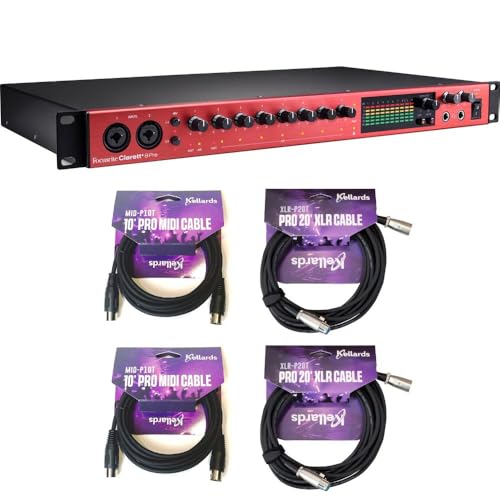
- Eight Air-enabled mic/line preamps
- 18x20 I/O with ADAT, S/PDIF, MIDI, and word clock
- Dual headphone outs and eight line outputs
Best For: Project studios and bands needing a rackmount interface with serious expandability.
Best for Easy Studio-Quality Recording

- 4th Gen Focusrite preamps with clean, detailed sound
- Auto Gain and Clip Safe simplify level setting
- Includes major DAWs and the Hitmaker Expansion bundle
Best For: Solo creators who want a compact interface with pro-grade sound and fast setup.
Best for Drum Tracking
Tascam US-16x08 Rackmount USB Audio/MIDI Interface
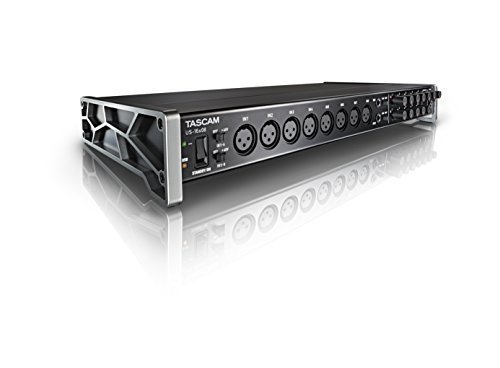
- 16 inputs for drums, bands, and multi-mic sessions
- Eight clean Ultra-HDDA preamps with up to 56dB gain
- DSP mixer supports low-latency monitoring and EQ
Best For: Home and project studios recording drums, ensembles, or other multi-source sessions.
Best Studio Bundle
Focusrite Clarett+ 8Pre + APM5B v2

- Eight-preamp Clarett+ interface with ADAT expansion
- Includes powered monitors for immediate playback
- Solid all-in-one option for compact studios
Best For: Producers and podcasters who want an interface-and-monitor bundle in one purchase.
Best Budget Starter
M-AUDIO M-Track Duo USB Audio Interface

- Dual combo XLR/line/instrument inputs
- 48kHz recording with Crystal Preamps
- Includes MPC Beats software
Best For: Beginners and podcasters who want an affordable two-input interface with easy monitoring.
Best for First-Time Recording Bundles
Focusrite Scarlett 2i2 Studio 4th Gen Bundle

- All-in-one kit with mic, headphones, and cables
- Auto Gain and Clip Safe simplify setup
- High-quality 24-bit / 192 kHz recording path
Best For: Singers, podcasters, and beginners who want a complete starter recording bundle.
Best for Advanced Routing
Antelope Discrete 8 Synergy Core

- Premium 121dB conversion for detailed recording
- USB + Thunderbolt with lots of analog and digital I/O
- Real-time Synergy Core effects and Auto-Tune support
Best For: Engineers and producers who need a feature-rich rackmount interface for flexible studio routing.
Best for Solo Recording
Focusrite Scarlett Solo 4th Gen USB Audio Interface

- 120dB dynamic range with Focusrite flagship-style converters
- Air mode adds presence and harmonic lift to vocals and guitars
- Includes recording software and Hitmaker Expansion plugins
Best For: Singer-songwriters and solo creators who want simple, high-quality desktop recording.
Best for Simple Studio Recording
Focusrite Scarlett 2i2 4th Gen
- Studio-quality 120dB dynamic range
- Auto Gain and Clip Safe simplify setup
- Includes recording software and plugins
Best For: Solo creators who want an easy, high-quality interface for vocals, guitar, podcasting, or streaming.
Best for Solo Songwriters
Focusrite Scarlett Solo 4th Gen
- 120dB dynamic range with upgraded Focusrite converters
- Air mode adds vocal and guitar presence
- Includes Pro Tools Intro+, Ableton Live Lite, and more
Best For: Singer-songwriters and solo home recordists who want pro sound in a simple desktop interface.
Best for Expanding a Pro Studio – Focusrite Clarett+ 8Pre Rackmount Interface
The Focusrite Clarett+ 8Pre is a strong pick for anyone comparing focusrite rackmount audio interfaces and wanting plenty of I/O in a clean 1U format. With eight mic/line preamps, ADAT and S/PDIF expansion, dual headphone outs, and upgraded 24-bit/192 kHz conversion, it is built for serious tracking, overdubs, and hybrid studio setups.
Best For: Project studios, producers, and bands that need a rackmount interface with room to grow.
Pros:
- Eight Air-enabled mic/line preamps with two Hi-Z inputs
- 18×20 routing plus ADAT, S/PDIF, MIDI, and word clock support
- Dual headphone outputs and eight line outs for flexible monitoring
- Includes USB-C and USB-A cables plus bundled MIDI and XLR leads
Cons:
- More interface than casual solo recordists usually need
- Bundled cables are useful, but they do not add studio hardware upgrades
- Rackmount setup is less portable than a small desktop interface
For buyers who want expandability, clean preamps, and a true rackmount workflow, this Clarett+ model stands out among focusrite rackmount audio interfaces. It is especially appealing if you expect to add external pres, digital gear, or multiple headphone mixes over time.
Best for Easy Studio-Quality Recording – Scarlett 2i2 4th Gen
If you want a simple interface that still sounds polished, the Scarlett 2i2 4th Gen is an easy pick for home studios searching for dependable focusrite rackmount audio interfaces alternatives in a compact desktop format. It delivers strong mic preamps, 120dB dynamic range, and workflow helpers like Auto Gain and Clip Safe so you can record faster with fewer level-setting headaches.
Best For: Solo musicians, podcasters, and streamers who want clean Focusrite sound, quick setup, and included recording software.
Pros:
- High-quality 4th Gen mic pres with up to 69dB of gain
- Auto Gain and Clip Safe help prevent bad takes
- Includes Pro Tools Intro+, Ableton Live Lite, and Hitmaker Expansion
- Air mode adds presence for vocals and guitars
Cons:
- Only two inputs, so it is not ideal for bigger sessions
- Desktop design may not suit rack-based studio builds
- Focused on recording basics rather than advanced I/O expansion
For buyers comparing focusrite rackmount audio interfaces, this 2-in/2-out model stands out as the easier, more affordable way to get pro-style results without a bulky setup. It is especially appealing if you value sound quality, included software, and a quick path from unboxing to recording.
Best for Drum Tracking – Tascam US-16×08 Rackmount USB Audio/MIDI Interface
If you need one of the more flexible focusrite rackmount audio interfaces-style alternatives for larger recording setups, the Tascam US-16×08 is built for multi-source sessions. It gives you plenty of input headroom, onboard monitoring control, and a straightforward rackmount format that works well for studios tracking drums, bands, or multiple instruments at once.
Best For: Home and project studios that need a rackmount interface with lots of inputs for drums, ensembles, and layered recording.
Pros:
- 16 total inputs make it easy to record full drum kits or small bands
- Eight Ultra-HDDA mic preamps aim for clean, quiet capture
- Built-in DSP mixer helps create low-latency monitor mixes
- Eight balanced outputs support flexible studio routing
Cons:
- No built-in bus-powered portability; it’s a rack-oriented studio unit
- Control and routing options may be more than casual users need
- Not the simplest pick if you only record one or two sources at a time
For buyers comparing focusrite rackmount audio interfaces, the US-16×08 stands out for input count and practical tracking features rather than flashy extras. It’s a strong fit when session size matters more than a compact footprint.
Best Studio Bundle – Focusrite Clarett+ 8Pre + APM5B v2
If you want one purchase that covers both recording and monitoring, this bundle is a practical way to step into focusrite rackmount audio interfaces with matching nearfield speakers. The Clarett+ 8Pre gives you eight clean preamps, ADAT expansion, and flexible routing, while the APM5B v2 monitors handle everyday mix checks and playback without needing extra gear.
Best For: Producers, podcasters, and home studios that need an interface-plus-monitor package in one box.
Pros:
- Eight Clarett preamps with low-noise performance and all-analogue Air
- ADAT, MIDI, and S/PDIF support for expandability and outboard gear
- Includes powered monitors with Bluetooth and multiple wired inputs
- Good fit for a compact studio that needs recording and playback together
Cons:
- Monitor speakers are included whether you need them or not
- Requires more desk or rack space than a single-interface purchase
- Not the simplest choice if you only want a basic 2-channel setup
This bundle makes sense if you value a ready-to-go studio package over piecing components together. For buyers comparing focusrite rackmount audio interfaces, the Clarett+ 8Pre stands out for its strong connectivity and expansion options, especially when paired with monitors that are already matched for general-purpose production work.
Best Budget Starter – M-AUDIO M-Track Duo USB Audio Interface
If you’re comparing focusrite rackmount audio interfaces but want a simple, affordable desktop option, the M-AUDIO M-Track Duo is a practical place to start. It covers recording, streaming, and podcasting with dual combo inputs, clean monitoring, and a straightforward USB setup for Mac or PC.
Best For: Beginners, podcasters, and home recordists who want a low-cost interface with two inputs and easy zero-latency monitoring.
Pros:
- Two combo XLR/line/instrument inputs with phantom power
- 48kHz recording and transparent Crystal Preamps
- Headphone out plus stereo outputs for flexible monitoring
- Includes MPC Beats software to get started quickly
Cons:
- Not a rackmount unit, so it won’t suit rack-based studio setups
- Limited to a basic two-input workflow
- Best for entry-level use rather than advanced I/O needs
This is a solid value pick if you need a compact interface and don’t actually require the rack format common in focusrite rackmount audio interfaces. It gives you the essentials without a steep learning curve, making it easier to move from idea to recording fast.
Best for First-Time Recording Bundles – Focusrite Scarlett 2i2 Studio 4th Gen Bundle
If you want a simple way to start recording without piecing together separate gear, this Scarlett 2i2 Studio bundle is a practical entry point in the world of focusrite rackmount audio interfaces alternatives. It gives you the interface, mic, headphones, and cables in one box, making it easier to get vocals, podcasts, and demo tracks going fast.
Best For: Singers, podcasters, and home-recording beginners who want an all-in-one setup with minimal guesswork.
Pros:
- Includes the interface, condenser mic, closed-back headphones, and XLR cable
- Auto Gain and Clip Safe help make clean levels easier to set
- 24-bit / 192 kHz conversion and strong preamps improve recording quality
- Software bundle adds useful tools for tracking and editing right away
Cons:
- Not a rackmount unit, so it won’t suit studio racks or fixed installations
- Only 2-in / 2-out, which may be limiting for larger recording sessions
This is a strong choice if you care more about an easy start than a full studio rack layout; among focusrite rackmount audio interfaces searches, it stands out as a ready-to-record bundle rather than a traditional rack solution.
Best for Advanced Routing – Antelope Discrete 8 Synergy Core
If you’re comparing focusrite rackmount audio interfaces and want more than basic input/output, the Antelope Discrete 8 Synergy Core stands out for its clocking, onboard processing, and wide digital I/O. It’s built for producers and engineers who want a serious rackmount hub for tracking vocals, instruments, and complex studio setups.
Best For: Home and project studios that need a rackmount interface with premium conversion, low-latency effects, and flexible connectivity.
Pros:
- 121dB conversion and 130dB monitor dynamic range for clean, detailed recordings
- USB and Thunderbolt support with eight mic/line inputs, eight outputs, S/PDIF, and dual ADAT
- Onboard Synergy Core processing adds real-time effects and Auto-Tune integration
Cons:
- Feature set is more complex than a straightforward budget interface
- Best value shows up most when you’ll use the onboard DSP/FX regularly
For buyers comparing focusrite rackmount audio interfaces, this is the pick that leans hardest into premium routing and built-in processing rather than simple plug-and-play operation. It’s a strong choice if you want one rackmount unit to anchor a more advanced studio workflow.
Best for Solo Recording – Focusrite Scarlett Solo 4th Gen USB Audio Interface
If you’re comparing focusrite rackmount audio interfaces but only need a compact, straightforward way to record vocals or guitar, the Scarlett Solo 4th Gen is a strong fit. It delivers studio-grade conversion, an improved Air mode for more presence, and a software bundle that helps you start recording right away.
Best For: Singer-songwriters, guitarists, and beginner producers who want high-quality 1-in/2-out recording in a simple desktop interface.
Pros:
- 120dB dynamic range and the same converters used in Focusrite’s higher-end interfaces
- Improved Air mode adds clarity and harmonic drive to vocals and guitars
- Includes Pro Tools Intro+, Ableton Live Lite, Cubase LE, and Hitmaker Expansion plugins
- Easy plug-in-and-record workflow for solo tracking
Cons:
- Not a rackmount unit, so it won’t suit multi-channel studio installs
- Limited I/O compared with larger interfaces for bands or complex setups
For simple home recording, the Scarlett Solo 4th Gen offers excellent sound and an easy start, but buyers specifically shopping for focusrite rackmount audio interfaces should look elsewhere for more inputs and installation flexibility.
Best for Simple Studio Recording – Focusrite Scarlett 2i2 4th Gen
If you’re comparing focusrite rackmount audio interfaces, the Scarlett 2i2 4th Gen is the easier desktop-friendly choice for solo creators who want clean, reliable recording without a complicated setup. It delivers studio-grade sound, helpful auto-leveling features, and a software bundle that gets you recording fast.
Best For: Singers, guitarists, podcasters, and streamers who want an easy-to-use Focusrite interface with pro-level recording quality.
Pros:
- 120dB dynamic range and Focusrite’s latest converters for polished, detailed audio
- Auto Gain and Clip Safe help prevent bad levels and clipped takes
- Air mode adds extra presence to vocals and guitars
- Includes Pro Tools Intro+, Ableton Live Lite, Cubase LE, and Hitmaker Expansion
Cons:
- Not a rackmount unit, so it won’t suit rack-based studio setups
- Only two inputs, which may be limiting for larger recording sessions
- Best suited to small home studios rather than multi-source productions
For buyers browsing focusrite rackmount audio interfaces, this model stands out more as a compact, great-sounding starter interface than a rack solution. It’s a strong pick if your priority is easy setup, dependable recording, and a solid software package.
Best for Solo Songwriters – Focusrite Scarlett Solo 4th Gen
If you want a simple, studio-quality interface for writing, tracking, and demoing songs, the Scarlett Solo 4th Gen is a strong fit. It’s not one of the larger focusrite rackmount audio interfaces, but it delivers the same polished Focusrite sound in a compact desktop format that’s easy to place anywhere.
Best For: Singer-songwriters, guitarists, and home recordists who want an easy 1-mic, 1-instrument interface with pro-level sound.
Pros:
- 120dB dynamic range and upgraded converters for cleaner, more detailed recordings
- Improved Air mode adds presence and harmonic lift to vocals and guitars
- Includes a strong software bundle for recording, mixing, and mastering
- Compact, beginner-friendly layout that gets you recording fast
Cons:
- Only one mic input and one instrument input, so it’s not built for bigger sessions
- Desktop design won’t suit users specifically looking for rackmount hardware
- Not ideal for expanding into multi-input band recording
For solo creators who care more about sound quality and simplicity than expandability, the Scarlett Solo 4th Gen is an easy recommendation. If your roundup of focusrite rackmount audio interfaces also includes compact alternatives, this stands out as the most approachable option for single-artist recording.
How We Picked These Focusrite Rackmount Audio Interfaces
We prioritized models and bundles that make sense for real-world studio use: strong preamp quality, enough inputs and outputs for tracking sessions, modern USB or Thunderbolt connectivity, and hardware that fits into a rack-friendly workflow. We also considered whether each option suits solo creators, small bands, or more advanced recording setups.
Quick Comparison
Among Focusrite Rackmount Audio Interfaces, the main difference is channel count and workflow. Compact 2-in/2-out models suit vocalists, guitarists, and podcasters who want simplicity, while larger rack units are better for drums, multiple microphones, outboard gear, and monitoring flexibility. Some bundled listings add useful extras, but the interface itself should still be the deciding factor.
Key Buying Factors for Focusrite Rackmount Audio Interfaces
I/O Count and Expansion
Match the number of mic, line, and instrument inputs to your actual sessions. If you record drums or full bands, more onboard inputs save time and reduce the need for extra gear. For smaller projects, a leaner interface may be easier to manage.
Connection Type
USB-C is the most common and convenient choice for modern computers. Thunderbolt can offer excellent performance for low-latency workflows, but only matters if your system supports it. Check compatibility before buying.
Monitoring and Routing
Look for direct monitoring, flexible headphone mixes, and enough outputs for speakers, cue mixes, or external processing. These features can make a bigger difference than a few extra headline specs.
Software and Bundle Value
Some listings include microphones, headphones, speakers, or MIDI cables. Bundles can be useful for first-time buyers, but make sure the interface and included accessories both fit your studio goals. Don’t pay extra for items you won’t use.
Who Should Buy Which Focusrite Rackmount Audio Interfaces?
Choose a smaller Scarlett-style interface if you’re a solo artist, streamer, or podcaster who needs dependable recording without a complicated setup. Step up to a rackmount option like the Clarett+ 8Pre or a similar multichannel unit if you need more inputs, better studio routing, or room to grow.
If your priority is live band tracking, drum recording, or a permanent studio install, focus on the rack units first and treat the smaller interfaces as convenient secondary or mobile solutions. The best choice is the one that matches your session size, monitoring needs, and upgrade path.