Long HDMI cables can be difficult to route, especially when your projector, television, AV receiver, or gaming setup sits far from the source. The best HDMI extenders for home theaters send video and audio over Cat5e, Cat6, or newer network cable while keeping installation cleaner and more flexible.
We selected 10 options covering straightforward point-to-point connections, multi-display splitting, matrix switching, IR control, ARC, and 4K at 60Hz. The right choice depends on your resolution, distance, wiring, and how many displays you need to connect.
Best 10 Hdmi Extenders for Home Theaters Picks for 2026
Best Long-Run Value
OREI 230ft 4K HDMI Over Ethernet Extender

- 1080p extension up to 230 feet
- PoC reduces power-cable clutter
- Includes IR, loop out, and EDID copy
Best For: Long-distance 1080p home theater installations
Best Compact Booster
Techigher Self-Powered HDMI Signal Repeater

- 4K/60Hz extension up to 80 feet
- No external power adapter required
- Useful for gaming and VR setups
Best For: Shorter cable runs needing a compact 4K/60Hz boost
Best 4K30 Over Cat Cable

- 4K/30Hz up to 131 feet
- 1080p up to 230 feet
- Adds loop out, EDID, IR, and PoC
Best For: Long wired installations using direct Cat5e/6/7 cable
Best Premium 4K60 Choice
AV Access HDBaseT ARC Extender

- 4K/60Hz 4:4:4 up to 131 feet
- Supports HDCP 2.2 and HDR formats
- Adds ARC, audio de-embedding, IR, and RS232
Best For: Advanced 4K home theaters with flexible audio routing
Best Multi-Screen Value

- 4K@30Hz to 132 feet; 1080p to 230 feet
- Two remote outputs plus local HDMI loop-out
- PoC power, IR control, and EDID management
Best For: Multi-screen home theaters and commercial displays
Best Simple Long-Run Option
4K HDMI Extender Over Ethernet

- 4K@30Hz up to 130 feet; 1080p up to 230 feet
- Local loop-out and included IR remote control
- POC simplifies receiver power and installation
Best For: Long-distance, single-source home theater connections
Best for Six Displays

- One source feeds six displays
- 1080p@60Hz and 3D up to 165 feet
- EDID presets support multiple audio modes
Best For: Large multi-display 1080p installations
Long-Range 4K Pick
200-Foot HDMI Over Ethernet Extender
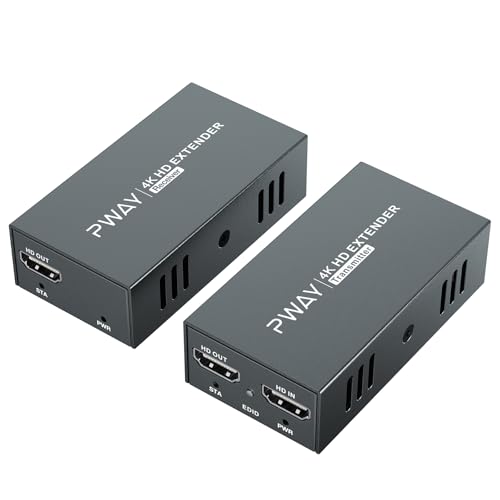
- 4K at 60Hz with 4:4:4 and HDR 10
- Up to 200 feet over CAT5e/CAT6/CAT7
- Loop-out and transmitter-side POC power
Best For: Long-distance 4K home theater and projector connections
Whole-Room Distribution Pick
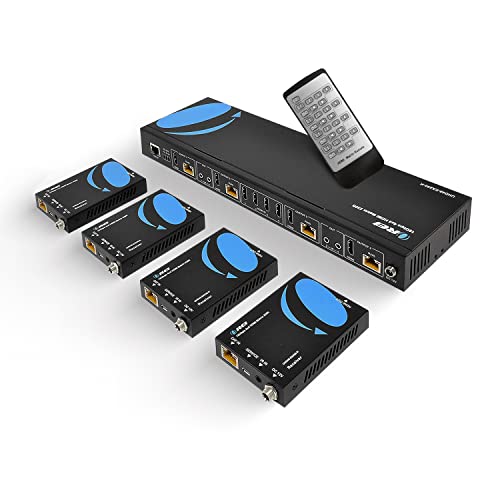
- Four inputs and four remote outputs
- 4K/60 support with HD audio pass-through
- IR, RS-232, EDID, and loop-out features
Best For: Multi-source, multi-display home theater systems
Best Simple Pick

- Sends one source to four remote displays
- 4K/30 or 1080p/60 over Ethernet cable
- PoC, local loop-out, IR, and EDID controls
Best For: One-source multi-screen home theater setups
Best Long-Run Value – OREI 230ft 4K HDMI Over Ethernet Extender
For home theaters that need to send a signal between distant rooms, this OREI unit is a practical choice among HDMI extenders for home theaters. It supports 4K at 30Hz up to 130 feet and 1080p up to 230 feet over Cat6/7 cable, with one-way IR and a local HDMI loop output.
Best For: Long-distance 1080p installations, home theaters using Blu-ray players, game consoles, media players, or set-top boxes.
Pros:
- Extends 1080p signals up to 230 feet and 4K at 30Hz up to 130 feet.
- PoC allows the transmitter’s single power adapter to power both units.
- Includes EDID copy, one-way IR, loop out, and support for multichannel audio formats.
Cons:
- 4K support is limited to 30Hz.
- Uses HDCP 1.4 rather than newer HDCP 2.2.
- Shielded Cat6/7 cable is recommended for the best signal quality.
This is a well-equipped extender for long 1080p runs, especially when simplified power wiring and remote-control support matter. Buyers seeking modern 4K/60Hz or HDCP 2.2 compatibility should consider a newer model.
Best Compact Booster – Techigher Self-Powered HDMI Signal Repeater
If you need a simple point-to-point boost rather than a full transmitter-and-receiver kit, this compact repeater is one of the more straightforward HDMI extenders for home theaters. It supports 4K at 60Hz up to 80 feet total and 1080p up to 145 feet, without an external power adapter.
Best For: Gaming, VR, streaming devices, or home theater setups using standard HDMI cables and requiring a compact, self-powered solution.
Pros:
- Supports 4K at 60Hz and HDR10/Dolby Vision-compatible sources.
- Self-powered design requires no external adapter.
- Compact metal housing and female-to-female HDMI connections simplify installation.
Cons:
- 4K range is limited to 80 feet total under the stated cable arrangement.
- It is unidirectional and does not upscale the source resolution.
- Not compatible with fiber optic HDMI cables, and only one repeater is recommended per chain.
This repeater is best when convenience and 4K/60Hz support are more important than maximum distance. Use certified HDMI 2.0 cables and stay within the specified input and output lengths.
Best 4K30 Over Cat Cable – OREI EX-170C HDMI Extender
The OREI EX-170C is a practical option for routing HDMI through an existing Cat5e, Cat6, or Cat7 cable. Among HDMI extenders for home theaters, it stands out for combining 4K/30Hz transmission, HDMI loop out, EDID copy, one-way IR, and PoC in a single installation-focused kit.
Best For: Home theaters, conference rooms, digital signage, and 4K CCTV systems needing long-distance extension over a direct Cat cable run.
Pros:
- Extends 1080p up to 230 feet or 4K at 30Hz up to 131 feet.
- Loop out enables local display monitoring while sending video remotely.
- PoC, EDID copy, one-way IR, and metal housing support cleaner, stable installations.
Cons:
- Does not support 4K at 60Hz.
- Not compatible with HDMI ARC.
- Requires a direct Cat5e/6/7 connection and should not be connected through a network switch or router.
This model offers useful integration features for a traditional wired theater, particularly where local monitoring and remote source control are needed. Its 4K/30Hz ceiling makes it less suitable for high-frame-rate 4K gaming.
Best Premium 4K60 Choice – AV Access HDBaseT ARC Extender
For a feature-rich theater installation, the AV Access 4KEX70-ARC-H2 is one of the strongest HDMI extenders for home theaters in this group. Its HDBaseT design supports 4K/60Hz 4:4:4 up to 131 feet over Cat6a/7, while ARC, S/PDIF, audio de-embedding, bidirectional IR, and RS232 add flexibility for advanced systems.
Best For: Dedicated home theaters and professional AV systems using 4K/60Hz sources, modern protected content, and external audio equipment.
Pros:
- Supports 4K/60Hz 4:4:4 with HDR10, HLG, Dolby Vision, and HDR10+ up to 131 feet.
- HDCP 2.2 compatibility better suits current 4K streaming and Blu-ray equipment.
- Includes ARC, S/PDIF, audio de-embedding, bidirectional IR, RS232, and bi-directional PoC.
Cons:
- eARC is not supported.
- 4K distance is shorter than the 1080p maximum of 230 feet.
- It is not a network or IP transmission device.
This is the most capable choice here for a modern, integrated theater, particularly when smooth 4K motion and flexible audio routing are priorities. Its higher-end feature set is most worthwhile in a planned installation rather than a basic cable extension.
Best Multi-Screen Value – 4K 1×2 HDMI Extender Splitter
For shoppers comparing hdmi extenders for home theaters, this KVZOO splitter combines long-distance CAT5/6/7 transmission with distribution to two remote displays and a local HDMI loop-out. It supports 4K at 30Hz and 1080p at 60Hz, making it a practical choice for synchronized multi-screen setups.
Best For: Home theater rooms, sports bars, classrooms, offices, and other setups needing one source on up to three screens.
Pros:
- Extends 4K@30Hz up to 132 feet, or up to 165 feet with CAT6/7; 1080p reaches up to 230 feet.
- Supports two remote receivers plus a local HDMI loop-out for three synchronized displays.
- PoC power, IR pass-through, EDID management, and metal housings simplify installation and troubleshooting.
Cons:
- 4K output is limited to 30Hz rather than 4K@60Hz.
- Requires compatible CAT cabling and supports HDMI 1.4/HDCP 1.4 specifications.
This is a flexible option when you want both extended runs and multi-display distribution without separate receiver power adapters. Its 4K@30Hz ceiling makes it better suited to general home theater viewing and signage than high-refresh-rate gaming.
Best Simple Long-Run Option – 4K HDMI Extender Over Ethernet
This KVZOO model is a straightforward pick among hdmi extenders for home theaters when you need to send one HDMI source to a distant display over existing CAT cabling. It adds a local loop-out, IR control, EDID optimization, and POC power while supporting 4K@30Hz or 1080p@60Hz.
Best For: Multi-room home theater installations, conference rooms, classrooms, churches, bars, and digital signage.
Pros:
- Extends 4K@30Hz up to 130 feet, or up to 165 feet with CAT6/7; 1080p reaches up to 230 feet.
- Includes HDMI loop-out for local monitoring and IR cables for remote source control.
- POC technology can power the receiver through the network cable, reducing wiring clutter.
Cons:
- Does not support 4K@60Hz.
- HDMI 1.4 does not support native HDR.
- Best results depend on using suitable, high-quality CAT6/6A/7 cabling.
Choose this extender when the priority is a clean, single-source connection over a long cable run. EDID copy and included accessories can make setup easier, but users seeking HDR or high-refresh 4K should consider a higher-spec solution.
Best for Six Displays – 1×6 HDMI Extender Splitter
For large installations, this DONGJIAN unit stands out among hdmi extenders for home theaters by distributing one HDMI source to six displays. Four remote receivers use Cat5e/Cat6 cabling, while two HDMI loop-outs handle nearby screens, with EDID presets helping manage resolution and audio compatibility.
Best For: Large home theater layouts, classrooms, conference rooms, projector systems, and digital signage installations.
Pros:
- Distributes one source to six displays using four UTP outputs and two HDMI loop-outs.
- Extends 1080p@60Hz and 3D video up to 165 feet over Cat5e/Cat6.
- Offers EDID modes for 2CH, 5.1CH, 7.1CH, and 3D configurations.
Cons:
- Supports up to 1080p rather than 4K resolution.
- Requires Ethernet cables wired to the T568B standard for stable transmission.
- The package includes four receivers, so smaller setups may not use all available outputs.
This is the strongest fit when display count matters more than 4K resolution. Its six-output architecture and selectable EDID settings are useful for coordinated viewing areas, though it is less suitable for modern 4K-focused systems.
Long-Range 4K Pick – 200-Foot HDMI Over Ethernet Extender
For home theaters that need a source device positioned well away from a TV or projector, this HDMI extender sends uncompressed 4K video over CAT5e, CAT6, or CAT7 cable. It supports 4K at 60Hz with 4:4:4 color and HDR 10, while its loop-out and power-over-cable features add practical flexibility to an installation.
Best For: Long-distance 4K home theater connections, projectors, and setups needing local monitoring.
Pros:
- Supports uncompressed 4K at 60Hz with 4:4:4 color and HDR 10.
- Extends HDMI signals up to 200 feet over standard Ethernet cable.
- Loop-out enables local monitoring, and POC requires power only at the transmitter.
Cons:
- Designed for one extended HDMI connection rather than multi-output distribution.
- The package includes one power adapter, so installation planning is still important.
This is a focused choice among HDMI extenders for home theaters when you want 4K/60 performance across a long cable run without adding a power outlet near the display.
Whole-Room Distribution Pick – 4×4 4K HDMI Matrix Extender
This OREI matrix is built for larger home theaters and AV systems that need to route multiple sources to multiple displays. It provides four HDMI inputs and four remote outputs over CAT5e, CAT6, or CAT7 cable, with 4K/60 support, IR control, loop-outs, and audio pass-through for compatible equipment.
Best For: Multi-source, multi-display home theaters and professionally managed AV installations.
Pros:
- Routes four HDMI sources to four remote displays over cable runs up to 230 feet.
- Supports 4K at 60Hz, HDMI 2.0, HDCP 2.2/1.4, and up to 7.1-channel HD audio pass-through.
- Includes IR control, RS-232, EDID management, four loop-outs, and four receivers.
Cons:
- Its matrix design may be more equipment than needed for a single-display setup.
- Installation and configuration are likely more involved than with a basic point-to-point extender.
- The notes specify that IR OUT ports follow the HDMI input rather than the HDMI output.
For buyers comparing HDMI extenders for home theaters, this is the feature-rich option when centralized source switching and distribution matter more than a simple plug-and-play link.
Best Simple Pick – 1×4 HDMI Extender Splitter
This 1×4 HDMI extender splitter distributes one source to four remote displays while also providing a local HDMI loop-out. It sends 4K at 30Hz or 1080p at 60Hz over CAT5e through CAT7 cable, making it a practical fit for synchronized screens in a home theater, media room, or multi-display entertainment setup.
Best For: One-source home theater systems with several synchronized TVs or displays.
Pros:
- Supports one source to four remote receivers plus a local HDMI display.
- Offers long cable distances, including up to 230 feet for 1080p and up to 165 feet for 4K with CAT6/7.
- PoC powers the receivers through the Ethernet cables, while IR pass-through and EDID controls aid operation.
- Metal housing, status indicators, and a reset key support troubleshooting and ongoing use.
Cons:
- 4K transmission is limited to 30Hz rather than 4K at 60Hz.
- The system is intended for mirrored content from one HDMI source, not independent displays.
- It uses HDMI 1.4 and HDCP 1.4 specifications.
Among HDMI extenders for home theaters, this model stands out when synchronized multi-screen output and simpler receiver power are more important than 4K/60 playback.
How We Picked the Best Hdmi Extenders for Home Theaters
We compared these HDMI extenders by examining their supported resolution and refresh rate, advertised transmission distance, cable requirements, signal-management features, and installation flexibility. We also considered whether each model supports useful home theater functions such as IR pass-through, EDID management, power over cable, ARC, loop-through output, and multi-display distribution.
Distance claims depend on cable quality, connector condition, interference, and the video format being transmitted. Treat the published range as a guideline, and use properly terminated solid-core cable for permanent installations.
Quick Comparison
| Type | Best For | What to Check |
|---|---|---|
| Point-to-point extender | One distant display | Resolution, range, and cable category |
| Splitter extender | One source feeding several screens | Output count and EDID behavior |
| Matrix extender | Multiple sources and displays | Input/output routing and control options |
| HDBaseT extender | Stable long-distance installations | HDBaseT compatibility and wiring quality |
Key Buying Factors for Hdmi Extenders for Home Theaters
Resolution, Refresh Rate, and HDR
Confirm that the extender supports the exact format your system uses. A 4K at 30Hz model may be sufficient for movies, but gaming and modern streaming devices often benefit from 4K at 60Hz. Check HDR, color depth, chroma subsampling, and HDCP support if you use a 4K Blu-ray player, game console, or AV receiver.
Transmission Distance and Cable Type
Most units use Cat5e, Cat6, Cat6a, or Cat7 cable. Cat6 or Cat6a is generally the safer choice for longer runs and higher-bandwidth signals. Avoid routing the cable alongside power wiring when possible, and remember that patch panels, couplers, and wall plates can reduce reliability.
Control and Installation Features
IR pass-through lets you control a source from the remote display. EDID helps resolve compatibility problems between displays and sources, while PoC can reduce the number of power adapters at one end. Loop-out, ARC, RS-232, and rack-friendly designs matter most in more advanced theater systems.
Who Should Buy Which Hdmi Extenders for Home Theaters?
Choose a basic point-to-point extender if you need to connect one television or projector in another room. A 4K at 60Hz model is the better fit for gaming, sports, and premium streaming. Pick a splitter when one source must feed several displays, such as a theater and an adjacent television. For multiple sources and screens, a 4×4 matrix provides the greatest routing flexibility, but it requires more planning and configuration.
Before buying, verify every device in the signal chain, including the source, receiver, display, cable, and AV receiver. Matching the extender to the weakest component is the simplest way to avoid blank screens, dropped audio, or reduced resolution.