When it comes to achieving superior sound control in your studio, selecting the right monitor controller is essential. You need a device that not only enhances your mixing experience but also provides reliable audio management. With options like the Mackie Big Knob Passive and PreSonus Monitor Station V2, you have powerful tools at your disposal. But what factors should you consider to guarantee you make the best choice for your setup? Let’s explore these options further.
Mackie Big Knob Passive Studio Monitor Controller

If you’re a home studio owner or working in a larger editing suite, the Mackie Big Knob Passive Studio Monitor Controller is an excellent choice for you. This passive 2×2 controller lets you switch between two audio sources and two monitor pairs effortlessly, ensuring pristine audio quality. With its sturdy, tank-like design, you’ll appreciate its durability in any setting. The Mono, Mute, and Dim buttons provide added functionality for checking mixes. While some users note channel imbalance at lower volumes, most agree it’s an effective tool for quick volume adjustments and monitoring. Plus, it’s lightweight and compact for easy placement.
Best For: Home studio owners and professionals in larger editing suites seeking a reliable and durable monitor controller for audio source switching.
Pros:
- Effective for switching between multiple audio sources and monitor pairs.
- Sturdy construction ensures long-lasting use in various environments.
- Compact and lightweight design allows for easy placement in any studio setup.
Cons:
- Some users report channel imbalance at lower volume settings.
- Occasional noise may be introduced at higher volume levels.
- Volume knob lacks tactile resistance, making adjustments less precise.
PreSonus Monitor Station V2 Desktop Studio Control Center (MONITO STAT V2)
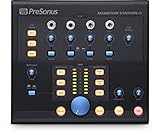
The PreSonus Monitor Station V2 Desktop Studio Control Center is an ideal choice for audio professionals looking to streamline their studio workflow. With four stereo input pairs and an S/PDIF digital input, you can easily connect multiple sources. It features three selectable speaker outputs, each with individual level controls, ensuring precise sound management. The large main level control, along with mute, mono, and dim switches, provides versatility. You’ll appreciate the four stereo headphone amplifiers with independent source selection and volume controls. Plus, the built-in talkback functionality enhances communication during sessions, making it a thorough solution for your studio needs.
Best For: Audio professionals and studio engineers seeking a comprehensive control center for managing multiple audio sources and outputs efficiently.
Pros:
- Versatile Connectivity: Supports multiple stereo input pairs and a digital S/PDIF input for flexible source management.
- Independent Control: Offers individual level controls for each speaker output and headphone amplifier, allowing for tailored listening experiences.
- Built-In Talkback Mic: Enhances communication during recording sessions with a dedicated talkback functionality.
Cons:
- Limited Digital Inputs: Only one S/PDIF digital input might be restrictive for users with multiple digital sources.
- No MIDI Support: Lacks MIDI connectivity, which could be a downside for those integrating MIDI devices into their setup.
- Size and Portability: Being a desktop unit, it may not be as portable as other compact audio interfaces or mixers.
Behringer XENYX CONTROL2USB Studio Control Center
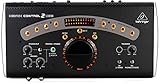
For audio engineers and musicians seeking a reliable hub for audio routing, the Behringer XENYX CONTROL2USB Studio Control Center stands out with its all-in-one functionality. Weighing just 5.29 pounds, this compact unit integrates a master volume controller, source selector, and monitor switcher. Its built-in talkback microphone lets you communicate directly with musicians, while VCA control guarantees precise level adjustments. With multiple outputs for three monitor sets and dual 12-segment LED meters, it’s designed for professional use. Users appreciate its clean sound quality and durability, making it an excellent choice for both home studios and professional environments.
Best For: Audio engineers and musicians looking for a compact and reliable audio routing hub for both home studios and professional environments.
Pros:
- Versatile all-in-one functionality with master volume, source selection, and monitoring capabilities.
- Built-in talkback microphone facilitates direct communication with musicians during sessions.
- Solid construction and clean sound quality ensure durability and professional performance.
Cons:
- Some users report potential noise issues and wear on buttons over time.
- The unit’s size may be cumbersome for smaller setups.
- Limited customer support options reported by some users.
Behringer Studio XL Monitor Controller
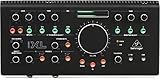
Behringer’s Studio XL Monitor Controller stands out as an excellent choice for home studio enthusiasts seeking a reliable and affordable solution. Weighing just 5.25 pounds and measuring 19.75 x 8.35 x 5.3 inches, it’s designed for easy integration into your workspace. With a solid all-metal chassis and smooth knobs, this controller offers quiet operation and sturdy performance. Users appreciate its multiple inputs and outputs, which enhance workflow efficiency. While some have reported USB connection issues, many rave about its sound quality and functionality, especially compared to pricier options like Mackie’s models. Overall, it’s a compelling addition to any studio setup.
Best For: Home studio enthusiasts seeking a reliable and affordable monitor controller.
Pros:
- High build quality with an all-metal chassis and smooth knobs for durability and ease of use.
- Multiple inputs and outputs enhance workflow efficiency, making it suitable for various studio setups.
- Competitive pricing compared to similar products, offering great value for sound quality and functionality.
Cons:
- Some users have reported USB connection stability issues, including clicking noises and audio dropouts.
- Longevity of the product is uncertain, with concerns about long-term durability based on early performance.
- Limited support for non-Windows audio software, which may restrict usability for some users.
PreSonus MicroStation BT 2.1 Monitor Controller with Bluetooth Connectivity

Whether you’re a professional producer or a casual listener, the PreSonus MicroStation BT 2.1 Monitor Controller stands out for its Bluetooth connectivity, making it easy to wirelessly connect to any speaker. Its stereo Bluetooth input, along with balanced ¼” and ⅛” TRS inputs, lets you hook up various audio gear effortlessly. You can quickly switch between Bluetooth and analog sources using the dedicated button. The compact design and user-friendly interface guarantee smooth operation at home or in the studio. With high-quality audio output, it meets the needs of musicians and casual listeners alike, providing versatility and superior sound control.
Best For: The PreSonus MicroStation BT 2.1 Monitor Controller is best for musicians, producers, and casual listeners seeking quality sound and wireless convenience.
Pros:
- Compact design suitable for both studio and home use.
- Easy switching between Bluetooth and analog sources enhances usability.
- High-quality audio output ensures accurate sound reproduction.
Cons:
- Limited to stereo output options, which may not meet all user needs.
- Bluetooth connectivity may introduce slight latency for some applications.
- Lacks built-in features like EQ or additional audio processing capabilities.
Passive Monitor Volume Controller for Studio Home Audio System

The Passive Monitor Volume Controller is an ideal choice for audio enthusiasts who demand high-quality sound without the hassle of complicated setups. This compact, 1-pound unit features XLR inputs and outputs for balanced audio, ensuring minimal distortion even over long distances. With its 70mm extended stroke fader, you can achieve precise volume adjustments effortlessly. Plus, it’s plug-and-play, so you won’t need any extra power supply. While some users note the sliders could be sturdier, its durable metal construction and gold-plated connectors offer impressive reliability. This controller excels with various devices, making it a versatile addition to your home audio system.
Best For: Audio enthusiasts seeking a high-quality, easy-to-use volume control solution for their studio or home audio systems.
Pros:
- Sturdy and lightweight build for portability.
- Smooth and functional sliders for precise volume adjustments.
- Supports stereo input/output with no external power required.
Cons:
- Bottom input lock may interfere with some XLR cables.
- Limited flexibility due to specific input requirements.
- Some users find sliders less robust compared to overall build quality.
Mackie Big Knob Studio Monitor Controller (BIG KNOB STUDIO PLUS)

For those seeking a versatile solution in their studio setup, the Mackie Big Knob Studio Monitor Controller (BIG KNOB STUDIO PLUS) stands out with its robust 4×3 configuration and high-resolution 192kHz USB audio interface. You’ll appreciate the flexible 2×4 USB recording capabilities, along with two boutique-quality Onyx mic preamps and phantom power for your condenser mics. This unit allows you to select from four sources and three monitor pairs effortlessly. With independent trim controls and a front panel 1/8” input for your smartphone, it’s compatible with all major DAWs on both Mac and Windows, enhancing your workflow.
Best For: Audio engineers and musicians looking for a reliable monitor controller with comprehensive connectivity and recording capabilities.
Pros:
- High-resolution 192kHz audio interface ensures professional-quality recording and playback.
- Flexible source and monitor selection allows seamless switching between multiple input sources and monitor pairs.
- Boutique-quality Onyx mic preamps with phantom power cater to a wide range of microphone needs.
Cons:
- Limited to 4 sources and 3 monitor pairs, which may not be sufficient for larger setups.
- Front panel 1/8” input may not accommodate all smartphone models without an adapter.
- Learning curve for users unfamiliar with studio monitor controllers may require some time to master.
PMC-2 Premium Passive 2 x 2 Studio Monitor Volume Controller

Designed specifically for home studio enthusiasts, the PMC-2 Premium Passive 2 x 2 Studio Monitor Volume Controller offers precise volume management without the need for a power supply. It connects easily between your audio sources and speakers, featuring balanced combo XLR/Phone Jack, RCA, and Mini Jack inputs. The large rotary knob guarantees smooth volume adjustments, while the durable metal chassis enhances longevity. Users appreciate its transparent operation and minimal noise, making it an excellent choice for controlling headphone volume remotely. If you’re after simple, effective volume control without unnecessary features, the PMC-2 is perfect for your studio setup.
Best For: Home studio enthusiasts seeking simple and effective volume control without unnecessary features.
Pros:
- Transparent operation with minimal noise and distortion.
- Durable metal chassis ensures longevity and reliability.
- Large rotary knob allows for precise and smooth volume adjustments.
Cons:
- Limited input/output options may require compatible audio cables.
- Some users report static noise when adjusting volume after extended use.
- Lack of clear position markers on the volume knob for visibility.
Behringer MONITOR2USB High-End Speaker and Headphone Monitoring Controller

If you’re a music producer or sound engineer looking for precise audio control, the Behringer MONITOR2USB High-End Speaker and Headphone Monitoring Controller is an excellent choice. This device features VCA control for accurate sound manipulation and doubles as a USB audio interface, making it versatile for various setups. With package dimensions of 13.07 x 9.57 x 5.47 inches and a weight of 4.47 pounds, it’s compact enough for any studio space. The MONITOR2USB guarantees you can seamlessly switch between speaker and headphone monitoring, giving you superior sound control tailored to your workflow. Elevate your audio experience with this reliable controller.
Best For: Music producers and sound engineers seeking precise audio control in their studio setups.
Pros:
- VCA control allows for accurate sound manipulation.
- Functions as a USB audio interface, enhancing versatility.
- Compact dimensions make it suitable for any studio space.
Cons:
- May be considered expensive for beginners or casual users.
- Limited features compared to more advanced monitoring controllers.
- The weight might be cumbersome for portable setups.
PreSonus Eris 3.5 Studio Monitors (Powered, Active Monitor Speakers)

The PreSonus Eris 3.5 Studio Monitors stand out as an excellent choice for anyone seeking studio-quality sound in a compact design. These powered speakers deliver accurate audio, thanks to their woven-composite woofers and 1-inch silk-dome tweeters, providing tight bass and superior stereo imaging. With 50 Watts of Class AB amplification, you’ll enjoy clear sound without distortion. They offer versatile connectivity options, including ¼-inch TRS balanced inputs and a convenient front-panel aux input. Plus, you can customize your audio with high- and low-frequency tuning controls. Perfect for home studios or casual listening, these monitors won’t disappoint.
Best For: The PreSonus Eris 3.5 Studio Monitors are best for home studio enthusiasts and casual listeners seeking high-quality audio in a compact form.
Pros:
- Studio-quality sound with accurate audio reproduction, ideal for music production and multimedia reference.
- Versatile connectivity options including balanced TRS inputs, RCA inputs, and a front-panel aux input for easy device connection.
- Customization features such as high- and low-frequency tuning controls to adapt audio output to your environment.
Cons:
- Wired connections are preferred for music production due to potential latency issues with Bluetooth versions.
- Limited bass response may not satisfy those looking for a more bass-heavy listening experience.
- Compact size may limit soundstage and depth compared to larger studio monitors.
Factors to Consider When Choosing a Studio Monitor Controller
When choosing a studio monitor controller, you’ll want to focus on several key factors. Consider the audio quality, connectivity options, and control features that fit your setup. Additionally, think about the size, portability, and build quality to guarantee it meets your needs.
Audio Quality Importance
Choosing a studio monitor controller hinges on audio quality, as it greatly impacts how accurately you can mix and master your music. A controller with a higher-quality audio path, like a passive design, preserves audio integrity by minimizing distortion and unwanted noise. Features such as independent trim controls and mute functions let you make precise adjustments, preventing signal clipping that can compromise your sound. Opt for controllers that use high-quality components, including dynamic drivers and balanced connections, to guarantee a clean audio signal free from interference. Additionally, a controller that manages multiple sources and outputs effectively helps maintain a consistent audio experience across different monitoring setups, guaranteeing you always hear your music as it was intended.
Connectivity Options Available
A variety of connectivity options can make or break your studio monitor controller experience. When choosing, consider the input types available—balanced XLR, TRS, RCA, and digital inputs like S/PDIF. This guarantees compatibility with your existing audio gear. Look for controllers that offer multiple output pairs, so you can connect various speaker systems for versatile monitoring setups. Features like Bluetooth connectivity enhance flexibility, allowing for wireless audio streaming. It’s also essential to have control options like Mono, Mute, and Dim to manage audio levels effectively. Finally, check for headphone outputs with independent source selection, providing convenience for personal monitoring without disturbing others. These connectivity features can greatly impact your workflow and overall sound control.
Size and Portability
Finding the right balance between size and portability is essential for any studio monitor controller. You’ll notice that dimensions and weight can vary greatly among models. For instance, the Mackie Big Knob Passive is compact at 7.8D x 8.3W x 4.9H inches and weighs just 2.2 pounds, making it easy to transport or fit on your desk. If you’re looking for even more portability, consider the PMC-2, which is only 3.6 x 7.6 x 2.2 inches and weighs 1.83 pounds. However, larger models like the Behringer XENYX CONTROL2USB offer added stability at the cost of mobility. Keep in mind that while compact controllers enhance convenience, they might sacrifice some features that larger units provide.
Control Features Offered
When selecting a studio monitor controller, it’s crucial to evaluate the control features it offers to enhance your mixing experience. Look for controllers with multiple input sources, including stereo pairs and digital inputs, for compatibility with various audio devices. Features like large main level controls, mute, mono, and dim switches improve usability and provide flexibility during mixing sessions. Independent level controls for each output let you tailor the volume for specific studio monitors or headphones. A cue section with source selection and input/output level control is invaluable for monitoring different audio sources without disrupting the main mix. Finally, advanced models with talkback functionality streamline communication with musicians, boosting your workflow efficiency.
Build Quality Durability
While evaluating studio monitor controllers, it’s essential to contemplate build quality and durability, as these factors greatly influence your equipment’s longevity and performance. Look for controllers with sturdy metal chassis instead of plastic, as they tend to last longer and withstand daily use in professional settings. The weight of the unit can also be a good indicator; heavier controllers often feature more robust components, enhancing their stability during operation. Pay attention to the quality of knobs and buttons—high-quality options should operate smoothly without showing signs of wear. A solid construction can also minimize noise interference, preserving audio integrity throughout your sessions. Prioritizing these elements guarantees you invest in a controller that meets your needs over time.
Price and Value
Considering the price and value of studio monitor controllers is essential for making an informed choice. You’ll find a wide range of prices, with budget options starting around $50 and premium models exceeding $200. It’s important to weigh the features offered—like the number of input sources, outputs, talkback microphones, and Bluetooth connectivity—against the cost. Higher-rated models, typically around 4.4 to 4.6 stars, often indicate better performance and user satisfaction. Features like VCA control and USB audio interfaces can elevate the price but enhance your workflow. Balancing upfront costs with long-term durability is significant; investing in a quality controller may save you money on replacements while delivering superior performance over time.