The best studio monitors make it easier to hear balance, detail, and problems in your recordings without relying on colored playback. This roundup covers compact desktop pairs, dependable near-field speakers, and larger options for more demanding rooms.
We compared the selected models by size, connectivity, tonal controls, placement flexibility, and intended use so you can choose a practical match for your workspace and budget.
Best 10 Studio Monitors Picks for 2026
Wide-Sweet-Spot Pick

- Wide-sweet-spot Image Control Waveguide
- Dual 41-watt Class-D amplification
- Boundary EQ and HF Trim controls
Best For: Music production, podcasting, and cinematic sound design
Accuracy-Focused Pick

- Uncolored, purity-focused sound
- 70 watts of bi-amplified power
- Balanced XLR and TRS inputs
Best For: Music production and critical near-field studio monitoring
Flexible-Connection Pick
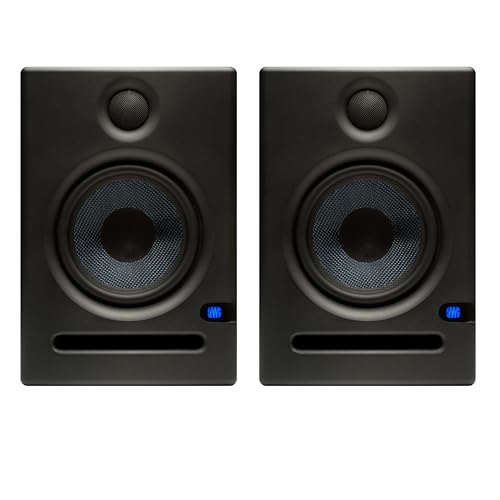
- 80-watt Class AB bi-amplification
- XLR, TRS, and RCA inputs
- Acoustic tuning controls and isolation feet
Best For: Home studios needing flexible connections and room adjustment
Connected Compact Pick

- Bluetooth multipoint plus balanced TRS
- Monitor, Music, and Custom modes
- App-based EQ adjustment
Best For: Compact home studios and versatile near-field listening
Compact Desktop Pick
M-Audio BX3 3.5-inch Studio Monitors

- 3.5-inch Kevlar woofers and silk-dome tweeters
- RCA, 1/4-inch, and 1/8-inch wired inputs
- Front headphone output and rear EQ controls
Best For: Desktop production, podcasting, streaming, and gaming
Wide Sweet-Spot Choice
PreSonus Eris E7 XT Studio Monitor

- 6.55-inch woven-composite woofer
- Wide 100° horizontal EBM waveguide
- Multiple acoustic tuning controls and pro inputs
Best For: Music production and mixing in an indoor studio
Simple Small-Studio Option

- Compact pair with 3.5-inch woofers
- Tone knob for quick voicing changes
- Location switch and included isolation pads
Best For: Small home studios, desktop audio, and casual listening
Balanced Desktop Reference

- 50W Class AB amplification
- Room-tuning controls
- TRS, RCA, aux, and headphone connections
Best For: Flexible home production and multimedia listening
Compact Yamaha Accuracy

- 4.5-inch woofer and 1-inch tweeter
- Room Control and High Trim adjustments
- XLR/TRS, RCA, and stereo-mini inputs
Best For: Compact music-production and video-editing workstations
Small-Space Versatility

- 50W stereo amplification
- Compact 3.5-inch woofer design
- TRS, RCA, aux, and headphone inputs
Best For: Desktop multimedia, gaming, and casual music production
Wide-Sweet-Spot Pick – JBL 305P MkII Pair
For producers and podcasters who want a matched pair of studio monitors, the JBL 305P MkII combines a 5-inch woofer with JBL’s Image Control Waveguide. Its room-adjustment controls and balanced inputs make it a practical choice for desktop monitoring and mixing.
Best For: Music production, podcasting, and cinematic sound design in small or medium rooms.
Pros:
- Image Control Waveguide provides precise imaging and a wide sweet spot.
- Dual 41-watt Class-D amplifiers support dynamic playback and deep bass.
- Boundary EQ and HF Trim help tailor response to the room.
- Includes XLR and 1/4-inch TRS connectivity.
Cons:
- These are wired monitors with no wireless connectivity listed.
- The 5-inch woofer may provide less low-end output than larger monitors.
- The supplied details list the package unit count inconsistently, so verify the included pair when ordering.
The JBL pair stands out among studio monitors for its broad listening area and useful acoustic controls. It is a strong fit when accurate stereo imaging and flexible room placement matter most.
Accuracy-Focused Pick – Yamaha HS5 Pair
The Yamaha HS5 pair is designed for listeners who want studio monitors that emphasize the original recording without added coloration. Bi-amplification, balanced inputs, and rear-panel room controls make these 5-inch monitors suited to focused near-field work.
Best For: Music production and studio monitoring where a clean, uncolored presentation is the priority.
Pros:
- Designed to emphasize sonic purity without altering the source.
- 5-inch woofer and 1-inch dome tweeter cover a 54 Hz to 30 kHz response.
- 70 watts of bi-amplified power provide useful near-field headroom.
- XLR and TRS inputs accept balanced or unbalanced signals.
Cons:
- The 5-inch design may not satisfy users seeking especially powerful sub-bass.
- No wireless audio capability is presented as a core feature in the supplied specifications.
- The monitors are intended for near-field use rather than filling a large room.
Among studio monitors, the HS5 pair is a straightforward choice for critical listening and mix decisions. Choose it when tonal neutrality is more important than extra connectivity or consumer-oriented features.
Flexible-Connection Pick – PreSonus Eris E5 Pair
The PreSonus Eris E5 pair offers a versatile connection panel and acoustic tuning controls for home or professional studio setups. Its 5.25-inch woven composite woofer, silk-dome tweeter, and 80-watt Class AB bi-amplification provide a practical monitoring upgrade with useful headroom.
Best For: Home studios and professional monitoring setups that need flexible inputs and room adjustment.
Pros:
- Woven composite woofer delivers solid low-end sound with minimal bass distortion.
- Silk-dome tweeter is designed to provide balanced highs without harshness.
- Balanced XLR and TRS plus unbalanced RCA inputs support varied sources.
- Acoustic tuning controls help contour the monitors to the listening environment.
Cons:
- There is no wireless communication technology listed.
- The 2-year manufacturer warranty is shorter than some competing options’ listed coverage.
- Its near-field design is better suited to close listening than large-room playback.
These studio monitors are a well-rounded option when connection flexibility and adjustable voicing are central requirements. The included isolation feet are also useful for improving desktop placement and reducing unwanted vibration.
Connected Compact Pick – Edifier MR3
The Edifier MR3 brings studio-monitor features to a compact, connected desktop setup. With Bluetooth, balanced TRS, RCA, and AUX inputs, plus selectable Monitor, Music, and Custom modes, it can cover audio production, video editing, and everyday listening.
Best For: Home studios and near-field users who want monitoring functions alongside convenient wireless and everyday playback.
Pros:
- Hi-Res Audio certification and a stated 52 Hz to 40 kHz flat response.
- Bluetooth supports multipoint connection, while TRS, RCA, and AUX expand source options.
- Monitor, Music, and Custom modes provide adaptable voicing.
- The EDIFIER ConneX app enables detailed EQ adjustment.
Cons:
- Its 18W-per-channel RMS output and 92.5 dB peak SPL are lower than the output figures listed for several larger monitors here.
- The 3.5-inch mid-low drivers offer less driver area than 5-inch and 5.25-inch alternatives.
- The supplied dimensions and unit-count specifications are inconsistent, so confirm the package details before purchase.
The MR3 is a practical choice among studio monitors when connectivity and versatility matter as much as mix-focused listening. It is especially appealing for compact desks shared between production, editing, instruments, and casual music use.
Compact Desktop Pick – M-Audio BX3 3.5-inch Studio Monitors
The M-Audio BX3 is a practical choice when you want compact studio monitors for a desk, gaming setup, podcasting station, or small music-production space. Its 3.5-inch Kevlar woofers, silk-dome tweeters, wired inputs, and adjustable EQ provide flexible nearfield monitoring without relying on wireless audio.
Best For: Desktop music production, podcasting, streaming, gaming, and general multimedia listening.
Pros:
- Compact stereo pair with 3.5-inch Kevlar woofers and silk-dome tweeters.
- Wired RCA, 1/4-inch, and 1/8-inch inputs support a variety of equipment.
- Front headphone access and rear high/low EQ controls add everyday convenience.
- Includes cables, foam feet, and MPC Beats software.
Cons:
- Its small 3.5-inch woofers are better suited to desktop use than large-room monitoring.
- The system is wired and not water resistant.
The BX3 stands out for flexible connectivity and useful desktop-focused controls. Choose it if you need an approachable pair of studio monitors that can handle both creative work and casual listening in a compact space.
Wide Sweet-Spot Choice – PreSonus Eris E7 XT Studio Monitor
PreSonus Eris E7 XT 2-Way Active Studio Monitor with EBM Waveguide (Pack of 1)
Check Price On AmazonThe PreSonus Eris E7 XT is a larger studio monitor designed for listeners who need deeper low-end extension and a broader listening area. Its 6.55-inch woven-composite woofer, 1.25-inch silk-dome tweeter, and EBM waveguide make it a strong fit for music-focused monitoring in an indoor studio.
Best For: Music production and mixing where a wider sweet spot and larger cabinet are useful.
Pros:
- 6.55-inch woofer delivers deeper lows than compact desktop monitors.
- EBM waveguide provides a wide horizontal sweet spot and solid imaging.
- Acoustic controls allow level, high-pass, low-frequency, high-frequency, and placement adjustments.
- Offers RCA, TRS, and XLR connectivity and includes music-production software.
Cons:
- Sold as a single monitor, so a stereo setup requires two units.
- Its larger floor-standing design is less convenient for very small desks.
- It is intended for indoor use and is not water resistant.
The Eris E7 XT is the most substantial option here for serious monitoring, particularly when placement and room tailoring matter. Keep the single-monitor packaging in mind when budgeting for a stereo pair.
Simple Small-Studio Option – Mackie CR3.5 Studio Monitors
The Mackie CR3.5 is a compact pair of studio monitors for desks, home studios, and multimedia setups. A front-panel Tone knob and Location switch make it easy to adjust the voicing and compensate for placement, while the included cables and isolation pads simplify setup.
Best For: Small home studios, desktop audio production, streaming, and casual listening.
Pros:
- Sold as a complete pair with compact 3.5-inch woofers.
- Tone knob enables quick voicing adjustments from the desk.
- Location switch helps correct bass response near a wall or in open placement.
- Includes isolation pads and the necessary connection cables.
Cons:
- 3.5-inch woofers are aimed at small-room and desktop use rather than large spaces.
- Connectivity is limited to RCA and TRS inputs.
- It is a corded, non-water-resistant system.
The CR3.5 is a straightforward choice for buyers who want compact studio monitors with hands-on tone and placement controls. It is especially convenient when you want a ready-to-use pair for a small workspace.
Balanced Desktop Reference – PreSonus Eris E4.5
The PreSonus Eris E4.5 is a versatile pair of studio monitors for music production, hi-fi listening, gaming, and general multimedia use. Its 4.5-inch woven-composite woofers, silk-dome tweeters, room-tuning controls, and multiple wired inputs make it a flexible choice for a desk, bookshelf, or compact listening setup.
Best For: Home producers and listeners who want room-adjustable studio monitors with strong connectivity and a headphone output.
Pros:
- 50 watts of Class AB amplification provides substantial output for compact monitors.
- High- and low-frequency controls help tailor the sound to the room and speaker placement.
- Balanced TRS, RCA, front-panel auxiliary, and headphone connections support varied setups.
- The 4.5-inch woofers and 1-inch tweeters provide tight bass and broad stereo imaging.
Cons:
- Bluetooth is not listed as a built-in connection for the monitors themselves.
- The pair uses one active speaker and one passive speaker, so placement requires speaker wiring.
The Eris E4.5 stands out as an adaptable all-purpose option among compact studio monitors. Choose it when tuning flexibility, front-panel convenience, and a wide range of inputs matter as much as accurate sound.
Compact Yamaha Accuracy – Yamaha HS4
The Yamaha HS4 is a compact pair of powered studio monitors designed for music production and video editing. With 4.5-inch woofers, 1-inch dome tweeters, room-control and high-trim adjustments, and XLR/TRS, RCA, and stereo-mini inputs, it fits neatly into a desktop workstation.
Best For: Creators who want compact Yamaha studio monitors for DAW workstations, music production, or video editing.
Pros:
- Two-way design combines a 4.5-inch cone woofer with a 1-inch dome tweeter.
- Room Control and High Trim controls allow basic tonal adjustment for the listening space.
- Inputs include XLR/TRS combo, RCA, and stereo mini connections.
- The package includes speaker cable, stereo mini-to-RCA cable, and anti-slip pads.
Cons:
- The listed 60 Hz–22 kHz response does not emphasize very deep bass extension.
- They are corded powered speakers and do not offer a wireless audio connection in the supplied specifications.
The HS4 is a sensible space-conscious pick for a desktop production system. Its input variety and adjustment controls make integration straightforward, while the compact two-way design keeps the setup manageable.
Small-Space Versatility – PreSonus Eris 3.5
The PreSonus Eris 3.5 is a compact stereo pair of studio monitors for desktops, bookshelves, gaming, streaming, movies, and entry-level music production. Its 3.5-inch woven-composite woofers, 1-inch silk-dome tweeters, acoustic tuning controls, and convenient front-panel connections make it easy to use in everyday setups.
Best For: Desktop users who need small studio monitors for multimedia, gaming, casual production, and private headphone listening.
Pros:
- 50 watts of built-in amplification delivers room-filling sound from a compact pair.
- High- and low-frequency controls help balance the sound in different spaces.
- Balanced TRS, RCA, front auxiliary, and headphone connections suit computers, consoles, phones, and turntables.
- The 3.5-inch woofers and 1-inch tweeters provide tighter bass and clear highs.
Cons:
- The smaller 3.5-inch woofers are less suited to listeners seeking substantial low-end extension.
- The supplied specifications do not identify a dedicated subwoofer output.
The Eris 3.5 is a practical choice when desk space and connection convenience are priorities. It offers useful tuning and a broad range of applications without requiring a larger monitor footprint.
How We Picked These Studio Monitors
We focused on active near-field speakers that suit home studios, desktop production, editing, and casual listening. The selection includes compact 3.5- and 4.5-inch models, versatile 5-inch monitors, and larger options for users who need greater output and low-frequency extension.
Our comparisons consider driver size, cabinet design, available inputs, rear-panel controls, stereo-pair value, and whether a model is best suited to close desktop placement or a more traditional monitor arrangement. Bluetooth and tone controls can add convenience, but they are not substitutes for accurate positioning and room treatment.
Quick Comparison
| Best For | Recommended Type | What to Prioritize |
|---|---|---|
| Small desks and beginners | 3.5- or 4.5-inch pair | Compact design, front access, simple connectivity |
| General home-studio mixing | 5-inch near-field monitors | Balanced response, room controls, reliable inputs |
| More bass and headroom | 6.5- to 7-inch monitor | Low-end extension, output, placement space |
| Flexible media and casual use | Powered monitor with Bluetooth | Convenient switching and multiple sources |
Key Buying Factors for Studio Monitors
Driver Size and Room Size
Five-inch monitors are a useful middle ground for many bedrooms and small project studios. Smaller drivers are easier to place on a crowded desk and can reduce excessive bass in compact rooms. Larger monitors may deliver more low end and volume, but they need more distance from walls and a room that can handle their output.
Inputs and Controls
Check whether the monitor offers balanced TRS or XLR inputs, unbalanced RCA or auxiliary inputs, and any convenient front-panel connection. Balanced connections are preferable for longer cable runs and interfaces. High- and low-frequency trim controls can help compensate for placement near walls or on a desktop.
Placement and Acoustic Reality
Place the speakers at ear height, form an approximately equal-sided triangle with your listening position, and aim the tweeters toward your ears. Isolation pads or stands can reduce desk vibration. Even excellent Studio Monitors will sound inaccurate if pushed against a wall or used in a highly reflective room.
Power, Bass, and Listening Distance
Choose enough output for comfortable listening without routinely approaching distortion. Near-field monitors are designed for relatively close listening, so maximum volume is less important than clean response at your normal working distance.
Who Should Buy Which Studio Monitors?
For First-Time Producers
Start with a compact 3.5- or 4.5-inch pair if desk space and budget are limited. These models provide a meaningful upgrade over ordinary computer speakers while remaining easier to position.
For Mixing and Recording
A capable 5-inch pair is the safest all-around choice for many home studios. Look for balanced inputs, useful acoustic controls, and a neutral presentation that helps reveal EQ, panning, and balance problems.
For Larger Rooms or Bass-Heavy Work
Choose the larger monitor option only when you have sufficient listening distance, room control, and space for proper placement. More bass is not automatically more accuracy.
For Hybrid Workspaces
If you also stream music, edit video, or switch between multiple sources, a model with Bluetooth or flexible consumer inputs may offer more convenience. Keep your primary production connections wired whenever possible.