The best compact studio monitors give you clearer, more dependable sound without taking over your desk. These powered speakers are sized for near-field listening, making them practical for bedrooms, project studios, editing setups, and everyday media work.
We compared 10 compact options across driver size, connectivity, controls, portability, and value so you can choose a monitor pair that fits your workspace and workflow.
Best 10 Compact Studio Monitors Picks for 2026
Most Travel-Friendly

- 50W RMS Class D stereo system
- DSP position and EQ controls
- Bluetooth, RCA, and aux inputs
Best For: Mobile producers and compact home studios
Best All-Around Desktop Pair

- 4.5-inch woofer and 1-inch tweeter
- 50W total Class AB amplification
- Balanced, RCA, aux, and headphone connections
Best For: Home production and multimedia listening
Best Connectivity
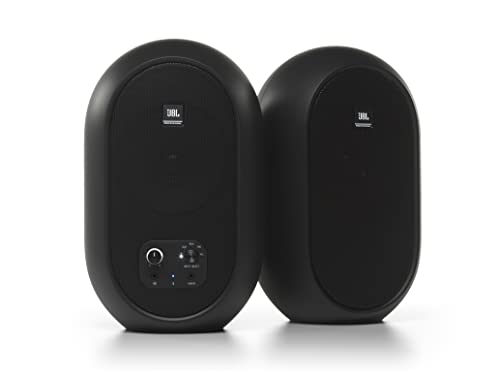
- 60W Class D power, 30W per speaker
- Bluetooth 5.0 plus TRS, RCA, and aux
- Coaxial driver for a broad sweet spot
Best For: Flexible desktop setups with multiple audio sources
Simple Powered Monitor

- 30W powered monitor design
- 4-inch woofer and 1-inch tweeter
- Two-band EQ for basic adjustment
Best For: Simple desktop and multimedia monitoring
Best Wired Value

- Low-latency wired desktop monitoring
- Flexible 1/4-inch, 1/8-inch, and RCA inputs
- Includes cables, foam feet, and MPC Beats
Best For: Compact wired production, podcasting, and gaming setups
Best Wireless Flexibility
Edifier MR3 Powered Studio Monitor

- Bluetooth multipoint plus balanced TRS
- Music, Monitor, and Custom sound modes
- App-based EQ and multiple wired inputs
Best For: Flexible home studios and mixed listening
Best Desk-Friendly Controls
Mackie CR3.5 3.5-inch Monitors

- Tone Knob enables quick voicing changes
- Location Switch helps with speaker placement
- Includes isolation pads and connection cables
Best For: Small desks and studios needing simple physical controls
Premium Desktop Precision

- 3.5-inch woofers with passive radiators reach down to 45 Hz.
- D-ART tweeters target precise, comfortable high frequencies.
- USB-C, balanced inputs, DSP controls, and flexible mounting.
Best For: Desktop music production and detailed nearfield listening
Connected Creative Workspace
Ortizan C7 Powered Studio Monitors

- Bluetooth 5.3, USB, RCA, AUX, and balanced TRS inputs.
- 24-bit DAC enables direct digital audio playback.
- Carbon-fiber woofer, silk-dome tweeter, and headphone output.
Best For: Small production desks with mixed wired and wireless sources
Versatile Everyday Monitoring

- 50 watts of amplification in a compact stereo pair.
- 3.5-inch woofers and 1-inch silk-dome tweeters.
- Room-tuning controls plus TRS, RCA, AUX, and headphone connections.
Best For: Home production, gaming, streaming, and everyday desktop audio
Most Travel-Friendly – iLoud Micro Monitor
The IK Multimedia iLoud Micro Monitor is a strong choice when compact studio monitors need to fit a small desk, mobile rig, or travel setup. This stereo pair combines 50W RMS of Class D amplification with DSP-based EQ and position compensation, while Bluetooth, RCA, and 1/8-inch inputs support both production and everyday listening.
Best For: Mobile producers, home studios, and cramped desktop setups that prioritize portability.
Pros:
- Very compact, lightweight design with a stated 55Hz (-3dB) low-frequency response.
- Internal DSP provides desktop, free-field, bass, and treble optimization.
- Supports Bluetooth, stereo RCA, and 1/8-inch auxiliary connections.
- 50W RMS of Class D power with a 3-inch woofer and silk-dome tweeter.
Cons:
- The 3-inch woofer may offer less low-end authority than larger compact monitors.
- The travel bag is optional rather than included.
Choose these if space and portability matter as much as monitoring flexibility. Their DSP controls and multiple inputs make them unusually adaptable for compact studio work, music playback, and on-the-road production.
Best All-Around Desktop Pair – PreSonus Eris E4.5
The PreSonus Eris E4.5 is a practical pick among compact studio monitors for desktop production, hi-fi listening, and multimedia use. Its 4.5-inch woven-composite woofer, 1-inch silk-dome tweeter, and 50W of Class AB amplification aim to deliver balanced, room-filling sound without taking up the space of larger monitors.
Best For: Home producers and listeners who want flexible connections and built-in desktop controls.
Pros:
- 50W total Class AB amplification, rated at 25W per side.
- Balanced 1/4-inch TRS, RCA, and front-panel 1/8-inch stereo inputs.
- High- and low-frequency tuning controls help accommodate room and placement differences.
- Front headphone output and integrated headphone amplifier simplify switching from speakers.
Cons:
- Bluetooth is not listed among the supplied connectivity features for the monitors themselves.
- The pair uses one active and one passive speaker, so placement requires speaker-to-speaker wiring.
The Eris E4.5 stands out for connection flexibility and convenient front-panel access. It is a well-rounded option for a fixed desktop or bookshelf setup, especially if headphone monitoring and room-tuning controls are important.
Best Connectivity – JBL 104-BT
The JBL Professional 104-BT makes a compelling case for compact studio monitors when desktop convenience and input flexibility are priorities. Sold as a pair, it combines a coaxial 4.5-inch woofer and 0.75-inch tweeter with Bluetooth 5.0, balanced TRS, RCA, and aux inputs, plus a front headphone jack.
Best For: Desktop producers who switch frequently between professional sources, consumer devices, and Bluetooth playback.
Pros:
- Coaxial driver design combines the woofer and tweeter for a wide listening sweet spot.
- Integrated 60W Class D amplifier distributes 30W to each speaker.
- Offers Bluetooth 5.0, 1/8-inch aux, RCA, and balanced 1/4-inch TRS inputs.
- Front controls include input selection, volume, and headphone output with speaker muting.
Cons:
- Specified frequency range is 88Hz–20kHz at -3dB, so deep bass extension is limited compared with a subwoofer-equipped system.
- The master monitor contains the electronics, which can create an uneven setup if the speakers are positioned far apart.
For a busy desktop, the 104-BT is especially convenient because its front-panel controls and multiple input paths reduce cable swapping. Its coaxial layout also suits listeners who move around rather than staying in one narrow listening position.
Simple Powered Monitor – Yamaha MS101-4
The Yamaha MS101-4 is a straightforward powered monitor for users who want compact studio monitors with a simple, self-contained format. It pairs a 4-inch woofer and 1-inch tweeter with 30W of power and a two-band EQ, making it suited to basic desktop, multimedia, and multipurpose monitoring needs.
Best For: Small desktop or multimedia setups that need a simple powered speaker with basic tonal adjustment.
Pros:
- Compact powered design with a 4-inch woofer and 1-inch tweeter.
- Built-in two-band EQ provides basic sound adjustment.
- 30W powered monitor format avoids the need for a separate amplifier.
- Compatible with laptops, desktops, smartphones, and tablets according to the supplied details.
Cons:
- The supplied notes identify one MS101-4 monitor rather than a stereo pair.
- Connectivity is listed as wired, so it offers less input detail and flexibility than the other options here.
The MS101-4 is best viewed as a compact, uncomplicated powered monitor rather than a feature-heavy stereo system. It makes sense when a single-speaker format, modest power, and basic EQ are more important than extensive connection options.
Best Wired Value – M-AUDIO BX3 3.5-inch Monitors
The M-AUDIO BX3 is a practical choice for compact studio monitors when you want a wired desktop setup with flexible connections. Its 3.5-inch Kevlar woofers, silk-dome tweeters, MDF cabinets, and rear EQ controls suit music production, podcasting, gaming, and general desktop listening.
Best For: Buyers who want compact, low-latency wired monitors with broad input compatibility.
Pros:
- Includes 1/4-inch, 1/8-inch, and RCA inputs for flexible hookups.
- 3.5-inch Kevlar woofers and silk-dome tweeters provide full-range stereo sound.
- Front headphone and auxiliary access supports convenient late-night monitoring.
- Includes foam feet, connection cables, and MPC Beats software.
Cons:
- Wired connectivity does not provide Bluetooth convenience.
- Rear EQ controls require reaching behind the speakers.
- Not waterproof.
Choose the BX3 if straightforward wired performance and connection flexibility matter more than wireless playback. It is especially well suited to a desktop or small production workspace.
Best Wireless Flexibility – Edifier MR3 Powered Studio Monitor
The Edifier MR3 stands out among compact studio monitors for combining balanced TRS connectivity with Bluetooth and app-based adjustment. Its 3.5-inch mid-low drivers, 1-inch tweeters, and selectable Music, Monitor, and Custom modes make it adaptable for home studios, video editing, guitar playing, and everyday listening.
Best For: Users who want compact monitoring with Bluetooth, multiple inputs, and customizable EQ.
Pros:
- Supports balanced TRS, RCA, AUX, and Bluetooth connections.
- Bluetooth multipoint allows connection with more than one compatible device.
- Hi-Res Audio certification and a stated 52Hz–40kHz response support detailed listening.
- EDIFIER ConneX app provides sound-mode selection and EQ adjustments.
Cons:
- Its feature-rich setup may be more than needed for a strictly wired studio.
- App control is required for in-depth sound customization.
- Listed dimensions and weight may make it less desk-friendly than smaller alternatives.
The MR3 is a strong fit when your compact monitor setup also needs convenient wireless listening. Its connectivity and software controls offer more flexibility than a basic wired pair.
Best Desk-Friendly Controls – Mackie CR3.5 3.5-inch Monitors
The Mackie CR3.5 is a straightforward pair of compact studio monitors for desks and small studios. Its 3.5-inch woofers, front-accessible Tone Knob, and Location Switch make it easy to adjust voicing and compensate for placement without navigating menus.
Best For: Desktop users who want simple physical controls and an included starter setup.
Pros:
- Sold as a pair and sized for desks and small studios.
- Tone Knob provides quick voicing adjustments from the desk.
- Location Switch helps correct bass response near a wall or in open placement.
- Includes isolation pads and the necessary connection cables.
Cons:
- Connectivity is limited to RCA and TRS rather than Bluetooth.
- Only a one-year all-inclusive warranty is listed.
- Not waterproof.
The CR3.5 is a sensible pick for buyers who value easy, hands-on adjustment over app features. The included pads and cables also make it convenient to get a small desktop system running quickly.
Premium Desktop Precision – ADAM Audio D3V
The ADAM Audio D3V is a strong choice when you want compact studio monitors with a more specialized monitoring design for a desk. Its 3.5-inch woofers, passive radiators, D-ART tweeters, USB-C connectivity, and placement controls make it especially adaptable for desktop production and focused listening.
Best For: Songwriters, producers, and listeners who want compact, detailed desktop monitoring with USB-C convenience.
Pros:
- 3.5-inch aluminum woofers and passive radiators extend response as low as 45 Hz.
- 1.5-inch D-ART tweeters are designed for precise, comfortable high-frequency reproduction.
- USB-C, balanced 1/4-inch inputs, headphone output, and placement-focused DSP controls.
- Included angled stands and 3/8-inch microphone-stand mounting options suit compact setups.
Cons:
- Limited to a stereo desktop system rather than a larger-room monitoring setup.
- Requires corded power and may offer more features than casual listeners need.
The D3V stands out among compact studio monitors for its combination of ribbon-tweeter detail, low-end extension, flexible mounting, and direct computer connectivity. It is particularly compelling when accurate nearfield listening is the priority.
Connected Creative Workspace – Ortizan C7 Powered Studio Monitors
The Ortizan C7 combines the flexibility of compact studio monitors with convenient home-audio connectivity. Bluetooth 5.3, USB audio through a built-in 24-bit DAC, RCA, AUX, and balanced TRS inputs let one pair serve a small production desk, entertainment system, or everyday listening setup.
Best For: Small-space creators who need both studio-oriented connections and wireless playback.
Pros:
- Multiple inputs include USB, Bluetooth 5.3, RCA, AUX, and 6.35mm TRS balanced connectivity.
- 3.5-inch carbon-fiber drivers and 0.75-inch silk-dome tweeters provide two-way playback.
- Built-in 24-bit DAC supports direct digital audio with reduced conversion steps.
- Front headphone output supports convenient private monitoring.
Cons:
- The feature-rich design may be more than needed for a simple wired monitoring setup.
- Its 3.5-inch drivers are intended for compact spaces rather than high-output room filling.
For buyers comparing compact studio monitors that can also handle TV, gaming, and wireless music, the C7 is unusually versatile. Its balanced input and stated professional tuning keep it relevant for small creative systems, while Bluetooth makes casual use easy.
Versatile Everyday Monitoring – PreSonus Eris 3.5
The PreSonus Eris 3.5 is a practical entry point for compact studio monitors that need to cover more than music production. Its 50-watt amplification, 3.5-inch woven-composite woofers, acoustic tuning controls, and broad input selection make it suitable for a desk, bookshelf, gaming station, or small creative workspace.
Best For: Home producers, gamers, streamers, and listeners seeking an adaptable stereo pair.
Pros:
- 50 watts of built-in amplification delivers clear, dynamic sound for desktop use.
- Woven-composite woofers and silk-dome tweeters target balanced bass and highs.
- High- and low-frequency controls help adapt the sound to different rooms.
- Balanced TRS, RCA, front AUX, and headphone connections cover common sources.
Cons:
- The stated 80 Hz–20 kHz range offers less low-end extension than some larger monitors.
- It does not provide the same specialized tweeter design or USB input as some alternatives.
The Eris 3.5 is a well-rounded option when compact studio monitors must also support gaming, movies, streaming, and general computer audio. Its tuning controls and accessible connections make it easy to integrate without additional gear.
How We Picked the Best Compact Studio Monitors
We focused on powered near-field speakers that suit small desks and project studios, then compared their driver sizes, amplification, connection options, placement flexibility, and stated studio or reference-monitor features. Bluetooth was considered useful for casual playback, but it was not treated as a substitute for a wired production connection.
We also looked for practical controls such as volume, tone adjustment, acoustic tuning, headphone output, and front- or rear-panel inputs. Because room size and listening distance strongly affect results, the list includes both ultra-compact desktop models and larger 4- to 4.5-inch designs.
Quick Comparison
- Smallest desktop footprint: M-Audio BX3, Mackie CR3.5, and PreSonus Eris 3.5.
- Portable and flexible: IK Multimedia iLoud Micro Monitor.
- Bluetooth-friendly options: JBL 104-BT, Edifier MR3, Ortizan C7, and IK Multimedia iLoud Micro Monitor.
- More low-end authority: PreSonus Eris E4.5 and JBL 104-BT, thanks to their larger driver designs.
- Premium desktop monitoring: ADAM Audio D3V.
- Simple single-speaker setup: Yamaha MS101-4.
Key Buying Factors for Compact Studio Monitors
Driver Size and Bass Expectations
Small 3- to 3.5-inch monitors save space but generally provide less deep bass than 4- or 4.5-inch models. If you produce bass-heavy music, plan to verify the low end on headphones or a second system, or choose the largest pair your desk can accommodate.
Inputs and Connectivity
For recording and mixing, prioritize dependable wired inputs that match your interface, mixer, or computer. Bluetooth is convenient for reference listening and streaming, while headphone outputs and front-panel controls can make desktop use easier.
Placement and Listening Distance
Near-field monitors work best when positioned close to your ears and angled toward your listening position. Keep the tweeters roughly at ear height, form a stable triangle with your seat, and avoid pushing rear-ported speakers directly against a wall.
Controls and Acoustic Adjustment
Volume and tone controls help compensate for desk reflections or a bright room. They cannot replace good placement, but they make compact monitors easier to integrate into imperfect workspaces.
Who Should Buy Which Compact Studio Monitors?
Choose the iLoud Micro Monitor if portability and a very small footprint matter most. Choose the Eris E4.5 or JBL 104-BT if you want a fuller desktop presentation from a larger compact pair. Choose the BX3, CR3.5, or Eris 3.5 for affordable entry-level production and general desktop listening.
Choose the ADAM Audio D3V if you want a more premium, detailed monitoring setup. Choose the Edifier MR3 or Ortizan C7 when Bluetooth convenience is a major priority. Choose the Yamaha MS101-4 when a straightforward powered monitor is better suited to your setup than a conventional stereo pair.
Before buying, measure your desk, confirm the available connections, and consider how loudly and how far away you will listen. The best Compact Studio Monitors are the ones that fit your room, workflow, and budget without encouraging you to compensate for avoidable placement problems.