Thunderbolt can be a smart choice for Windows creators who want low-latency tracking, reliable performance, and plenty of headroom for larger sessions. The right interface depends on your input count, software workflow, and whether you need built-in DSP.
This roundup focuses on the best thunderbolt audio interfaces for windows in 2026, with options for solo producers, small studios, and heavier multitrack rigs.
Best 8 Thunderbolt Audio Interfaces for Windows Picks for 2026
Best for High-Channel Windows Studios
MOTU 16A Thunderbolt 4/USB4 Audio Interface

- 32x34 I/O with 16 analog channels and optical expansion
- Low-latency Windows performance with MOTU drivers
- 64-channel mixing plus DSP effects and AVB networking
Best For: Windows studios that need lots of I/O, flexible routing, and network expansion.
Best for Pro Plugin Monitoring
Apollo Twin X DUO Gen 2 Essentials

- Dual Unison preamps for analog-style tracking
- Built-in DUO Core DSP for real-time UAD effects
- Monitor correction and bass management improve mix decisions
Best For: Windows producers who want premium Thunderbolt sound, DSP plug-ins, and accurate monitoring.
Best for Advanced Routing
MOTU 848 Thunderbolt 4/USB4 Interface
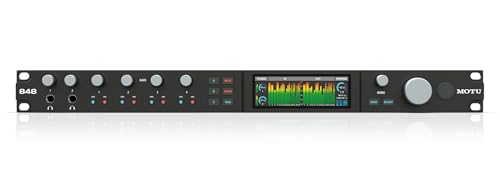
- 28x32 I/O with analog, optical, headphone, and network connectivity
- Thunderbolt 4 / USB4 support with low-latency Windows performance
- Onboard mixing, effects, CueMix Pro, and AVB expansion
Best For: Windows studios that need deep routing control and expandable I/O.
Best for Pro DSP Monitoring
Universal Audio Apollo x4 Gen 2 Essentials

- Studio-grade conversion with very low distortion
- Unison preamps and real-time UAD processing
- Apollo Monitor Correction helps improve monitoring accuracy
Best For: Windows creators who want a premium desktop interface for tracking and mixing with DSP.
Best for Easy Setup
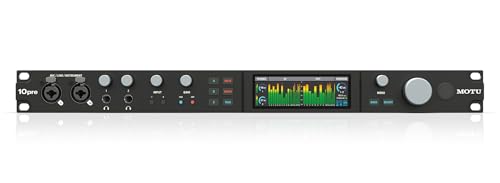
- 10 mic inputs with +74 dB gain and phantom power
- 26-in/28-out design with optical I/O and AVB expansion
- Ultra-low-latency Thunderbolt 4 / USB4 performance on Windows
Best For: Windows studios that need lots of mic inputs, fast monitoring, and expandability.
Best for Low-Latency Tracking
Zoom TAC-2R 2-Channel Thunderbolt Interface

- Ultra-low latency Thunderbolt performance
- 24-bit/192 kHz recording and playback
- Bus-powered with MIDI I/O
Best For: Windows users who want a compact Thunderbolt interface for fast, simple recording and monitoring.
Best for UAD Plugins
Apollo Solo Heritage Edition TB3
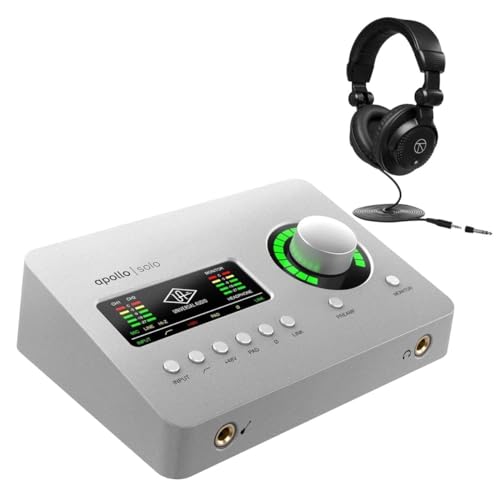
- Near-zero-latency UAD monitoring
- Unison preamps with classic emulations
- Strong headphone amp for solo tracking
Best For: Windows creators who want a compact Thunderbolt interface with built-in UAD processing.
Best DSP Expansion
UAD 2 Satellite QUAD Thunderbolt 3

- Adds QUAD DSP for running UAD plug-ins with less CPU load
- Thunderbolt 3 support for modern Windows 10 and Mac systems
- Includes 100+ plug-ins plus the Analog Classics Plus bundle
Best For: Windows users who already have an interface and want more UAD processing power.
Best for High-Channel Windows Studios – MOTU 16A Thunderbolt 4/USB4 Audio Interface
If you need one of the most capable thunderbolt audio interfaces for windows, the MOTU 16A is built for serious multichannel recording, low-latency tracking, and flexible routing. It combines Thunderbolt 4/USB4 connectivity with 32×34 I/O, strong driver performance, and onboard mixing so it can handle both studio production and expandability.
Best For: Windows users who want a high-channel-count interface for larger tracking setups, routing-heavy studios, or AVB networking.
Pros:
- 32×34 I/O with 16 analog line-level channels plus optical expansion
- Very low latency and high-performance MOTU drivers for Windows
- Built-in 64-channel mixing, DSP effects, and CueMix Pro routing
- Dual Gigabit AVB ports for daisy-chaining and networked audio
Cons:
- Overkill for simple solo or two-channel recording setups
- Requires a Thunderbolt 4/USB4-capable computer for best results
- Advanced feature set may take time to learn
This is a strong fit if your priority is scalability rather than simplicity. For buyers comparing thunderbolt audio interfaces for windows, the 16A stands out for its channel count, routing depth, and pro-grade driver support.
Best for Pro Plugin Monitoring – Apollo Twin X DUO Gen 2 Essentials
Universal Audio Apollo Twin X DUO Gen 2 with UAD Analog Classics Thunderbolt 3 Audio Interface
Check Price On AmazonIf you want one of the more polished thunderbolt audio interfaces for windows, the Universal Audio Apollo Twin X DUO Gen 2 stands out for its Unison preamps, high-end conversion, and built-in DSP that lets you track through classic UAD effects with very low latency. It’s a strong fit for desktop studios that need premium front-end sound and a ready-made plug-in ecosystem.
Best For: Windows users who want a compact Thunderbolt interface with premium preamps, DSP, and mix-ready monitoring tools.
Pros:
- Dual Unison mic preamps deliver convincing analog-style tracking.
- DUO Core DSP supports real-time UAD plug-ins while recording.
- Apollo Monitor Correction and bass management improve headphone and speaker mixes.
- Auto-Gain helps speed up input setup before sessions.
Cons:
- Thunderbolt connectivity may require extra compatibility checks on some Windows PCs.
- It’s a premium buy if you only need basic recording features.
For creators comparing thunderbolt audio interfaces for windows, this Apollo Twin X is less about bargain pricing and more about getting top-tier sound shaping, monitoring, and plug-in power in a compact desktop unit. If your workflow benefits from UAD processing and pro-grade preamps, it’s an easy interface to justify.
Best for Advanced Routing – MOTU 848 Thunderbolt 4/USB4 Interface
If you need one of the most flexible thunderbolt audio interfaces for windows, the MOTU 848 stands out for its 28×32 I/O, AVB networking, onboard mixing, and ultra-low-latency driver support. It’s aimed at users who want pro-level routing, lots of analog and digital connections, and the ability to expand later without changing the core interface.
Best For: Windows-based studios that need high channel counts, detailed routing control, and networked expansion for multitrack recording or hybrid setups.
Pros:
- 28 inputs and 32 outputs with analog, optical, headphone, and network options
- Thunderbolt 4 / USB4 connectivity with strong Windows driver performance and low latency
- Onboard mixing, effects, CueMix Pro routing, and AVB daisy-chaining for larger rigs
- High-end ESS Sabre32 conversion plus four ultra-quiet mic preamps
Cons:
- More interface than many simple home studio users need
- Advanced routing and networking may take some setup time
- Premium feature set comes with a premium price
For buyers comparing thunderbolt audio interfaces for windows, the MOTU 848 is a serious step up if you need scalability, flexible internal mixing, and professional expandability in one box. It’s especially compelling for studios that expect their I/O needs to grow.
Best for Pro DSP Monitoring – Universal Audio Apollo x4 Gen 2 Essentials
Universal Audio Apollo x4 Gen 2 with UAD Analog Classics Thunderbolt 3 Audio Interface
Check Price On AmazonIf you want one of the most capable thunderbolt audio interfaces for windows workstations, the Apollo x4 Gen 2 Essentials + Edition stands out for its clean conversion, onboard DSP, and monitoring tools. It is a strong fit for creators who want to track through classic analog-style processing while keeping latency low and session control simple.
Best For: Windows users who need a premium desktop interface for recording, mixing, and real-time plugin processing.
Pros:
- High-end AD/DA conversion with very low distortion and wide dynamic range
- Unison preamps let you record through emulations of iconic hardware in real time
- Includes access to a large UAD DSP and Native plug-in library for tracking and mixing
- Apollo Monitor Correction with Sonarworks helps make headphone and room monitoring more reliable
Cons:
- Thunderbolt connection and premium feature set make it more niche than basic USB interfaces
- Likely more interface than casual home-recording users need
- Best value comes when you plan to use the bundled DSP and plug-ins
This is a polished option for buyers comparing thunderbolt audio interfaces for windows and wanting studio-grade sound plus real-time processing in a compact desktop format. If you value Apollo conversion, plug-in workflow, and dependable monitoring, it is an easy high-end shortlist contender.
Best for Easy Setup – MOTU 10pre TB4/USB4 Interface
MOTU 10pre 26x28 Thunderbolt 4/USB4 audio interface for Mac, Windows and iOS with 10 mic inputs
Check Price On AmazonIf you need a serious upgrade among thunderbolt audio interfaces for windows, the MOTU 10pre is built for studios that want lots of I/O, low latency, and dependable driver performance. It pairs 10 mic inputs with 26 inputs and 28 outputs total, plus Thunderbolt 4/USB4 compatibility for flexible Windows use.
Best For: Windows recording setups that need many mic channels, fast monitoring, and pro-level routing in one interface.
Pros:
- 10 ultra-quiet mic/line/instrument inputs with strong preamp gain and phantom power
- Thunderbolt 4 / USB4 connectivity with very low latency on supported Windows systems
- 26-in/28-out layout plus dual optical I/O and AVB expansion options
- High-end ESS Sabre32 conversion and onboard mixing/effects
Cons:
- More interface than most small home studios need
- Best results depend on a compatible USB4/Thunderbolt-capable Windows machine
- Higher-feature design may feel complex for beginners
For buyers comparing thunderbolt audio interfaces for windows, the 10pre stands out when channel count and routing matter more than simplicity. It’s a strong fit for project studios, hybrid setups, and anyone who wants room to expand later.
Best for Low-Latency Tracking – Zoom TAC-2R 2-Channel Thunderbolt Interface
If you want a compact option in thunderbolt audio interfaces for windows, the Zoom TAC-2R is built around speed, clean conversion, and simple 2-in/2-out recording. It supports up to 24-bit/192 kHz playback and recording, includes MIDI I/O, and runs bus-powered, making it a practical grab-and-go interface for small studios and mobile setups.
Best For: Windows users who want a minimal, low-latency Thunderbolt interface for stereo recording, monitoring, and MIDI integration.
Pros:
- Ultra-low latency Thunderbolt streaming for responsive tracking
- 24-bit/192 kHz support for high-resolution audio work
- Bus-powered design keeps the setup simple and portable
- MIDI I/O adds flexibility for keyboards and controllers
Cons:
- Only two inputs and two outputs, so it is not ideal for larger sessions
- Thunderbolt compatibility can be more limited on some Windows systems
- Best suited to focused recording setups rather than full band tracking
Overall, the TAC-2R makes sense if you value speed and portability over channel count. For buyers comparing thunderbolt audio interfaces for windows, it stands out as a lean, low-latency choice for straightforward recording chains.
Best for UAD Plugins – Apollo Solo Heritage Edition TB3
If you want one of the more polished thunderbolt audio interfaces for windows, the Apollo Solo Heritage Edition stands out for its near-zero-latency UAD processing, Unison preamps, and strong 24-bit/192 kHz conversion. It’s a compact 2×4 desktop interface, so it fits solo recording setups without giving up the polished Apollo sound.
Best For: Windows users who want a compact Thunderbolt interface with built-in UAD processing for tracking vocals, guitars, and voiceover work.
Pros:
- Realtime UAD effects let you monitor and record with low latency
- Unison preamps add authentic color from classic Neve, API, and more
- Excellent 24-bit/192 kHz conversion in a small desktop footprint
- Includes a strong headphone amp for detailed monitoring
Cons:
- 2-in/4-out layout is limited for larger recording sessions
- Thunderbolt workflow is less universal than USB interfaces
- Best value depends on whether you’ll use the UAD ecosystem
This is a smart pick if you want a premium solo recording interface rather than a general-purpose box. Among thunderbolt audio interfaces for windows, it makes the most sense for users who care about tracking through classic analog-style processing right from the input stage.
Best DSP Expansion – UAD 2 Satellite QUAD Thunderbolt 3
Universal Audio UAD 2 Satellite QUAD Core Thunderbolt 3 DSP Interface MAC or PC
Check Price On AmazonIf you already have an interface and want more plug-in power, the Universal Audio UAD 2 Satellite QUAD is a smart add-on for thunderbolt audio interfaces for windows. It offloads demanding UAD effects to dedicated DSP, helping you run larger sessions with less strain on your computer.
Best For: Windows producers and engineers who need extra UAD processing for mixing, mastering, and bigger plug-in chains.
Pros:
- Thunderbolt 3 support works with modern Windows 10 systems and is backward compatible with Thunderbolt 1/2 devices.
- QUAD DSP adds serious processing headroom for UAD plug-ins and dense mixes.
- Works with major DAWs like Pro Tools, Cubase, Logic Pro X, and Live.
- Includes access to 100+ UAD plug-ins plus the Analog Classics Plus bundle.
Cons:
- It is not an audio interface, so it will not replace I/O hardware on its own.
- Thunderbolt compatibility on Windows can depend on your system and motherboard support.
- Best value only if you already use or plan to buy into the UAD plug-in ecosystem.
This is a strong pick for users building around thunderbolt audio interfaces for windows who want more plugin horsepower without changing their main interface. It is especially useful in professional mixing setups where low-latency DSP matters more than onboard inputs and outputs.
How We Picked the Best Thunderbolt Audio Interfaces for Windows
We focused on Windows compatibility, driver stability, Thunderbolt implementation, input and output flexibility, onboard monitoring and DSP features, and overall value for common studio setups. We also favored models that make sense for real-world recording workflows, not just spec sheets.
Quick Comparison
Broadly, the lineup splits into three groups: compact desktop interfaces for singers, guitarists, and podcasters; midrange units for project studios that need more I/O and cue mixing; and larger rack-style interfaces for multitrack tracking, hybrid mixing, and expanding studio setups. If you are comparing Thunderbolt Audio Interfaces for Windows, start by matching channel count to your current sessions, then decide whether you need DSP, mic preamp count, or expansion options.
Key Buying Factors for Thunderbolt Audio Interfaces for Windows
Driver Support and Stability
For Windows users, driver quality matters as much as raw speed. Look for interfaces with a strong track record for low-latency performance, consistent firmware updates, and clear Thunderbolt compatibility guidance for your motherboard, controller, and cabling.
I/O Count and Workflow
Choose enough inputs for your typical recording day, not just your current gear list. Solo creators may only need one or two mic inputs, while bands, drum recording, or hardware-heavy studios will benefit from more line inputs, digital expansion, and multiple monitor feeds.
Built-In DSP and Monitoring
Some Thunderbolt interfaces include onboard effects or cue mixing, which can reduce CPU load and make zero-latency monitoring easier. This is especially useful if you record vocals, guitar, or clients who need personalized headphone mixes.
Expansion and System Fit
Consider whether the interface supports ADAT, word clock, or network audio if you plan to grow later. Also check whether your PC has a proper Thunderbolt port or USB4 implementation that the manufacturer officially supports.
Who Should Buy Which Thunderbolt Audio Interfaces for Windows?
If you want a compact desktop unit for one or two sources, choose a smaller Apollo-style or two-channel option. If you need more inputs for full-band sessions or a flexible studio hub, the larger MOTU rack interfaces are the better fit. Creators who want UAD processing and a polished plugin workflow should lean toward Apollo models, while users prioritizing high channel counts and studio expansion should focus on the MOTU lineup. For a simple, budget-conscious entry point, a two-channel interface remains a practical place to start.
In short, the best choice depends on whether you value portability, channel count, DSP, or future expansion. Match the interface to your sessions today, but leave room for the projects you expect to take on next.