When it comes to enhancing your music production workflow in 2025, choosing the right DAW control surface can make all the difference. With a variety of options available, you’ll find features like motorized faders and customizable layouts that can elevate your mixing and editing experience. Let’s explore the top contenders that could redefine your setup and help you achieve professional results with ease. You might be surprised by what’s available.
Novation Launch Control XL 3 MIDI Control Surface and Mixer
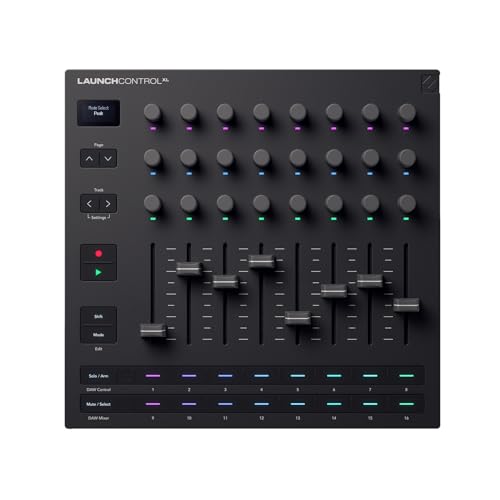
If you’re looking for a versatile control surface that seamlessly integrates with your favorite DAWs, the Novation Launch Control XL 3 is an excellent choice. This USB-powered MIDI control surface features 8 faders, 24 endless encoders, and 16 customizable buttons, all designed for deep integration with major DAWs like Ableton Live and Logic Pro. Its compact design makes it portable, while the durable build guarantees longevity. With customizable mappings and visual feedback through multicolor LED indicators, you’ll enjoy smooth control during both studio sessions and live performances. Plus, it’s compatible with both PC and Mac, making it a flexible addition to your setup.
Best For: Musicians and producers seeking a compact and customizable MIDI control surface for studio production and live performances.
Pros:
- Highly customizable with 15 custom modes and easy MIDI mapping.
- Durable construction with smooth faders and responsive controls.
- Seamless integration with major DAWs, enhancing workflow efficiency.
Cons:
- Some users desire an integrated keyboard for more functionality.
- Reports of occasional power issues when using with certain devices.
- Limited to USB power, which could restrict portability options.
Behringer X-TOUCH Universal Control Surface

The Behringer X-TOUCH Universal Control Surface is an excellent choice for both studio and live music production, thanks to its nine touch-sensitive motor faders. You’ll appreciate its universal DAW remote control capabilities, compatible with HUI and Mackie Control protocols. The eight dynamic LCD Scribble Strips let you easily see track names and parameters, enhancing your workflow. With Ethernet, USB, and MIDI interfaces, connectivity is a breeze, allowing real-time protocol MIDI support. Plus, its future compatibility with the BEHRINGER X32 remote control guarantees you’re set for any upcoming projects. This surface streamlines your production process, making it a valuable asset in your setup.
Best For: The Behringer X-TOUCH Universal Control Surface is best for musicians and audio engineers looking for a versatile and efficient control surface for both studio and live applications.
Pros:
- Touch-sensitive motor faders allow for precise control over mixing and automation.
- Dynamic LCD Scribble Strips provide clear track names and parameter information for improved workflow.
- Multiple connectivity options (Ethernet, USB, MIDI) ensure compatibility with various setups and real-time protocol support.
Cons:
- May have a learning curve for users unfamiliar with DAW control surfaces.
- Limited number of faders may be inadequate for larger, more complex projects.
- Future compatibility with BEHRINGER X32 may require additional setup or updates.
PreSonus FaderPort 16 DAW Controller with Studio One Pro Software

For producers seeking an intuitive and efficient workflow, the PreSonus FaderPort 16 DAW Controller stands out with its 16 touch-sensitive motorized faders. This compact controller features 89 buttons, enabling 104 functions to streamline your sessions. The high-definition Scribble Strip displays make channel identification effortless, while the Session Navigator offers quick access to track scrolling, zooming, and master fader control. Plus, it supports various modes for plug-ins and bus sends. You’ll also get a software bundle worth over $1000, including Studio One Artist and more, ensuring compatibility with most major DAWs on both Mac and Windows.
Best For: Producers and musicians looking for a compact and efficient DAW controller to enhance their recording and mixing workflow.
Pros:
- 16 touch-sensitive motorized faders provide precise control for mixing and automation.
- High-definition Scribble Strip displays allow for easy channel identification and navigation.
- Includes a comprehensive software bundle worth over $1000, enhancing the overall value.
Cons:
- May have a learning curve for users unfamiliar with DAW controllers.
- Limited to 16 channels, which may not be sufficient for larger sessions.
- Compatibility issues may arise with certain DAWs not supporting Mackie Control Universal or HUI emulation.
PreSonus FaderPort DAW Controller with Studio One Pro Software

Designed with both beginners and advanced users in mind, the PreSonus FaderPort DAW Controller stands out for its single touch-sensitive motorized fader, which allows you to execute real-time fades and automation effortlessly. Its large 360-degree push-button encoder and 24 buttons covering 40 functions streamline editing and mixing. You’ll appreciate the innovative Session Navigator for quick DAW control, and it connects easily via USB 2.0, natively supporting Studio One. With compatibility across various DAWs, over $1000 worth of included software, and high customer ratings, this controller enhances your workflow and is a cost-effective solution for your music production needs.
Best For: The PreSonus FaderPort DAW Controller is best for both beginners and advanced users looking for an efficient and cost-effective solution for digital audio workstation control.
Pros:
- Seamless integration with various DAWs, particularly Studio One, enhancing workflow efficiency.
- Includes over $1000 worth of recording software, providing great value for music production.
- High customer satisfaction with a rating of 4.5 out of 5 stars, indicating strong performance and reliability.
Cons:
- Some users report minor issues with channel number display and fader behavior in specific DAWs.
- The product may not have as many features as higher-end controllers, which could be a limitation for some advanced users.
- Limited mixer channel quantity (only one channel), which may not meet the needs of larger mixing projects.
Behringer X-TOUCH ONE Universal Control Surface

With its touch-sensitive motorized fader and intuitive layout, the Behringer X-TOUCH ONE Universal Control Surface is an ideal choice for home studio enthusiasts looking to enhance their music production experience. It features 34 illuminated buttons, an LCD scribble strip, and a jog/shuttle wheel, making navigation a breeze. Compatible with popular DAWs like Ableton Live and Pro Tools, you’ll find setup easy, often taking less than 10 minutes. While some build components could improve, its performance and price make it a solid investment. With a 4.5-star rating, it’s clear users appreciate this streamlined control surface for their projects.
Best For: Home studio enthusiasts seeking an affordable and efficient control surface for music production.
Pros:
- Easy setup and integration with major DAWs, often completed in under 10 minutes.
- Touch-sensitive motorized fader allows for real-time synchronization with your DAW, enhancing workflow.
- Compact design with illuminated buttons and an LCD scribble strip improves navigation and usability.
Cons:
- Some components, such as the jog dial and transport buttons, may feel less durable and could be improved.
- Lacks an on/off switch, which might be inconvenient for some users.
- Compatibility issues reported on certain AMD CPU motherboards.
Icon Pro Audio P1-Nano Compact DAW Control Surface Bundle with D5 Display

The Icon Pro Audio P1-Nano Compact DAW Control Surface Bundle, featuring its impressive 4-inch customizable touchscreen, is the perfect choice for music producers who crave efficiency and precision in their workflow. With multi-DAW compatibility, you can seamlessly control up to three DAWs like Logic Pro X and Ableton Live simultaneously. Its touch-sensitive motorized fader and 80 displayable functions enhance your creativity, while the durable metal casing guarantees portability. Plus, the D5 display unit offers enhanced visual feedback, making adjustments quick and easy. Weighing just 2 pounds, it’s a compact powerhouse ready to elevate your music production experience.
Best For: Music producers seeking a compact and efficient control surface for multi-DAW environments.
Pros:
- Compact design makes it highly portable without sacrificing functionality.
- Multi-DAW compatibility allows for seamless control of multiple software simultaneously.
- Customizable touchscreen and motorized fader enhance user experience and precision in adjustments.
Cons:
- Limited to 4-inch touchscreen which may be small for some users requiring extensive visual feedback.
- The 12-bit resolution of the fader may not meet the needs of professionals seeking ultra-high precision.
- Firmware upgrades require a USB connection, which may limit flexibility for updates.
Akai Professional MIDImix USB MIDI Controller Mixer

If you’re a music producer looking for a compact and efficient way to control your DAW, the Akai Professional MIDImix USB MIDI Controller Mixer stands out as an ideal choice. Weighing just 1.54 pounds, this sturdy metal mixer features 8 assignable faders, a master fader, 24 knobs, and 16 buttons, making it perfect for seamless mixing. Its plug-and-play functionality guarantees easy integration with Ableton Live and other DAWs. Plus, you can customize controls through the MIDImix Editor software. Enjoy a solid build and quick setup to enhance your music production experience. The MIDImix truly streamlines your workflow.
Best For: Music producers seeking a lightweight and efficient MIDI controller for seamless DAW integration.
Pros:
- Lightweight and portable design, making it easy to transport.
- Instant 1 to 1 mapping with Ableton Live for quick setup.
- Customizable controls through MIDImix Editor software for personalized configurations.
Cons:
- Some users find the small knobs challenging to manipulate during extended sessions.
- The feel of the faders could be improved for a better mixing experience.
- Limited to 16 channels, which may not meet the needs of larger setups.
Icon Pro Audio P1-M DAW Control Surface Bundle with D4T Display

For music producers seeking precision and efficiency, the Icon Pro Audio P1-M DAW Control Surface Bundle with D4T Display stands out with its 8 touch-sensitive motorized faders. These faders boast 12-bit resolution, guaranteeing accurate control over your DAW. Its 4-inch digital touchscreen features 16 customizable panels, allowing access to up to 80 functions, while the robust metal casing guarantees durability. You can connect up to 3 DAWs simultaneously, seamlessly integrating with popular software like Pro Tools and Logic Pro. Plus, firmware upgrades are simple through USB-C, enhancing your workflow and keeping your setup current.
Best For: Music producers and audio engineers seeking precise control and efficiency in their digital audio workstations.
Pros:
- 8 touch-sensitive motorized faders allow for accurate mixing and automation control.
- Customizable 4-inch touchscreen provides access to multiple functions, enhancing workflow flexibility.
- Seamless integration with major DAWs like Pro Tools and Logic Pro ensures compatibility and ease of use.
Cons:
- Limited number of faders may not be sufficient for larger projects without expansion units.
- Dependency on software updates for optimal performance might require regular attention.
- Initial setup may require some learning curve for new users unfamiliar with DAW control surfaces.
Icon Pro Audio V1-M DAW Control Surface, Icon Pro Audio V1-X Bundle

Designed for professionals and serious hobbyists alike, the Icon Pro Audio V1-M DAW Control Surface stands out with its impressive 24-panel programmable digital touchscreen. It features nine motorized faders, eight dual-function encoder knobs, and an expandable 64-channel setup with the V1-X Bundle. You can customize the touchscreen with five color-coded layers, giving you quick access to up to 360 functions. The large TFT display and meter bridge enhance monitoring, allowing you to track levels without glancing at your computer. Compatible with major DAWs, the V1-M guarantees a seamless workflow, making it an essential tool for any studio setup.
Best For: Professionals and serious hobbyists looking for an advanced and customizable DAW control surface for their studio setup.
Pros:
- Large 24-panel programmable touchscreen enhances workflow and accessibility.
- Nine motorized faders and expandable setup support up to 64 channels.
- Compatible with major DAWs, ensuring seamless integration into various studio environments.
Cons:
- The complexity of features may be overwhelming for beginners.
- Additional cost for V1-X Expanders to reach the full 64-channel capability.
- Limited functionality may arise if not using supported DAWs.
iCON Pro Audio V1-M USB MIDI DAW Control Surface with Motorized Faders

The iCON Pro Audio V1-M USB MIDI DAW Control Surface stands out with its eight touch-sensitive motorized faders, making it an ideal choice for producers seeking precision and control in their music production workflow. With a customizable 7-inch touchscreen and 120 accessible functions, you can easily navigate your projects. Its seamless integration with popular DAWs like Logic Pro X and Pro Tools guarantees compatibility, while the OLED display provides real-time feedback on levels. Although some users mention setup challenges, the build quality and functionality make the V1-M a solid investment for enhancing your creative process.
Best For: Music producers and audio engineers seeking a versatile and efficient control surface to enhance their digital audio production workflow.
Pros:
- Motorized faders provide precise control and automation for mixing.
- Customizable touchscreen allows easy access to numerous DAW functions.
- Seamless integration with multiple popular DAWs ensures flexibility in software choice.
Cons:
- Some users report setup complexity and challenges during initial configuration.
- Mixed reviews regarding software compatibility may lead to frustration.
- Average customer rating suggests inconsistencies in user experience and satisfaction.
Factors to Consider When Choosing DAW Control Surfaces
When you’re choosing a DAW control surface, several key factors come into play. You’ll want to contemplate compatibility with your DAW, the number of faders you need, and the overall build quality and design. Additionally, think about whether you prefer touchscreen controls or physical ones, along with the available connectivity options.
Compatibility With DAWS
Choosing a DAW control surface that works seamlessly with your digital audio workstation can greatly enhance your music production experience. First, verify the surface supports major protocols like HUI and Mackie Control for broad compatibility. Many control surfaces offer native integration with popular DAWs, making it easy to map controls without extensive setup. It’s also wise to check if the device allows for compatibility with multiple DAWs simultaneously, enabling you to switch between software environments as needed. Additionally, confirm that the control surface includes software bundles that support the DAWs you plan to use, which can streamline your workflow. Finally, look for user feedback regarding setup ease and integration, as this varies considerably across different surfaces.
Number of Faders
Selecting the right number of faders on a DAW control surface can make a significant difference in your mixing workflow. The number of faders directly affects how many audio tracks you can control at once. If you’re working on complex projects, consider surfaces with 16 or more faders for greater flexibility. More faders enhance efficiency, letting you adjust multiple volume levels simultaneously. Motorized faders are particularly beneficial, as they automatically reflect the levels of selected tracks, providing real-time feedback during sessions. Ultimately, choose a fader count that suits your specific needs while considering your workspace and budget. Balancing extensive control with practicality guarantees you get the most out of your DAW control surface.
Build Quality and Design
After determining the right number of faders for your mixing needs, it’s important to evaluate build quality and design. Look for controllers made from high-quality materials like metal or sturdy plastic to guarantee durability in both studio and live settings. Prioritize user ergonomics; an intuitive layout with tactile controls and clear labeling can greatly enhance your workflow. Compact and lightweight designs are ideal for portability, making it easy to transport your setup. Visual feedback features, such as OLED displays and multicolor LED indicators, help you identify controls quickly. Finally, verify the faders and knobs have a solid feel—smooth action with slight resistance allows for precise adjustments, enhancing your mixing and automation tasks.
Touchscreen vs. Physical Controls
When it comes to DAW control surfaces, the choice between touchscreen and physical controls can greatly impact your music production experience. Touchscreens offer customizable functions and layered interfaces, allowing you to access multiple controls at once. However, they can demand more visual attention and might distract you during intense sessions. On the other hand, physical controls like faders and knobs provide tactile feedback, making precise adjustments feel more intuitive, especially in live settings. They also tend to last longer and withstand high-use environments better than touchscreens, which are more prone to wear and tear. Ultimately, consider your workflow preferences and the environments you’ll be working in when deciding which option suits you best.
Connectivity Options Available
Understanding the connectivity options available for DAW control surfaces is essential for optimizing your music production setup. Most control surfaces come with USB connections, which simplify power and data transfer, making them compatible with modern computers and DAWs. If you’re in a networked environment, consider surfaces with Ethernet interfaces that support RTP MIDI; they offer lower latency and reliable communication. Additionally, some controllers feature traditional 5-Pin MIDI ports, allowing you to connect external hardware like synthesizers. Look for MIDI In, Out, and Thru options if you plan to control multiple devices. Finally, guarantee your control surface supports established protocols like Mackie Control and HUI for enhanced compatibility across various digital audio workstations.
Portability and Size
Choosing the right size and portability for your DAW control surface can make all the difference in your music production experience. If you’re working with limited desk space or need something lightweight for travel, compact controllers measuring around 7.1 x 8.38 x 2.36 inches are ideal. Weighing as little as 1 pound, these options are perfect for mobile musicians. On the other hand, larger control surfaces, reaching up to 20.87 x 10.63 x 4.33 inches, offer more controls but demand more studio space. Look for USB-powered options for easy connectivity to laptops, facilitating setups in various locations. Additionally, robust materials enhance durability without adding weight, making frequent transport hassle-free. Choose wisely to fit your workflow!
Price and Value Comparison
Prices for DAW control surfaces can start at around $100 for basic models and soar past $1,000 for advanced units packed with features. While budget-friendly options under $200 may catch your eye, they often have limited functionality, fewer faders, and knobs. If you’re serious about music production, investing in mid-range or high-end models is worth considering. These often include motorized faders, customizable displays, and seamless DAW integration that enhance your workflow. When evaluating value, think beyond just the initial cost; consider how much these features can boost your productivity. Additionally, some manufacturers bundle valuable software with their control surfaces, increasing the overall value and expanding your creative possibilities. Make your choice wisely to maximize your investment.