Choosing among the best audio equalizers for podcasting can make spoken-word recordings sound clearer, more balanced, and easier to mix. The right option depends on your microphone, recording setup, number of speakers, and whether you need hands-on EQ control or an all-in-one mixer.
This roundup compares 10 options ranging from compact seven-band equalizers to podcast-ready USB mixers with XLR inputs, phantom power, monitoring, Bluetooth, and built-in effects. Use the guide below to narrow the list by workflow, connectivity, and sound-shaping needs.
Best 10 Audio Equalizers for Podcasting Picks for 2026
Compact Podcast EQ

- Seven bands with ±12 dB control
- Dual-channel headphone-friendly design
- 3.5mm input and output connections
Best For: Basic podcast and streaming EQ control
Precision Studio EQ

- 31-band tuning with spectrum monitoring
- 12 customizable modes and auto-save presets
- Optical, coaxial, USB, and Bluetooth inputs
Best For: Detailed studio and multi-device audio setups
All-in-One Podcast Mixer
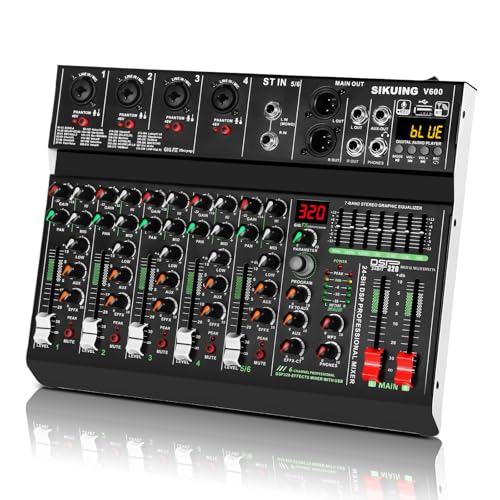
- Six channels with 7-band graphic EQ
- 320 DSP effects for voice and ambience
- USB sound card, Bluetooth, and 48V phantom power
Best For: Multi-source podcasting and live streaming
Visual Home Audio EQ

- 15-band EQ for two channels
- 31-band spectrum display with color options
- RCA, 3.5mm, USB, and Bluetooth inputs
Best For: Visual home-audio and DJ-oriented podcast setups
Flexible Podcasting Interface
USB Mixer for Mic and Instrument Control

- XLR mic input with 48V phantom power
- Instrument input and direct monitoring
- USB-C connection for Mac and PC
Best For: Solo podcasters recording vocals, instruments, or video content
Precision Rack EQ
15-Band Stereo Graphic Equalizer

- 15 bands per channel with ±12 dB adjustment
- Low-cut filter for unwanted low-end noise
- XLR and 1/4-inch TRS connectivity
Best For: Rack-based podcast and home audio systems needing detailed EQ
All-in-One Creator Mixer
Bluetooth Podcast Mixer with 7-Band EQ

- Four channels with XLR and 1/4-inch inputs
- 7-band EQ and 99 DSP vocal effects
- USB, Bluetooth input, and 48V phantom power
Best For: Podcasters and streamers managing multiple sources and effects
Best Flexible Tuning Pick

- Seven adjustable frequency bands
- TRS/TRRS headset support
- Simultaneous RCA and 3.5mm outputs
Best For: Podcasters and streamers needing hands-on EQ and flexible analog routing
Best Balanced Connectivity Pick

- XLR and RCA input/output connectivity
- Seven-band ±6dB tone adjustment
- High stated SNR and low distortion
Best For: XLR-equipped podcast and home audio chains
Best Visual Monitoring Pick

- Five-band independent EQ processing
- Bluetooth 5.0 wireless playback
- Dual VU meters with adjustable settings
Best For: Desktop creators wanting visual monitoring and Bluetooth convenience
Compact Podcast EQ – 7-Band Sound Equalizer
This compact seven-band unit is a practical option for creators seeking audio equalizers for podcasting without adding a full mixer to the setup. It offers dual-channel processing, up to 12 dB of adjustment per band, and a 3.5mm connection suited to headphone-and-microphone configurations.
Best For: Podcasters and streamers who want basic hands-on EQ control in a small, freestanding unit.
Pros:
- Seven adjustable bands cover 60 Hz through 15 kHz.
- Dual-channel design includes a headphone amplifier section.
- Supports 5V to 12V DC power and has an aluminum-alloy body.
Cons:
- Its 3.5mm-focused connectivity may be limiting for larger studio systems.
- It provides basic EQ rather than the broader routing and effects of a mixer.
This is a straightforward choice when you need simple tone shaping for speech and monitoring. Confirm your plugs, power source, and signal path before buying.
Precision Studio EQ – 31-Band Graphic Equalizer
For buyers comparing audio equalizers for podcasting alongside broader studio equipment, this 31-band graphic equalizer offers detailed frequency shaping and real-time spectrum monitoring. Its customizable modes, noise and echo reduction, and multiple digital inputs make it suitable for more involved setups.
Best For: Recording spaces, home studios, and podcasters who want fine-grained EQ control across different listening or production scenarios.
Pros:
- Provides 31 bands for detailed bass, midrange, and treble adjustment.
- Includes a real-time spectrum analyzer and 12 customizable modes.
- Supports optical, coaxial, USB, and Bluetooth connectivity.
- Auto-save presets simplify switching between sound profiles.
Cons:
- The extensive feature set may be more than a simple voice-only setup needs.
- The supplied notes do not specify microphone input or phantom-power support.
This model stands out for flexibility and visual feedback rather than minimalist podcast operation. It makes the most sense when you also want to integrate home audio, studio monitors, or other playback sources.
All-in-One Podcast Mixer – 6-Channel DJ Audio Mixer
This six-channel mixer is a strong alternative for creators who need audio equalizers for podcasting plus microphone connectivity, monitoring, effects, and computer recording. It combines a seven-band graphic EQ with 320 DSP effects, USB audio interfacing, and 48V phantom-power capability on the stereo channels.
Best For: Podcasts, live streams, and small recording sessions using multiple microphones, instruments, or playback devices.
Pros:
- Six channels accommodate microphones, instruments, phones, and computers.
- Seven-band EQ provides hands-on tone shaping.
- Includes 320 DSP effects such as reverb, delay, and chorus.
- USB sound-card functionality supports PC and Mac recording.
Cons:
- It is larger and more feature-heavy than a standalone EQ.
- The supplied information does not identify specific recording software compatibility.
Choose this mixer if your podcast workflow involves several sources or live production rather than EQ alone. Bluetooth playback and USB connectivity add flexibility, while the metal chassis is designed for portable use.
Visual Home Audio EQ – TNZ SGE6 Graphic Equalizer
The TNZ SGE6 combines a 15-band, two-channel EQ with a prominent spectrum display, making it an interesting option among audio equalizers for podcasting when visual monitoring and home-audio integration matter. RCA and 3.5mm connections support pairing with amplifiers, preamps, mixing consoles, and HiFi systems.
Best For: Home podcast and DJ setups that value visual spectrum effects, flexible playback inputs, and preamp functionality.
Pros:
- Offers 15-band EQ across two channels.
- Includes RCA, 3.5mm auxiliary, USB, and Bluetooth 5.0 inputs.
- Built-in microphone can drive the spectrum display without an audio cable.
- Can function as an audio amplifier or preamplifier.
Cons:
- Its feature emphasis is broader home audio and visualization rather than podcast-specific processing.
- The supplied notes do not specify phantom power or USB recording capability.
This unit is best viewed as a visual home-audio processor with useful EQ functions, not a complete podcast interface. Check that your microphone and mixer connections match its RCA and 3.5mm-oriented design.
Flexible Podcasting Interface – USB Mixer for Mic and Instrument Control
If you need audio equalizers for podcasting but also want straightforward recording connectivity, the FIFINE SC1 combines a USB interface with essential input and monitoring controls. Its XLR microphone input, instrument input, gain adjustment, and direct monitoring make it a practical fit for a solo creator or musician.
Best For: Podcasters who use an XLR microphone and may also record guitar, bass, or other instruments.
Pros:
- XLR input supports condenser microphones with 48V phantom power.
- Dedicated mic gain, output volume, and monitoring controls simplify level management.
- USB-C connectivity and plug-and-play operation work with Mac and PC systems.
- Supports sample rates up to 192 kHz for compatible recording software.
Cons:
- Provides one XLR microphone input, so it is less suited to multi-mic podcasts.
- Its controls are focused on interface and monitoring functions rather than detailed multi-band EQ.
The SC1 is a compact recording interface rather than a dedicated graphic equalizer. Choose it when clean input control, instrument support, and real-time monitoring matter more than extensive tone-shaping bands.
Precision Rack EQ – 15-Band Stereo Graphic Equalizer
For creators building a more advanced signal chain, this 15-band stereo graphic equalizer offers hands-on frequency shaping for podcasting and home audio. Dual-channel controls, adjustable low-cut filtering, and balanced or unbalanced connections provide more precise control than a basic mixer EQ.
Best For: Podcasters and audio enthusiasts with a rack-based setup who need detailed stereo tone adjustment and low-frequency cleanup.
Pros:
- Provides 15 adjustable bands per channel with a stated range of ±12 dB.
- Low-cut control helps reduce unwanted low-end noise.
- XLR balanced and 1/4-inch TRS unbalanced connections support flexible integration.
- Includes a dedicated bass output with adjustable frequency.
Cons:
- Its 1U rack-mount design is less convenient for compact desktop podcast setups.
- It requires a separate audio interface or mixer to handle microphone recording.
- Its corded, professional-style design may be more equipment than a beginner needs.
The EQX-215S is the strongest choice here for deliberate frequency shaping, especially when room noise or excessive bass needs attention. Confirm that your existing interface or mixer provides the connections and signal path required for a rack-mounted equalizer.
All-in-One Creator Mixer – Bluetooth Podcast Mixer with 7-Band EQ
This four-channel mixer is a versatile option for podcasters who want audio equalizers for podcasting alongside effects, Bluetooth playback, and USB recording. Its 7-band EQ, 99 DSP effects, XLR inputs, and phantom power support a broad range of home studio and streaming workflows.
Best For: Content creators who need multiple inputs, vocal effects, background music playback, and a compact desktop mixer.
Pros:
- Four channels accommodate microphones, instruments, and other audio sources.
- 7-band EQ provides more shaping control than a basic 2- or 3-band mixer.
- Includes 99 DSP effects such as reverb, delay, chorus, and flange.
- USB recording, Bluetooth input, USB-drive playback, and 48V phantom power add flexibility.
Cons:
- Bluetooth supports input only, not wireless output.
- The listed 62 dB noise level may matter in especially quiet recording environments.
- It uses a corded power supply rather than battery operation.
The mixer balances podcast-focused features with live-streaming convenience. It is a practical all-in-one choice when you want EQ, effects, playback, and several input options without adding a separate rack equalizer.
Best Flexible Tuning Pick – 7-Band Stereo Equalizer
For shoppers comparing audio equalizers for podcasting, this compact 7-band model offers practical control over bass, mids, and treble while supporting both RCA and 3.5mm connections. Its headset-friendly 3.5mm interface also makes it useful for streaming, gaming, and voice chat setups.
Best For: Podcasters and streamers who want straightforward frequency control, microphone-headset compatibility, and flexible desktop routing.
Pros:
- Seven adjustable frequencies with up to ±12dB of bass, midrange, and treble adjustment.
- 3.5mm TRS/TRRS support can retain headset microphone functionality.
- RCA and 3.5mm outputs can operate simultaneously for headphones and speakers.
- 14dB preamp gain helps support lower-output source devices.
Cons:
- Input selection is limited to either RCA or 3.5mm at a time.
- Its feature set is more focused on basic analog routing than advanced podcast-specific processing.
This is a practical choice when you need hands-on tonal shaping and simple headphone or speaker routing in a compact unit. The 3.5mm headset support is particularly useful for casual podcasting and voice-chat workflows.
Best Balanced Connectivity Pick – Douk Audio T7 7-Band EQ
This Douk Audio T7 is a strong option among audio equalizers for podcasting when your setup uses balanced XLR connections. Its seven-band controls provide focused tonal adjustment, while simultaneous XLR and RCA outputs simplify integration with different home-studio components.
Best For: Podcasters with XLR-based or mixed analog setups who want a clean, dedicated equalizer without an added volume-control stage.
Pros:
- Seven frequency bands cover 64Hz through 8kHz with ±6dB adjustment.
- XLR and RCA inputs and outputs support a variety of amplifier and speaker systems.
- High stated SNR above 104dB and low distortion of 0.003%.
- Compact aluminum housing helps provide shielding against interference.
Cons:
- No volume control knob; it outputs at the rated level.
- Its frequency bands and ±6dB range provide less adjustment than some wider-range EQ designs.
The T7 fits best in a more structured analog chain where balanced connectivity matters. Because it omits a volume control, confirm that your amplifier, interface, or speakers provide convenient level adjustment.
Best Visual Monitoring Pick – Douk Audio EQ5 Tone
For a compact desktop setup, the Douk Audio EQ5 Tone combines five-band adjustment with Bluetooth 5.0 and dual VU meters. It is one of the more visually engaging audio equalizers for podcasting, especially if you want quick tonal changes and an at-a-glance view of signal activity.
Best For: Desktop podcasters and content creators who want Bluetooth playback, simple EQ shaping, and visible level monitoring.
Pros:
- Five independently processed bands target 75Hz, 400Hz, 800Hz, 4kHz, and 10kHz.
- Bluetooth 5.0 enables wireless audio streaming from compatible devices.
- Large dual VU meters provide real-time visual signal monitoring.
- Bypass, balance, and adjustable meter settings add convenient control.
Cons:
- Five bands offer less detailed frequency control than the seven-band models listed here.
- The supplied features emphasize stereo playback and monitoring rather than dedicated microphone processing.
- It requires a DC 5V power source.
The EQ5 Tone is a good fit for a compact, personality-driven desktop system where visual feedback and wireless playback are useful. Choose it when five-band control is sufficient and you value bypass and balance controls.
How We Picked These Audio Equalizers for Podcasting
We selected products across the main categories podcasters encounter: standalone graphic equalizers, stereo preamp-style EQs, DJ and home-audio units, and USB mixers designed for recording or streaming. We considered band count, input and output formats, microphone compatibility, monitoring features, portability, and ease of integration with a computer or existing mixer.
Because podcast setups vary widely, this list includes both dedicated EQ hardware and mixer-based solutions. A standalone equalizer may suit a traditional analog signal chain, while a USB mixer can combine microphone input, gain control, EQ, monitoring, and computer connectivity in one device.
Quick Comparison
- Best for simple tone control: Compact seven-band and five-band equalizers.
- Best for multiple microphones: Four- or six-channel mixers with XLR inputs.
- Best for computer recording: USB mixers with audio interfaces and direct monitoring.
- Best for advanced routing: A 15- or 31-band graphic equalizer with multiple outputs.
- Best for flexible home use: Bluetooth-enabled EQs with RCA, auxiliary, or XLR connectivity.
Key Buying Factors for Audio Equalizers for Podcasting
Band Count and Control Range
More bands provide finer control over voice frequencies, but they also require more setup knowledge. A five- or seven-band model is usually enough for basic tonal correction, while a 15- or 31-band unit offers more precise control over room resonance, muddiness, and harshness.
Inputs, Outputs, and Microphone Support
Check whether the unit accepts the connections your system uses. RCA and 3.5mm interfaces are common for line-level sources, while XLR inputs are important for microphones and balanced studio equipment. If you use a condenser microphone, confirm that the mixer or interface supplies 48V phantom power.
USB, Monitoring, and Routing
USB connectivity can simplify recording directly to a computer. Headphone monitoring, independent volume controls, and a suitable output mix are particularly useful when recording live conversations. Built-in Bluetooth is convenient for playback or remote audio, but it should not replace the wired connections needed for primary microphone recording.
Effects and Noise Management
DSP effects can be useful for live streaming, though they are not essential for clean podcast production. Prioritize reliable gain control, low-noise operation, and practical EQ adjustment before choosing a unit based on its effects count.
Who Should Buy Which Audio Equalizers for Podcasting?
Solo podcasters with a basic analog setup should consider a compact stereo or seven-band EQ. Interviewers and co-hosts will generally benefit more from a multi-channel USB mixer with multiple XLR inputs and headphone monitoring. Creators recording directly to a computer should prioritize a USB mixer or interface with phantom power and simple direct monitoring.
Home-stereo users who also podcast occasionally may prefer a Bluetooth RCA/XLR preamp-style equalizer, while advanced users managing room or system-specific frequency problems should look at higher-band graphic EQs. Before buying, map your full signal chain—from microphone to recorder or computer—and confirm every connector, power requirement, and output level will work together.