Choosing the best audio interface with Dante depends on more than channel count. Your system may need USB or PCIe recording, XLR inputs, stagebox expansion, PoE, low-latency monitoring, or compatibility with an existing Dante network.
We’ve selected 10 Dante-enabled interfaces and adapters covering compact studio setups, live production, broadcast workflows, and commercial installations. Use the guide below to narrow the options by connectivity, I/O, scale, and intended use.
Best 10 Audio Interface with Dante Picks for 2026
Reference Dante Pick

- Dante IP audio networking
- 24-bit/96kHz conversion
- Windows, macOS, and major DAW support
Best For: Compact recording, live sound, and measurement setups
High-Channel Dante Hub

- 128-in/128-out Dante and MADI
- USB 3.0 computer connectivity
- Up to 24-bit/192kHz operation
Best For: Large Windows-based Dante and MADI systems
Installed Audio Choice
- Four mic/line XLR inputs
- Dante network audio interface
- Crestron and AMX compatibility
Best For: Professional AV and conferencing installations
Simple Dante Retrofit
- Two-channel analog-to-Dante adapter
- RJ45 Dante network connection
- Supports many existing analog devices
Best For: Connecting analog gear to an established Dante network
Best Software-Ready Pick
Yamaha RUio16-D Dante/USB Interface

- 16x16 Dante and USB audio connectivity
- Includes VST Rack Pro with 30+ plug-ins
- Mac/Windows support with 96 kHz operation
Best For: Computer-based Dante processing and live sound setups
Best Compact Dante Input
Allen & Heath DT20-X Dante Input Interface

- Adds two Dante input channels
- Two XLR inputs for focused expansion
- Supports PoE and includes a power supply
Best For: AHM systems, mixers, and compact Dante installations
Best Stage-Box Expansion
Yamaha Tio1608-D2 Dante Stage Box

- 16 inputs and 8 outputs in a 3U rack unit
- Dante Ethernet with 96 kHz support
- QUICK CONFIG and recallable D-PRE preamplifiers
Best For: Yamaha TF and DM3 live sound systems needing remote I/O
Best for Large Dante Systems

- 128x128 channels at 24-bit/192kHz
- Dual Ethernet with switched or redundant modes
- Windows and Mac compatible
Best For: High-channel-count professional audio systems
Best Compact XLR Converter

- Two-channel XLR-to-Dante conversion
- Up to 96kHz/24-bit audio
- PoE or USB-C powered
Best For: Compact two-source Dante installations
Best Four-Input Dante Box

- Four 3-pin XLR analog inputs
- Dante and AES67 support
- PoE or Type-C power
Best For: Four-source installed audio systems
Reference Dante Pick – ESI planet 22c
The ESI planet 22c is a practical audio interface with Dante for recording, live sound, and audio measurement. It combines a Dante IP audio network connection with 24-bit/96kHz converters and supports Windows, macOS, and all major DAWs.
Best For: Musicians, engineers, and small production setups needing Dante connectivity with high-quality 96kHz conversion.
Pros:
- Dante networking with 24-bit/96kHz converters
- Works with Windows, macOS, and major DAWs
- Compact 0.5 kg design
- Includes a two-year warranty with US- and Germany-based support
Cons:
- Four-channel capacity may not suit larger systems
- TRS input connectivity may be limiting for setups requiring XLR inputs
The planet 22c is a focused choice for buyers who want Dante integration without stepping up to a larger channel-count interface. Its 96kHz support and broad software compatibility make it flexible for studio and live applications.
High-Channel Dante Hub – RME Digiface Dante
The RME Digiface Dante is an audio interface with Dante built for high-channel-count computer-based systems. It provides 128-in/128-out Dante, MADI, and USB 3.0 connectivity, with support for up to 24-bit/192kHz operation and a headphone output.
Best For: Windows users managing complex Dante or MADI recording and routing systems from a computer.
Pros:
- 128 inputs and 128 outputs for extensive routing
- Combines Dante, MADI, and USB 3.0 connectivity
- Supports up to 24-bit/192kHz operation
- Includes a headphone output and word-clock I/O
Cons:
- Windows operating system support is specified, but macOS support is not listed in the supplied details
- Its high channel capacity may be unnecessary for smaller setups
For demanding networked audio workflows, the Digiface Dante stands out through its unusually large I/O count and combination of Dante and MADI. It is best suited to users who need extensive routing rather than a simple desktop interface.
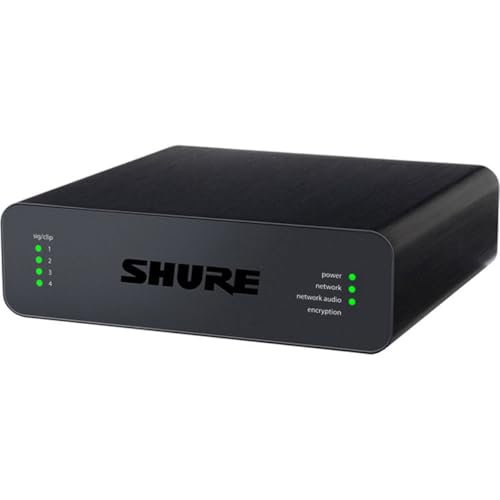
Installed Audio Choice – Shure ANI4IN-XLR
The Shure ANI4IN-XLR is an audio interface with Dante that converts four microphone or line-level XLR inputs for professional networked audio systems. Its integration with professional audio devices, Crestron, and AMX makes it especially relevant to installed conferencing and control environments.
Best For: Commercial AV, conferencing, and installed systems using four analog microphone or line inputs.
Pros:
- Four mic/line XLR inputs
- Dante networking for professional audio systems
- Supports up to 192kHz sample rates
- Compatible with Crestron and AMX environments
Cons:
- Four-channel input capacity may be restrictive for larger installations
- Designed around XLR connectivity rather than a broad range of instrument inputs
The ANI4IN-XLR is a purpose-built solution rather than a general-purpose music interface. Its four XLR inputs and control-system compatibility make it a strong fit when reliable Dante integration is the priority in an installed AV setup.
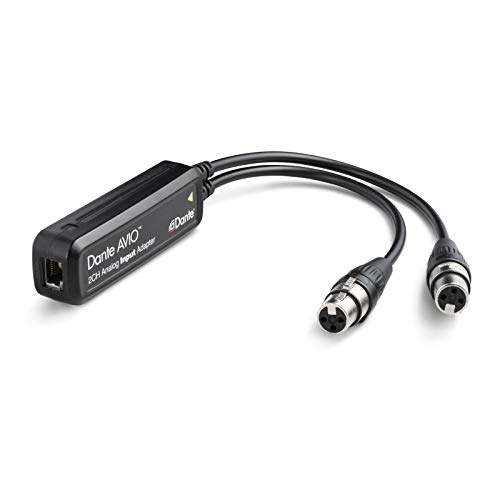
Simple Dante Retrofit – Audinate Dante AVIO 2-Channel
The Audinate Dante AVIO 2-Channel Analog Input Adapter is a straightforward way to add analog sources to a Dante network. Its two-channel design accepts equipment such as mixers, DI boxes, keyboard instruments, compressors, wireless microphone receivers, and other non-networked audio devices.
Best For: Adding two analog outputs from existing audio equipment to a Dante system.
Pros:
- Converts two analog channels to Dante
- Works with mixers, consoles, processors, DI boxes, and wireless mic receivers
- RJ45 network connection
- Useful for upgrading non-networked audio equipment
Cons:
- Limited to two analog input channels
- Adapter format may not replace a full recording interface
- Power plug is not included
The Dante AVIO is a practical retrofit option for systems that already have analog equipment but need network access. Choose it when simplicity and two-channel Dante integration matter more than full studio-interface features.
Best Software-Ready Pick – Yamaha RUio16-D Dante/USB Interface
The Yamaha RUio16-D is a flexible audio interface with Dante for Mac and Windows setups that need both networked and USB connectivity. It provides 16 Dante input and output channels, two mic inputs, two line-level outputs, and support for sample rates up to 96 kHz.
Best For: Computer-based Dante systems, live sound processing, and users who want VST Rack Pro with more than 30 plug-ins.
Pros:
- Combines 16×16 Dante connectivity with USB audio.
- Includes VST Rack Pro software and 30+ plug-ins.
- Works with both macOS and Windows.
- Supports sample rates up to 96 kHz.
Cons:
- Only two mic inputs and two line-level outputs are listed.
- Its 16-channel layout may be more than simple two-channel applications require.
Choose the RUio16-D when software integration and flexible Dante-to-computer routing matter most. Its channel count and bundled processing software make it a strong fit for more involved production setups.
Best Compact Dante Input – Allen & Heath DT20-X Dante Input Interface
The Allen & Heath DT20-X is a compact audio interface with Dante designed to add two XLR input channels to compatible Dante systems. It includes a power supply and supports PoE, making it a practical option for focused input expansion.
Best For: AHM systems, Dante-enabled mixers, and installations that need two additional XLR inputs.
Pros:
- Provides two Dante input channels.
- Uses XLR audio input connections.
- Supports both PoE and the included power supply.
- Supports sample rates up to 96 kHz.
Cons:
- Two-channel input capacity is limited for larger systems.
- Its stated compatibility centers on AHM systems, Dante systems, and mixers.
The DT20-X is best viewed as a targeted Dante input node rather than a general-purpose multichannel interface. Its compact two-channel design suits installations where simple XLR expansion is the priority.
Best Stage-Box Expansion – Yamaha Tio1608-D2 Dante Stage Box
The Yamaha Tio1608-D2 is a Dante-enabled stage box for Yamaha TF mixers with Dante cards and related systems. Its 3U rack format provides 16 inputs and 8 outputs, with 96 kHz support and recallable D-PRE preamplifiers.
Best For: Yamaha TF and DM3-based live sound systems that need substantial remote I/O over Dante.
Pros:
- Offers 16 inputs and 8 outputs in a 3U rack unit.
- Provides Dante Ethernet connectivity.
- Supports sample rates up to 96 kHz.
- Includes QUICK CONFIG Mode for DM3 and TF series and recallable D-PRE preamplifiers.
Cons:
- Compatibility is specifically listed with Yamaha TF mixers featuring Dante cards.
- At 12.6 pounds and 3U, it is less portable than compact interfaces.
- The listed warranty is one year.
The Tio1608-D2 is the strongest choice here for high-channel-count stage I/O, especially within a Yamaha-centered workflow. Confirm mixer compatibility and rack space before buying.
Best for Large Dante Systems – RedNet PCIeNX
For demanding computer-based setups, the Focusrite RedNet PCIeNX is an audio interface with Dante that provides 128×128 channels at 24-bit/192kHz. Its PCIe connectivity, dual Ethernet ports, and support for AES67 make it suited to large-scale production and installation workflows.
Best For: High-channel-count studio, broadcast, immersive audio, and professional networked-audio systems.
Pros:
- 128×128 Dante channels at up to 192kHz with ultra-low round-trip latency.
- Dual RJ-45 ports support switched or redundant network operation.
- Works with Windows and Mac systems, including Intel and Apple Silicon computers.
- Supports AES67 and SMPTE ST 2110 compliance when the required DDM setup is used.
Cons:
- The optional upgrade is required for 256×256 channel operation.
- PCIe-based installation may be more involved than a standalone network box.
- Its extensive capacity may be unnecessary for smaller systems.
The RedNet PCIeNX is the strongest choice here when channel count, latency, and computer integration matter most. Its three-year warranty and 24/7/365 technical support add reassurance for professional deployments.
Best Compact XLR Converter – ToVi Dante XLR Encoder
The ToVi Dante XLR Audio Encoder is a compact audio interface with Dante for converting two balanced or unbalanced XLR sources into Dante network streams. It supports 96kHz/24-bit audio, adjustable input sensitivity, and either PoE or USB-C power.
Best For: Small AV, conference, broadcast, live-sound, and installed systems needing two XLR inputs on a Dante network.
Pros:
- Converts two XLR inputs to Dante audio with low-latency transmission.
- Supports PCM audio up to 96kHz/24-bit.
- Five selectable sensitivity levels accommodate professional and consumer sources.
- PoE or USB-C power supports flexible installation, with transmission up to 328 feet over suitable cabling.
Cons:
- Provides only two input channels.
- It is an encoder rather than a full computer-oriented multichannel interface.
- Network operation requires compatible Dante-enabled or AES67-compliant equipment.
Choose the ToVi when you need a straightforward way to place two XLR sources onto a Dante network. Its gain options and dual-power approach make it practical for varied signal levels and installation conditions.
Best Four-Input Dante Box – MAXSQUARE MSQ-3900D
The MAXSQUARE MSQ-3900D is an audio interface with Dante built around four 3-pin XLR inputs. It sends uncompressed, low-latency audio over Dante or AES67 and supports common sample rates through 96kHz, with PoE and Type-C power options for flexible installation.
Best For: Professional AV, conference, and installed-audio systems needing four networked analog inputs.
Pros:
- Four XLR inputs provide more source capacity than two-channel converters.
- Supports 44.1kHz, 48kHz, and 96kHz sample rates.
- Handles Dante audio over IP and AES67 RTP transport with uncompressed, low-latency transmission.
- PoE and Type-C power options simplify deployment.
Cons:
- It is designed for analog XLR input rather than broad computer-interface connectivity.
- The listed frequency-response detail is 48kHz, despite support for sample rates up to 96kHz.
- Includes a one-year limited warranty, shorter than the coverage listed for the Focusrite option.
The MSQ-3900D is a practical middle ground for systems that need four XLR inputs without moving to a large PCIe interface. Its aluminum housing, PoE support, and AES67 compatibility suit permanent or professional network installations.
How We Picked the Best Audio Interface with Dante
We focused on products that provide a practical connection to a Dante audio network, whether they function as a computer interface, analog input adapter, stagebox, PCIe card, or dedicated network endpoint. The selection includes compact two-channel devices, multi-input rack units, and high-capacity systems for larger production environments.
We considered connection type, analog I/O, channel capacity, sample-rate support, synchronization options, power requirements, physical format, and likely use case. Because these products serve different roles, the most expensive or highest-channel-count option is not automatically the best choice for every buyer.
Quick Comparison
| Best For | What to Prioritize | Typical Product Type |
|---|---|---|
| Computer recording | USB or PCIe connectivity, driver support, monitoring | Dante/USB interface or PCIe card |
| Live sound | Remote I/O, rugged rack format, channel density | Dante stagebox or input interface |
| Installed audio | PoE, compact housing, simple analog conversion | Dante adapter or network interface box |
| Broadcast and large studios | High channel count, clocking, redundancy, scalability | Professional PCIe or rack interface |
Key Buying Factors for an Audio Interface with Dante
Connection to Your Host System
First decide how audio reaches your computer or console. USB models are generally convenient for mobile rigs and smaller studios, while PCIe interfaces are designed for high-channel-count computer systems with demanding, low-latency workflows. Some Dante devices do not connect directly to a computer at all; they simply place analog signals onto the network.
Inputs, Outputs, and Channel Capacity
Count the sources you need now and leave room for expansion. Two-channel adapters suit a pair of microphones, stereo playback, or a single source feed. Larger interfaces and stageboxes are better for drum kits, multi-microphone sessions, venue inputs, and distributed systems. Check whether the listed channel count refers to analog inputs, network channels, or total simultaneous I/O.
Network, Clocking, and Power Requirements
Confirm the device’s Dante compatibility, supported sample rates, network connection, and synchronization features. PoE can simplify installations by supplying power through a compatible network switch, but not every Dante interface supports it. For larger systems, look for clocking options, redundant networking, and clear configuration support.
Physical Design and Workflow
Rackmount hardware fits touring racks, machine rooms, and broadcast facilities, whereas compact adapters are easier to place near a source or behind a wall plate. Also consider XLR versus line-level connections, front-panel controls, gain adjustment, and whether setup depends on software or a Dante Controller-based workflow.
Who Should Buy Which Audio Interface with Dante?
Choose a Compact Adapter for Simple Analog Feeds
Two-channel Dante adapters and small XLR interfaces are sensible for single microphones, stereo sources, intercom feeds, conference rooms, and distributed installation audio.
Choose a USB Dante Interface for Flexible Studio Work
A USB-equipped unit is a strong fit when you need to record or monitor Dante channels from a laptop or desktop without building a PCIe-based system.
Choose a Stagebox for Live Production
Live engineers and venues should prioritize remote analog I/O, rack durability, channel density, and compatibility with the existing console and Dante network.
Choose PCIe for High-Channel Professional Systems
Studios, broadcast facilities, and production rooms handling many network channels should consider a high-capacity PCIe interface, provided the computer, network, clocking, and software environment are ready for it.