Choosing the right mixer can make your streams sound instantly more polished. The best podcast mixer consoles for streaming give you cleaner voice capture, faster level control, and fewer audio headaches mid-broadcast.
In this roundup, we focused on creator-friendly options that balance sound quality, ease of use, and the right features for solo hosts, teams, and live content workflows.
Best 10 Podcast Mixer Consoles for Streaming Picks for 2026
Compact All-in-One Studio
RØDECaster Duo for Podcasting & Streaming

- Two Revolution Preamps with 76dB gain
- Four faders and touchscreen control
- Six SMART pads plus APHEX processing
Best For: Solo creators and small two-person podcast or stream setups
Adaptive Creator Console
Mackie DLZ Creator for Podcasts & Live Streams
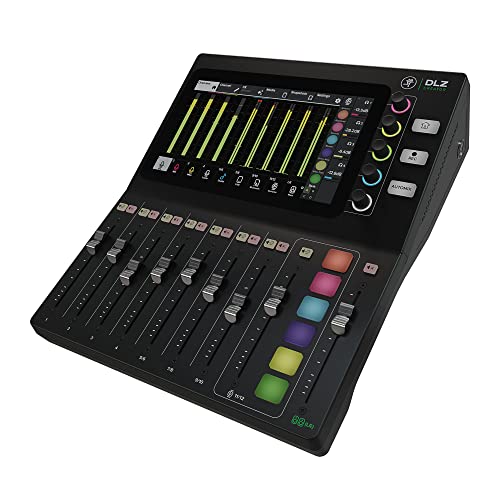
- Easy, Enhanced, and Pro touchscreen modes
- AutoMix for up to four mics
- USB-C or SD multitrack recording
Best For: Creators who want flexible controls and room to grow
Portable Multi-Channel Mixer
Roland GO:MIXER Studio for Creators

- Up to 12 inputs in a compact unit
- 24-bit/192 kHz with onboard EQ and reverb
- Scene memories and Loop Back support
Best For: Mobile creators and musicians needing a portable audio hub
Starter Streaming Bundle
Podcast Mixer Kit with Mic and Effects

- Includes mixer, condenser mic, and accessories
- Noise reduction plus voice changer effects
- Plug-and-play with PC, phone, tablet
Best For: Beginners who want a simple all-in-one streaming bundle
Portable Mobile Mixer
Roland GO:MIXER PRO-X for Phones and Tablets

- Mixes up to 7 sources
- Loop back for backing tracks
- Battery or smartphone powered
Best For: Mobile podcasting and livestreaming on phones or tablets
Live Streaming Mixer
Yamaha AG06MK2 6-Channel USB Interface

- 6-channel USB mixer/interface
- Loopback and DSP effects
- Two phantom-powered mic inputs
Best For: Desktop streamers and podcasters using condenser microphones
Gaming Stream Mixer
FIFINE AmpliGame SC3 for Podcasts

- One XLR input with 48V phantom power
- Individual channel and mute control
- Built-in voice effects and RGB
Best For: PC streamers and podcasters using XLR microphones
Compact All-in-One Stream Mixer
MAONO Podcast Equipment Bundle

- Includes mixer, microphone, cables, and tripod in one box.
- Offers built-in effects, voice changer modes, and monitoring.
- Compatible with PC, smartphones, iPhone, and tablets.
Best For: Beginners who want a ready-to-use streaming and podcast bundle
Gaming Voice Control Mixer

- Includes voice changer, reverb, and 4 programmable sound pads.
- Noise cancellation is designed to cut fan noise and room hum.
- Bluetooth input supports wireless background audio only.
Best For: Gamers and streamers who want sound effects and voice shaping
Studio-Style Multi-Platform Mixer

- Comes with two condenser mics and suspension arms.
- Adds noise reduction, DSP processing, and voice modes.
- Compatible with PC, mobile devices, consoles, and more.
Best For: Creators wanting a fuller bundle for streaming and recording
Compact All-in-One Studio – RØDECaster Duo for Podcasting & Streaming
If you want podcast mixer consoles for streaming that keep the setup compact without cutting pro features, the RØDECaster Duo is built for that middle ground. It combines a mixer, interface, and production tools in one desktop unit, with two high-gain Revolution Preamps, four faders, onboard APHEX processing, and a touchscreen workflow designed for fast show control.
Best For: Solo creators or two-host shows that want a compact all-in-one mixer for podcasting and streaming.
Pros:
- Two Neutrik combo jacks with ultra-low-noise Revolution Preamps for clean mic capture.
- Four broadcast-quality faders plus a haptic touchscreen for hands-on control.
- Six SMART pads with bank switching for sound triggers and workflow shortcuts.
- APHEX processing, including Aural Exciter and Big Bottom, adds polished broadcast-style tone.
Cons:
- Only two mic/instrument inputs, so it is not ideal for larger panels.
- Built as a corded desktop unit, so it is less portable than compact mobile mixers.
The Duo makes sense if you want a streamlined production center instead of a pile of separate gear. It is especially appealing when you care about clean preamps, quick control, and built-in effects in a small footprint.
Adaptive Creator Console – Mackie DLZ Creator for Podcasts & Live Streams
For buyers comparing podcast mixer consoles for streaming, the Mackie DLZ Creator stands out because it adapts to your experience level instead of forcing one workflow. Its Easy, Enhanced, and Pro modes change the touchscreen layout, while AutoMix, Onyx80 preamps, and multitrack USB-C or SD recording make it a practical choice for creators who want flexible control and solid results.
Best For: Podcasters and streamers who want an adaptable mixer that scales from beginner-friendly use to deeper control.
Pros:
- Three control modes let the 10.1-inch touchscreen match your skill level.
- AutoMix helps balance up to four microphones during multi-person recordings.
- Multitrack recording via USB-C or directly to SD card supports flexible workflows.
- Up to four customized headphone mixes are useful for hosts and guests.
Cons:
- At 9.12 pounds, it is much less portable than smaller creator mixers.
- Its larger footprint takes more desk space than compact all-in-one units.
This is a strong fit if you want a mixer that can grow with you. The adaptive interface and self-contained recording options make it especially useful for creators who split time between podcasting, YouTube, and live streaming.
Portable Multi-Channel Mixer – Roland GO:MIXER Studio for Creators
If portability matters as much as sound quality, the Roland GO:MIXER STUDIO is a smart pick among podcast mixer consoles for streaming. It offers up to 12 input channels, two XLR inputs, onboard EQ/compressor/reverb, and 24-bit/192 kHz recording support, all in a compact USB-C mixer that can work with mobile devices or a macOS computer.
Best For: Mobile creators and musicians who need a compact mixer with pro-style audio tools.
Pros:
- Compact design with 12 inputs and six outputs for flexible routing.
- Two XLR inputs plus 48V phantom power support mics and line-level sources.
- Onboard EQ, compressor, and reverb provide practical processing for live use.
- Scene memories and Loop Back make it easier to recall setups and blend backing tracks.
Cons:
- Computer support is limited to macOS, which narrows compatibility for some users.
- 48V phantom power requires sufficient 15W power from the source.
This model is best when you need a small mixer that still handles serious inputs and processing. It is particularly useful for creators who move between recording, streaming, and music-centered content.
Starter Streaming Bundle – Podcast Mixer Kit with Mic and Effects
For beginners shopping podcast mixer consoles for streaming, this bundle is built as an all-in-one entry point. It pairs a live sound board with a condenser microphone and includes voice effects, noise reduction, and real-time tone controls, so you can get a simple streaming or podcast setup running without having to source every piece separately.
Best For: First-time creators who want an affordable-style bundled setup for streaming, gaming, and casual podcasting.
Pros:
- Complete bundle includes mixer, microphone, and accessories for a streamlined start.
- Built-in noise reduction helps deliver clearer vocal output.
- Voice changer, sound effects, and singing mode add interactive options for live content.
- Works with PC, phone, tablet, Windows, Mac, iOS, and Android with plug-and-play setup.
Cons:
- Only two channels, so it is not suited to more complex multi-mic shows.
- Battery-powered design may not match the permanence of a desk-based studio unit.
This bundle is less about advanced production and more about making it easy to start. If you want a simple, flexible path into live audio control, it covers the basics and adds a few creator-friendly extras.
Portable Mobile Mixer – Roland GO:MIXER PRO-X for Phones and Tablets
If you’re shopping for podcast mixer consoles for streaming on a phone or tablet, the Roland GO:MIXER PRO-X is built for compact, mobile setups. It lets you connect and blend up to seven audio sources, including microphones and instruments, while the loop back function helps you play along with backing tracks from your device.
Best For: Mobile creators, podcasters, and livestreamers who want a small mixer for phone- or tablet-based recording.
Pros:
- Connects and mixes up to seven audio sources for flexible mobile content creation.
- Includes loop back for working with backing tracks from your device.
- Supports microphones and instruments, with 48 V phantom power available via XLR.
- Runs on smartphone power or four AAA alkaline batteries for portable use.
Cons:
- Designed around mobile devices rather than a full desktop streaming desk.
- Four-channel layout may feel limited if you need a traditional larger mixer surface.
For creators who want a compact, travel-friendly mixer, this Roland unit focuses on practical mobile streaming basics with simple power options and broad input support. It is a strong fit when your podcast or livestream setup lives on a phone or tablet.
Live Streaming Mixer – Yamaha AG06MK2 6-Channel USB Interface
For podcast mixer consoles for streaming on a desktop or hybrid setup, the Yamaha AG06MK2 combines a 6-channel mixer with a USB audio interface and loopback support. It also adds DSP effects, a mute button, and two phantom-powered mic inputs, giving streamers and podcasters useful control without a complicated workflow.
Best For: Streamers and podcasters who want a wired mixer/interface with onboard effects and phantom power for condenser mics.
Pros:
- 6-channel layout with USB audio interface for streaming and recording.
- Loopback function and mute button are designed for live streaming.
- Two phantom-powered mic inputs support condenser microphones.
- Includes DSP effects plus AG Controller software for Windows, Mac, and iOS.
Cons:
- Requires wired, corded-electric operation rather than battery portability.
- Larger and heavier than pocket-size mobile mixers.
The AG06MK2 is a practical choice if you want more hands-on control than a basic audio interface and need streaming-friendly tools built in. Its software bundle and loopback features make it especially convenient for voice-focused content.
Gaming Stream Mixer – FIFINE AmpliGame SC3 for Podcasts
If you want podcast mixer consoles for streaming with more hands-on control, the FIFINE AmpliGame SC3 is aimed at PC-based creators who use XLR mics. It offers individual channel control, mute and monitor buttons, 48V phantom power, and extra sound effects that can add variety to podcast or livestream audio.
Best For: PC streamers, beginner podcasters, and gaming creators who want a feature-rich XLR mixer.
Pros:
- One XLR microphone input with built-in 48V phantom power.
- Independent control for microphone, line in, headphone, and line out channels.
- Front mute and monitor buttons make live adjustments easier during streams.
- Includes voice-changing modes, auto tune options, and customizable sound effect buttons.
Cons:
- Not compatible with USB microphones.
- XLR cable is not included.
- RGB styling and effects may be more than some podcast-only users need.
This mixer is a strong fit if you want a compact desktop control center for streaming and recording with XLR gear. Its built-in effects and channel controls make it particularly appealing for creators who want flexibility without relying only on software.
Compact All-in-One Stream Mixer – MAONO Podcast Equipment Bundle
If you want podcast mixer consoles for streaming that are simple to start with, this MAONO bundle is built around an all-in-one workflow. It combines a mixer, included 3.5mm condenser mic, voice effects, and built-in monitoring, so you can get a basic live setup running quickly on PC, smartphone, or tablet with minimal extra gear.
Best For: New streamers and podcasters who want an easy plug-in bundle with voice effects and basic multi-device support.
Pros:
- All-in-one bundle includes mixer, microphone, cables, tripod, and windscreen.
- Supports live streaming for up to 2 people, with 4 devices and 4 platforms.
- Built-in sound effects, recordable effects, voice changer modes, and real-time monitoring.
- Works with Windows, Mac OS, iOS, Android, and most laptops or smartphones with the right connection.
Cons:
- Only supports 3.5mm microphone input and does not offer phantom power.
- Some phones may need an OTG adapter, which is not included.
- Guitar or keyboard connections require an additional adapter not included in the box.
This is a practical starter option if you want an integrated mixer and mic package rather than building a setup piece by piece. Its strength is convenience and built-in creative controls, while the main tradeoff is that it stays within a simpler 3.5mm-based system.
Gaming Voice Control Mixer – PUPGSIS Audio Interface
Among podcast mixer consoles for streaming, this PUPGSIS unit is aimed at creators who want more live voice control and sound customization. It combines a voice changer, adjustable reverb, noise cancellation, and programmable sound-effect pads in a single interface designed for streaming, podcasting, and gaming.
Best For: Streamers and gamers who want real-time voice effects, noise reduction, and custom sound pads.
Pros:
- Built-in voice changer, adjustable reverb, and 4 customizable sound effect pads.
- Noise cancellation helps reduce background hum and fan noise in louder rooms.
- Bluetooth input can stream background audio wirelessly into the mixer.
- Designed as an all-in-one audio hub for live streaming, podcasting, and gaming.
Cons:
- Not compatible with 48V dynamic microphones or USB microphones.
- XLR mic use requires a 1/4″ TRS to XLR cable, which is not included by default.
- Bluetooth is input-only, so it cannot be used for wireless headphones or mic output.
This is a good fit if your priority is on-the-fly voice styling and simple soundboard control. Just make sure your mic setup matches the supported connection type before buying, since the compatibility limits are more specific than on some other mixers.
Studio-Style Multi-Platform Mixer – BRVOMUSSY Podcast Bundle
If you are comparing podcast mixer consoles for streaming with broader device support, this bundle leans toward a more complete creator kit. It pairs two condenser mics with a sound card and voice effects, plus USB-C connectivity for quick use with PC, smartphones, and tablets in podcasting, live streams, or video content.
Best For: Creators who want a feature-rich bundle with two mics, voice effects, and wide platform compatibility.
Pros:
- Includes two broadcast-style condenser microphones and suspension arms.
- Offers smart noise reduction, DSP audio processing, and 360° omnidirectional capture.
- Provides multiple voice modes and 10 sound effects for streaming or recording.
- Supports a wide range of platforms, including Windows, Mac OS, Android, iOS, Chrome OS, PS5, and Xbox.
Cons:
- Uses XLR audio input, so it is not as plug-and-play simple as some 3.5mm bundles.
- Battery-powered design means charging is part of the setup routine.
- Instrument input is a strong feature, but the product is still centered on a bundled all-in-one workflow.
This bundle makes sense if you want more of a studio-style kit instead of a bare mixer. The main appeal is the combination of included mics, cross-platform support, and a broad set of voice and sound controls in one package.
How We Picked the Best Podcast Mixer Consoles for Streaming
We prioritized Podcast Mixer Consoles for Streaming that offer reliable microphone inputs, straightforward controls, useful monitoring tools, and features that reduce setup time. We also looked for models that suit different creator needs, from simple plug-and-play bundles to more advanced mixers with DSP, loopback, and multi-source routing.
Quick Comparison
Before buying, compare input count, mic preamp quality, monitoring options, phantom power, loopback support, and whether the unit works best with a PC, smartphone, or standalone streaming setup. If you record guests or switch between platforms often, routing flexibility matters more than extra effects.
Key Buying Factors for Podcast Mixer Consoles for Streaming
Inputs and Source Flexibility
Think about how many microphones, phones, instruments, or computer audio sources you need at once. Solo creators may only need a compact two-channel setup, while interview shows and gaming streams benefit from more inputs and faster channel switching.
Preamp Quality and Gain Control
Clear, low-noise preamps help voices stay full without needing heavy processing. Good gain control is especially important if you use dynamic microphones, since weak preamps can make your signal harder to manage.
Loopback, Monitoring, and Effects
Loopback is useful when you want system audio, calls, or game sound mixed into your stream. Direct monitoring helps you hear problems before viewers do, and basic DSP tools like EQ, compression, or noise reduction can improve consistency without extra software.
Workflow and Ease of Use
The best Podcast Mixer Consoles for Streaming should speed up your setup, not complicate it. Physical faders, mute buttons, app control, and preset modes can save time during live sessions, especially for creators who switch between recording and streaming regularly.
Who Should Buy Which Podcast Mixer Consoles for Streaming?
Choose a compact all-in-one unit if you want the simplest path to professional-sounding solo podcasting or streaming. Pick a more feature-rich digital mixer if you need routing control, multiple voices, or frequent guest sessions. Smartphone-focused mixers work well for mobile creators, while bundle kits may suit beginners who want an easier starter package without assembling every component separately.