The right projector mount can improve image alignment, reclaim table space, and make a home theater or presentation room feel much cleaner. The wrong one can create installation headaches, cable strain, or compatibility problems.
We selected 10 projector mounts covering fixed and adjustable ceiling designs, wall installation, drop ceilings, full-motion positioning, and compact projectors. Use the guide below to narrow your options by projector size, mounting surface, adjustment needs, and installation space.
Best 10 Projector Mounts Picks for 2026
Best Low-Profile Pick
VIVO Adjustable Ceiling Projector Mount

- Supports up to 30 pounds
- 15° tilt, swivel, and 360° rotation
- Holds projector 6 inches from ceiling
Best For: Compact ceiling installations
Best Cable-Management Option
WALI Universal Projector Mount

- Supports ceiling and wall mounting
- Built-in cable storage
- Adjustable ceiling and wall lengths
Best For: Flexible installations with tidy cables
Best Extended Ceiling Mount
VIVO Extending Projector Mount
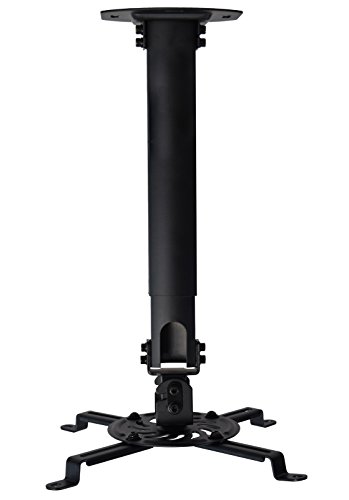
- Extends 15–23 inches from ceiling
- Supports up to 30 pounds
- Adjustable tilt, swivel, and rotation
Best For: High ceilings and adjustable projector height
Best Heavy-Duty 3-in-1 Mount
Mount-It! MI-604 Projector Mount
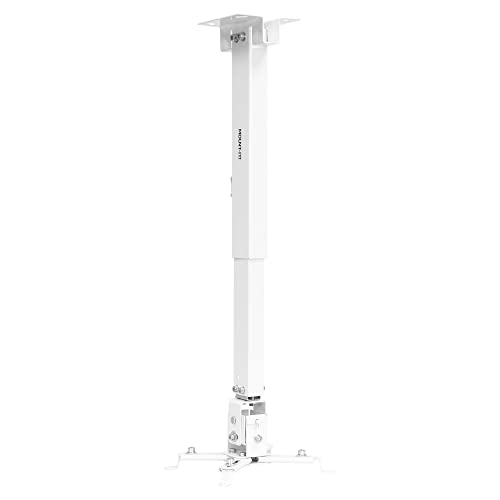
- Supports up to 44 pounds
- Works on walls or ceilings
- Includes cable management
Best For: Heavy projectors and versatile installations
Best for Easy Setup
VIVO Adjustable Ceiling Projector Mount
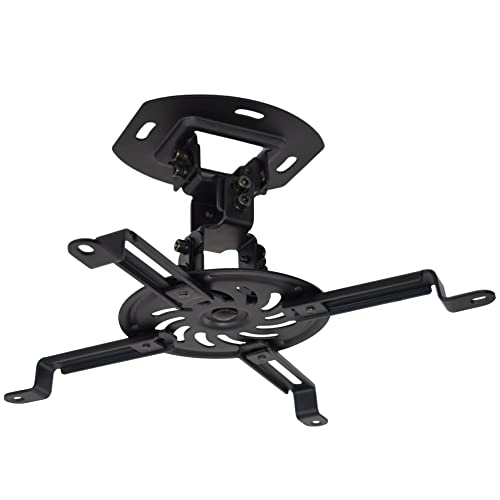
- Supports up to 30 pounds
- ±15° tilt and swivel with 360° rotation
- Low-profile 6-inch ceiling clearance
Best For: Home theaters and offices needing a sturdy, compact ceiling mount
Best Extended-Reach Pick
DYNAVISTA Full Motion Projector Mount
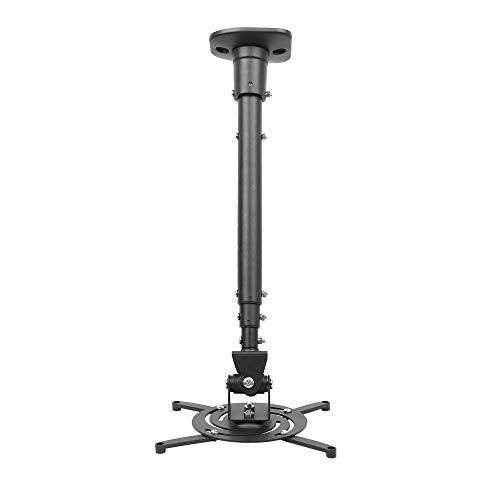
- Extends up to 43.6 inches
- Supports up to 30 pounds
- 25° tilt, 90° swivel, and 360° rotation
Best For: High or offset flat-ceiling installations needing extra reach
Best Mini Projector Pick
suptek PR05MINI Adjustable Mount

- Fits 1/4-inch, M4, or M6 threads
- Works on ceilings, sloped ceilings, or walls
- 13.38–21.25-inch height adjustment
Best For: Single-hole mini projectors needing flexible installation options
Best Drop-Ceiling Kit
AMRDCP100KIT Universal 2 x 2 ft Mount

- Fits 2 x 2-foot suspended ceilings
- Multiple holes aid projector alignment
- Supports up to 13.61 kg
Best For: Drop-ceiling projector installations
Best Adjustable Compact Mount
Aurzen Rotating and Tilting Ceiling Bracket

- 360-degree rotation and 90-degree tilt
- Pole extends from 9 to 15 inches
- Supports up to 2.5 kg on ceilings
Best For: Lightweight projectors with centered 1/4-inch threads
Best Heavy-Duty Versatile Mount
Tonalee Wall or Ceiling Projector Bracket

- Works for wall, flush ceiling, or telescoping ceiling setups
- Offers 30-degree tilt and swivel adjustment
- Ceiling support is rated up to 40 lbs
Best For: Solid-wall or ceiling installations needing flexible reach
Best Low-Profile Pick – VIVO Adjustable Ceiling Projector Mount
If you need projector mounts for a standard ceiling installation, the VIVO VP01W offers a sturdy, low-profile setup with broad angle adjustment. It supports up to 30 pounds and places the projector just 6 inches from the ceiling.
Best For: Home theaters, offices, and rooms where a compact ceiling installation is preferred.
Pros:
- Supports projectors up to 30 pounds.
- Provides 15-degree tilt, 15-degree swivel, and 360-degree rotation.
- Quick-release hooks and included hardware simplify installation.
- Low-profile design sits 6 inches from the ceiling.
Cons:
- Requires specific mounting-hole spacing for compatibility.
- Not compatible with several listed Epson, Mitsubishi, and LG models.
- Extension arms must be removed for mini projectors.
This is a practical choice when you want a strong, adjustable projector mount without a long extension arm. Confirm your projector’s mounting-hole pattern before ordering.
Best Cable-Management Option – WALI Universal Projector Mount
Among projector mounts, the WALI PM-005-B stands out for flexible ceiling or wall installation and built-in cable storage. Its adjustable length and multi-dimensional positioning help accommodate different room layouts and screen configurations.
Best For: Home, office, or cinema setups that need flexible placement and tidier cabling.
Pros:
- Supports up to 22 pounds.
- Works for ceiling and wall mounting.
- Includes built-in cable storage to reduce tangles.
- Offers adjustable ranges for ceiling and wall installations.
Cons:
- Projector dimensions must be under 13.7 inches long and 8.6 inches wide.
- Lower weight capacity than the 30- and 44-pound alternatives.
- Its longer adjustment ranges may be unnecessary for simple installations.
The WALI is a versatile option when installation location and cable organization matter as much as basic support. Check both the projector dimensions and weight before choosing it.
Best Extended Ceiling Mount – VIVO Extending Projector Mount
For rooms needing extra clearance, the VIVO MOUNT-VP02B is one of the more adaptable projector mounts in this group. Its telescoping design extends the projector 15 to 23 inches from the ceiling while retaining full angle adjustment.
Best For: High ceilings, conference rooms, classrooms, and home theaters requiring adjustable projector height.
Pros:
- Telescopes from 15 to 23 inches below the ceiling.
- Supports projectors up to 30 pounds.
- Offers 15-degree tilt, 15-degree swivel, and 360-degree rotation.
- Uses quick-release hooks for installation and removal.
Cons:
- Not compatible with several listed Epson, Mitsubishi, and LG models.
- Requires mounting-hole spacing of 5.25 to 12.5 inches with arms.
- The extended design is less suitable when a low-profile mount is desired.
This mount makes sense when projector height needs to be adjusted rather than fixed close to the ceiling. Verify the mounting pattern and ensure the extended position suits your screen placement.
Best Heavy-Duty 3-in-1 Mount – Mount-It! MI-604 Projector Mount
The Mount-It! MI-604 is a strong choice among projector mounts when you want multiple installation methods. It supports flush-ceiling, telescoping-ceiling, and wall installation, with a 44-pound load capacity and integrated cable management.
Best For: Larger projectors and installations requiring wall or ceiling mounting flexibility.
Pros:
- Supports up to 44 pounds.
- Offers flush-ceiling, telescoping-ceiling, and wall installation.
- Provides 360-degree swivel with adjustable pitch and roll.
- Includes cable management for concealed, organized wiring.
Cons:
- Projector mounting holes must measure between 8.85 and 12.40 inches.
- Its 3.6-pound weight may make installation more involved than simpler mounts.
- Wall installation extends 16.9 to 25.6 inches from the wall.
Choose the MI-604 when load capacity and installation versatility are priorities. Its mounting-hole requirement is narrower than some universal designs, so measure the projector carefully first.
Best for Easy Setup – VIVO Adjustable Ceiling Projector Mount
For a dependable projector mounts setup in a home or office, the VIVO VP01B combines steel construction, broad compatibility, and a low-profile ceiling design. It supports projectors up to 30 pounds and allows tilt, swivel, and rotation adjustments for easier image alignment.
Best For: Home theaters and offices that need a sturdy, low-profile ceiling mount.
Pros:
- Supports projectors weighing up to 30 pounds.
- Offers ±15° tilt, ±15° swivel, and 360° rotation.
- Holds the projector just 6 inches from the ceiling.
- Includes hardware, instructions, and quick-release hooks.
Cons:
- Mounting holes must be no more than 31.8 cm apart.
- Mini projectors require the extension arms to be removed.
Its compact profile and flexible adjustment range make this a practical choice when you want a clean installation without sacrificing positioning control. Confirm the projector’s mounting-hole spacing before ordering.
Best Extended-Reach Pick – DYNAVISTA Full Motion Projector Mount
This DYNAVISTA projector mounts option is designed for installations that need extra reach from the ceiling. Its extendable arm adjusts from a compact 23 inches to 43.6 inches, while the full-motion design helps accommodate different viewing angles in home and office setups.
Best For: High or unusually positioned flat ceilings where extra projector reach is useful.
Pros:
- Supports projectors up to 30 pounds.
- Extends from 23 to 43.6 inches from the ceiling.
- Provides 25° tilt, 90° swivel, and 360° rotation.
- Arrives pre-assembled with mounting hardware and instructions.
Cons:
- Compatible mounting-hole spacing is limited to 12.1 inches or less.
- Designed for flat ceilings, according to the supplied notes.
- Longer extension may require careful screw tightening to reduce shaking.
The adjustable arm gives this mount more installation flexibility than a short fixed bracket, especially when ceiling height or room layout is a concern. Measure both the projector and ceiling position before installation.
Best Mini Projector Pick – suptek PR05MINI Adjustable Mount
The suptek PR05MINI is a versatile choice among projector mounts for compatible mini projectors and other devices with a single 1/4-inch, M4, or M6 thread. It supports ceiling, sloped-ceiling, and wall installation, with adjustable height for different room layouts.
Best For: Single-hole mini projectors or compatible devices needing ceiling or wall mounting.
Pros:
- Works with 1/4-inch, M4, or M6 threaded connections.
- Supports ceiling, sloped-ceiling, and wall installation.
- Adjusts from 13.38 to 21.25 inches in height.
- Provides 90° tilt and 360° pan/swivel.
Cons:
- Only supports single-hole installation.
- Not suitable for three-hole or four-hole projector installations.
- Threaded compatibility and projector weight must be verified before purchase.
Its multi-installation design and threaded adapters make it especially useful for compact projectors with the right mounting connection. Check the projector’s thread type and mounting pattern carefully, since this bracket is not a universal multi-hole mount.
Best Drop-Ceiling Kit – AMRDCP100KIT Universal 2 x 2 ft Mount
If you need projector mounts for a suspended ceiling, the Amer Mounts AMRDCP100KIT is built around a 2 x 2-foot drop-in ceiling layout. Its reinforced steel plate and multiple mounting holes are designed to help with projector positioning while providing a lightweight, heat-dissipating surface.
Best For: Drop-ceiling installations that need a sturdy 2 x 2-foot mounting plate and alignment flexibility.
Pros:
- Designed for 2 x 2-foot suspended drop ceilings.
- Multiple mounting holes support projector alignment.
- Reinforced steel and aluminum construction with a 13.61 kg maximum capacity.
Cons:
- Purpose-built for drop-ceiling installations rather than general wall mounting.
- The white, rectangular plate may be more noticeable in some ceiling designs.
Choose this model when compatibility with a suspended 2 x 2-foot ceiling grid is the priority. Its broad plate and mounting-hole layout make it a practical option for positioning a supported projector.
Best Adjustable Compact Mount – Aurzen Rotating and Tilting Ceiling Bracket
Among projector mounts for compact home theater or office setups, the Aurzen ceiling bracket stands out for its motion range and telescoping height. It rotates 360 degrees, tilts 90 degrees, and adjusts from 9 to 15 inches, provided your projector has a centered 1/4-inch thread and stays within the weight limits.
Best For: Lightweight projectors with a centered 1/4-inch thread that need flexible angle and height adjustment.
Pros:
- Offers 360-degree rotation and 90-degree vertical tilt.
- Telescoping pole adjusts from 9 to 15 inches.
- Includes the ceiling base, telescoping pole, screw kit, anchors, and manual.
Cons:
- Ceiling capacity is limited to 2.5 kg, with a 1 kg limit for wall installations.
- Requires a centered 1/4-inch thread and does not support off-center, M6, or M8 holes.
- Not compatible with the Aurzen D1 MAX.
This is a focused choice for lighter, thread-compatible projectors rather than a universal heavy-duty bracket. Confirm the projector’s mounting interface and installation surface before buying.
Best Heavy-Duty Versatile Mount – Tonalee Wall or Ceiling Projector Bracket
For shoppers comparing projector mounts that can work on a wall or ceiling, this Tonalee bracket offers three installation configurations: flush ceiling, telescoping ceiling, and wall mounting. Its steel construction and adjustable arms are intended for compatible projectors with three or four 3 mm or 4 mm screw holes.
Best For: Home or office installations needing wall-or-ceiling flexibility and a wide adjustment range.
Pros:
- Supports flush ceiling, telescoping ceiling, and wall installation.
- Provides plus-or-minus 30-degree tilt and swivel adjustment.
- Telescoping lengths range from 16.9 to 25.6 inches from the ceiling and 13.8 to 22.5 inches from the wall.
- High-grade steel construction is rated for projectors up to 40 lbs on ceiling installations.
Cons:
- Requires a hard, solid installation surface; regular drywall and vaulted ceilings are not supported.
- Not compatible with mini projectors.
- Projector compatibility depends on having three or four 3 mm or 4 mm screw holes.
This mount is appealing when installation flexibility and extended reach matter more than a compact design. Carefully verify both the projector’s screw-hole pattern and the structural strength of the mounting surface.
How We Picked These Projector Mounts
We focused on the installation details that matter most in everyday use: supported weight, mounting versatility, adjustment range, projector compatibility, cable management, and the type of ceiling or wall each design can handle. The list includes universal brackets, extended mounts for high ceilings, compact options for mini projectors, and a dedicated drop-ceiling kit.
Because product specifications and included hardware can vary, verify the manufacturer’s current load rating, screw-thread compatibility, and installation instructions before purchasing. A mount should support your projector with margin, not merely meet its listed weight.
Quick Comparison
| Best For | Recommended Style | What to Check |
|---|---|---|
| Standard home theater projectors | Adjustable ceiling mount | Weight limit, mounting pattern, tilt and swivel range |
| High ceilings | Extended or drop mount | Extension length, ceiling structure, vibration control |
| Wall installation | Wall or ceiling universal bracket | Clearance, stud or masonry support, lens position |
| Mini projectors | Compact adjustable mount | Thread adapters, low load capacity, ventilation clearance |
| Drop ceilings | Suspended drop-in mounting kit | Grid compatibility and structural support above the tiles |
Key Buying Factors for Projector Mounts
Weight and Mounting Pattern
Confirm the projector’s weight and threaded mounting-hole layout. Universal arms are convenient, but they must reach the holes without blocking vents, controls, or the lens. For heavier models, choose a mount with a meaningful capacity buffer.
Adjustment and Image Alignment
Tilt, swivel, rotation, and height adjustment help center the image without shimming the projector. Extended designs are useful when the lens must sit lower, but longer arms can increase movement and may need extra tightening.
Ceiling or Wall Compatibility
Do not attach a projector mount only to drywall or a ceiling tile. Use suitable studs, joists, masonry anchors, or structural support. Drop-ceiling installations generally require hardware that transfers the load to the building structure above the grid.
Cable Routing and Ventilation
Look for clearance around air intakes and exhaust vents, plus a clean route for power and video cables. Hidden cable management can improve appearance, but cables should not be sharply bent or pulled tight when the mount is adjusted.
Who Should Buy Which Projector Mounts?
Choose a standard adjustable ceiling bracket for most living rooms and offices. Pick an extending model when ceiling height or projector throw geometry requires additional drop. A wall-or-ceiling universal mount is more flexible for rooms where ceiling installation is impractical.
Mini-projector owners should use a compact mount with the correct thread adapters rather than adapting a full-size bracket. For suspended ceilings, select a purpose-built drop-in kit and confirm that the structure above the tiles can carry the combined mount and projector weight. If precise positioning matters, prioritize full-motion adjustment and locking hardware over the lowest price.