A reliable wireless video receiver can simplify live streaming by sending camera or computer footage to a monitor, capture device, switcher, or remote production station without adding long cable runs.
These 10 picks cover practical streaming needs ranging from plug-and-play HDMI kits to professional systems with SDI, UVC output, loop-through, dual-band operation, and multi-receiver support.
Best 10 Wireless Video Receivers for Live Streaming Picks for 2026
Versatile 4K Home Theater Pick

- 4K@30Hz receiver output
- Up to 165-foot open-air range
- Supports up to 8 transmitters
Best For: Home theaters, gaming, classrooms, and meetings
Multi-Display Presentation Pick
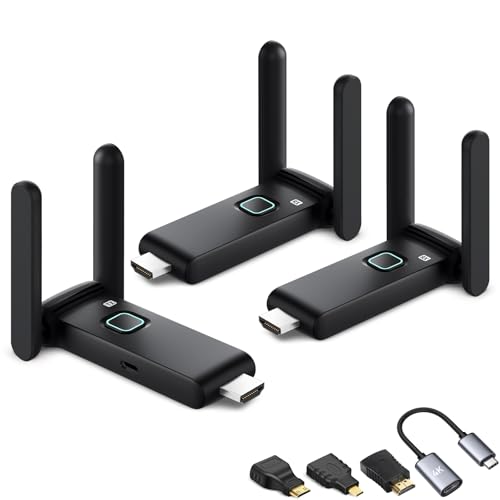
- Includes 1 transmitter and 2 receivers
- Supports synchronized multi-screen output
- Includes USB-C and mini-HDMI adapters
Best For: Classrooms, meetings, churches, and multi-room viewing
Live-Streaming Workflow Pick
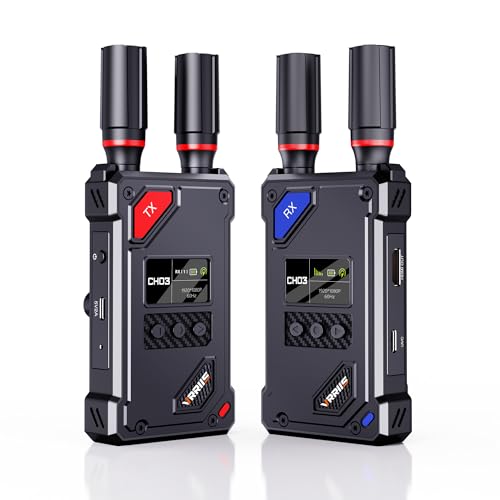
- UVC output for OBS streaming
- Up to 1,500-foot line-of-sight range
- 20 adjustable channels and HDMI loop-out
Best For: OBS streaming, event production, and camera monitoring
Long-Range Monitoring Pick

- Up to about 1,312-foot stated range
- 1080p@60Hz with 0.05-second latency
- HDMI loop-out and IR control
Best For: DSLR workflows, presentations, and local monitoring
Professional Long-Range Pick

- Dual-band 2.4GHz/5GHz transmission
- 0.05-second latency and up to 1,200-foot range
- HDMI and SDI support for 1080p/60fps
Best For: Professional monitoring and live production
Simple Travel Option
BRAIDOL TR30 Wireless HDMI Kit

- Plug-and-play mirroring and extension modes
- 1080p/60Hz output with 4K decoding
- Up to 98 feet or 30 meters of transmission
Best For: Portable HDMI display sharing
Production Workflow Pick

- 1080p/60fps transmission up to 300 meters
- 40ms latency with HDMI loopout support
- App tools for monitoring, adjustments, and review
Best For: Long-range live and film production
Long-Range Home & Venue Link

- 1080p at 60Hz with 0.05-second listed latency
- Loop-out and IR remote control included
- Supports up to 1TX to 5RX
Best For: Long-distance HDMI links for venues, presentations, and home entertainment
Multi-Screen Production Pick
Pro 820FT Wireless HDMI System

- 4K input with 1080p at 60Hz output
- One transmitter supports up to four receivers
- NP-F and USB-C power options
Best For: Live production, camera monitoring, and multi-screen events
Flexible Multi-Display Value
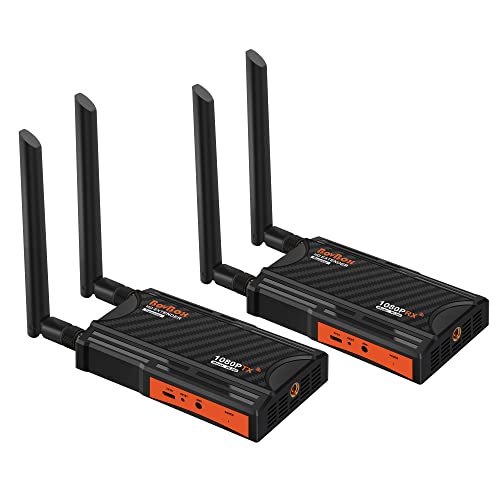
- 1080p at 60Hz over dual-band wireless
- Loop-out and IR remote support
- Expandable to 1TX and 4RX
Best For: HDMI distribution for cameras, offices, churches, and home setups
Versatile 4K Home Theater Pick – AIMIBO Wireless HDMI Kit
Among wireless video receivers for live streaming, the AIMIBO kit stands out for its 4K receiver output, plug-and-play setup, and broad adapter support. It can transmit HDMI video and audio up to 165 feet in open conditions, while its dual-band connection is designed for low-latency screen mirroring.
Best For: Home theaters, gaming, classrooms, meetings, and users who need 4K playback or multiple source devices.
Pros:
- Supports 4K at 30Hz through the receiver and 1080p at 60Hz through the transmitter and receiver.
- Plug-and-play operation without Bluetooth, Wi-Fi, or an app.
- Supports up to eight transmitters paired with one receiver.
- Includes mini-HDMI and micro-HDMI adapters for added compatibility.
Cons:
- Range can drop to about 32 feet through walls or floors.
- 4K output is limited to 30Hz.
- The transmitter and receiver must be connected to the correct device ports.
This is a flexible choice if you want wireless HDMI for entertainment, presentations, and occasional live workflows. Its 4K receiver support and included adapters add versatility, though users should account for reduced range through obstructions.
Multi-Display Presentation Pick – Wireless HDMI Splitter Kit
This wireless HDMI kit is a practical option among wireless video receivers for live streaming when one source needs to reach several displays. It includes one transmitter and two receivers, supports synchronized output, and can connect with additional receivers for meeting rooms, classrooms, or multi-room viewing.
Best For: Presentations, classrooms, churches, restaurants, and setups that need the same content on multiple screens.
Pros:
- Includes two receivers for simultaneous display on multiple screens.
- Supports up to four receivers from one transmitter, with additional device combinations listed by the manufacturer.
- Includes USB-C, mini-HDMI, and HDMI extension accessories.
- Supports 1080p at 60Hz with dual-band 2.4/5GHz transmission.
Cons:
- Transmission range can fall to about 32 feet through walls or floors.
- Interference in crowded Wi-Fi areas may require changing the wireless channel.
- More receivers can mean a more involved setup than a basic one-to-one kit.
Choose this model when synchronized multi-screen output matters more than a minimalist setup. Its included receivers and adapters make it useful for larger display systems, while the stated range and interference limitations should be considered during installation.
Live-Streaming Workflow Pick – Vrriis UVC Wireless System
For shoppers specifically comparing wireless video receivers for live streaming, the Vrriis system offers a useful UVC output for sending received footage to software such as OBS without a separate capture device. It combines 1080p transmission, manual channel selection, HDMI loop-out, and multiple power options for production and monitoring setups.
Best For: OBS-based streaming, camera monitoring, event production, and users who need channel control or UVC output.
Pros:
- UVC output lets the receiver feed video to a computer and streaming platforms such as OBS.
- Offers up to 1,500 feet of line-of-sight range in open, interference-free conditions.
- Provides 20 manually adjustable channels with signal and interference information on the LCD.
- Supports HDMI loop-out and power from USB-C, adapters, or NP-F batteries.
Cons:
- Walls, metal, brick, and glass can substantially reduce coverage.
- NP-F batteries are not included.
- Resolution is limited to Full HD 1080p at 60Hz.
This is the most directly streaming-oriented option in the group because its UVC output is designed to work with computer software such as OBS. It is a strong fit for controlled line-of-sight production environments, especially when channel management and local monitoring are important.
Long-Range Monitoring Pick – BovBox 1080p HDMI Extender
The BovBox extender is a straightforward choice among wireless video receivers for live streaming when you need Full HD output, long-range transmission, and local monitoring. It arrives paired for plug-and-play use, supports dual-band wireless transmission, and adds IR control plus HDMI loop-out.
Best For: DSLR workflows, outdoor presentations, sports viewing, conference rooms, and setups requiring a local monitor.
Pros:
- Advertises transmission up to about 1,312 feet with dual-band 2.4/5GHz wireless.
- Supports 1080p at 60Hz with stated 0.05-second latency.
- HDMI loop-out allows a local display for monitoring.
- Supports up to five receivers from one transmitter and includes IR remote control support.
Cons:
- Additional receivers can reduce the transmission distance.
- It does not offer the UVC streaming output described for the Vrriis system.
- Its stated long range is dependent on the environment and wireless conditions.
This model suits users who prioritize wireless distance, Full HD performance, and source-device monitoring. It is particularly practical for camera and presentation setups, but streamers who need direct computer capture should look for a system with explicit UVC output.
Professional Long-Range Pick – CineView SE Receiver
For demanding wireless video receivers for live streaming setups, the ACCSOON CineView SE emphasizes low latency, long reach, and flexible HDMI/SDI connectivity. This listing is for the receiver only, so verify that you have a compatible transmitter before buying.
Best For: Professional video monitoring, live production, and multi-device viewing where 1080p/60fps HDMI or SDI support matters.
Pros:
- Dual-band 2.4GHz and 5GHz transmission is designed to identify interference and combine streams.
- Claims ultra-low 0.05-second latency and transmission distances up to 1,200 feet.
- Supports HDMI and SDI connections with 1080p video up to 60fps.
- Compact aluminum design includes a 1.3-inch OLED display, silent cooling, and Accsoon GO app support.
Cons:
- This listing includes only the receiver.
- Its professional HDMI/SDI feature set may be more than casual users need.
The CineView SE stands out when signal resilience, long-distance operation, and production-oriented connections are priorities. Confirm transmitter compatibility and your required connection type before ordering.
Simple Travel Option – BRAIDOL TR30 Wireless HDMI Kit
The BRAIDOL TR30 is a straightforward choice among wireless video receivers for live streaming when you want plug-and-play HDMI mirroring or extension. It is built for short-range connections between common HDMI devices rather than phone- or tablet-based streaming.
Best For: Laptop, PC, TV box, projector, and display connections in homes, offices, classrooms, or travel setups.
Pros:
- Plug-and-play operation does not require apps, Bluetooth, or a Wi-Fi setup.
- Supports screen mirroring and screen extension modes.
- Provides 1080p output at 60Hz and supports 4K decoding.
- Compact design offers a claimed wireless range of up to 98 feet or 30 meters.
Cons:
- It is not suitable for connecting mobile phones or tablets.
- Walls and other obstacles can reduce transmission distance or speed.
- Some computers may require an external 5V/2A power source for the transmitter.
The TR30 favors convenience over production-focused controls: connect the HDMI hardware, choose mirroring or extension, and start viewing. It is a practical fit for short-range presentations and display sharing, but less suited to advanced camera workflows.
Production Workflow Pick – SYNCO XVision System
The SYNCO XVision is a full transmitter-and-receiver system for shoppers comparing wireless video receivers for live streaming, film work, and event production. It combines 1080p/60fps transmission with HDMI input/output, loopout, app-based monitoring, and a claimed 300-meter range.
Best For: Live streaming, TVC and film production, large events, and camera setups needing long-range monitoring and loopout flexibility.
Pros:
- Supports 1080p/60fps transmission over a claimed distance of up to 300 meters.
- Offers 40ms latency for responsive real-time monitoring.
- HDMI dual input/output and loopout support suit more involved production setups.
- SYNCO Link provides monitoring, image adjustments, screenshots, saving, and playback.
Cons:
- The system weighs 15.7 ounces, making it less minimal than compact receiver-only options.
- Its advanced production features may be unnecessary for basic display sharing.
- The supplied specifications do not identify included accessories or connector cables.
With app-assisted review, automatic pairing memory, a status display, and fanless 2W operation, the XVision is designed for efficient production use. Consider it when range and workflow tools matter more than the smallest possible setup.
Long-Range Home & Venue Link – 1300FT Wireless HDMI Extender
For shoppers comparing wireless video receivers for live streaming, this kit focuses on long-range 1080p transmission, simple setup, and flexible monitoring. It connects an HDMI source such as a DSLR, laptop, or set-top box to a TV or projector without running a long HDMI cable.
Best For: Home entertainment, church projections, conferences, and setups needing a local monitor plus remote source control.
Pros:
- Supports up to 1080p at 60Hz with listed 0.05-second latency.
- Advertised range reaches up to 1300 feet in an open field with reduced interference.
- Transmitter loop-out supports local monitoring, while included IR cables enable remote source control.
- Supports up to one transmitter and five receivers, though range decreases as receivers are added.
Cons:
- Walls, metal, brick, and glass can significantly reduce coverage.
- The product is designed for HDMI devices and does not provide direct wireless camera-network streaming.
This is a practical choice when range and straightforward point-to-point HDMI connectivity matter most. Its loop-out and IR features also make it more useful for presentations or monitoring than a basic transmitter-receiver pair.
Multi-Screen Production Pick – Pro 820FT Wireless HDMI System
Among wireless video receivers for live streaming, this professional-oriented system stands out for multi-screen distribution and portable event use. It accepts 4K input while delivering 1080p at 60Hz, making it suited to cameras, live production monitoring, presentations, and church events.
Best For: Live event crews, filmmakers, streamers, churches, and teams that need one HDMI source sent to several displays.
Pros:
- Supports 4K input and outputs 1080p at 60Hz with less than 0.06-second listed latency.
- One transmitter can send to up to four receivers; listed range is 820 feet with one receiver and 623 feet with four.
- Loop-out provides a local feed for monitoring or recording.
- Supports NP-F batteries or USB-C power banks for extended event use.
Cons:
- Multi-receiver operation reduces the listed transmission range.
- Output is 1080p even though the system accepts 4K input.
- Its professional feature set may be more than needed for a simple single-TV setup.
This is the strongest fit here for production workflows that require several viewing points. Battery support, local monitoring, and low listed latency give it useful flexibility for cameras and live events, while the reduced multi-receiver range should be planned for in advance.
Flexible Multi-Display Value – 820FT Wireless HDMI Kit
This BovBox kit is a straightforward option for shoppers seeking wireless video receivers for live streaming, presentations, or home viewing. It provides dual-band HDMI transmission at up to 1080p and includes loop-out and IR control for setups that need both a remote display and local monitoring.
Best For: PC, camera, console, church, office, and home entertainment setups that may expand to multiple displays.
Pros:
- Supports 1080p at 60Hz over 2.4GHz and 5.8GHz transmission bands.
- Advertised open-field range reaches up to 820 feet with one receiver.
- Loop-out enables local monitoring, and IR control supports remote source operation.
- Can support up to one transmitter and four receivers, with stated range estimates for each configuration.
Cons:
- The listed 0.06-second delay may be noticeable for real-time gaming.
- Range decreases as additional receivers are added.
- Performance depends on placement; the manufacturer recommends raising the units above the ground for longer transmission distance.
With broad HDMI compatibility and a clear upgrade path to multiple screens, this kit is a versatile middle-ground option. It is best suited to video distribution and monitoring where a small amount of latency is acceptable.
How We Picked the Best Wireless Video Receivers for Live Streaming
We focused on the features that matter during real broadcasts: dependable wireless performance, supported resolutions and frame rates, connection flexibility, latency, range, setup simplicity, and monitoring options. The selection includes consumer-friendly HDMI extenders as well as more advanced systems designed for cameras, switchers, capture hardware, and field production.
Because advertised range depends on walls, interference, antenna placement, and line of sight, treat maximum-distance claims as best-case figures. A receiver with stable performance at a shorter working distance is often more useful than one with an impressive but inconsistent headline range.
Quick Comparison
- Best for simple setups: Plug-and-play HDMI transmitter and receiver kits.
- Best for multiple displays: Models supporting two or more receivers or multi-monitor distribution.
- Best for camera production: Systems offering 1080p at 60fps, low latency, loop-out, or SDI connectivity.
- Best for computer capture: A receiver with UVC output for direct compatibility with streaming software and USB capture workflows.
- Best for longer links: Long-range systems with clear line-of-sight placement and robust antenna design.
Key Buying Factors for Wireless Video Receivers for Live Streaming
Compatibility and Outputs
Check the source and destination connections before buying. HDMI is common for cameras, laptops, consoles, and switchers, while SDI is more useful in professional video environments. UVC output can simplify webcam-style workflows by allowing compatible streaming applications to recognize the receiver as a video source.
Resolution, Frame Rate, and Latency
For most live broadcasts, 1080p at 60fps provides a practical balance of image quality and bandwidth. Low latency is especially important for presenters, camera operators, interviews, and interactive events. A system that adds noticeable delay can make monitoring and conversation difficult even when the picture looks sharp.
Range and Interference
Dual-band 2.4GHz/5GHz operation may improve flexibility, but the best frequency depends on local congestion and obstructions. Keep transmitters and receivers away from crowded wireless equipment, and use clear line of sight whenever possible. Consider loop-out if you need to monitor the source locally while sending video wirelessly.
Power and Daily Usability
Confirm how each unit is powered and whether the kit includes the required adapters, cables, antennas, and mounting accessories. Manual channel selection, automatic pairing, IR pass-through, and compact designs can make a major difference when equipment must be moved or reset quickly.
Who Should Buy Which Wireless Video Receivers for Live Streaming?
Choose a basic plug-and-play HDMI kit for occasional streaming, classroom presentations, home studios, or sending one source to a nearby display. Select a multi-receiver model when the same feed must reach several monitors. Camera operators and event producers should prioritize low latency, 60fps support, loop-out, and reliable range. For professional workflows involving SDI, UVC capture, or multiple production devices, choose the receiver that matches your existing infrastructure rather than relying on HDMI alone.