A reliable wireless video receiver can simplify camera monitoring, live streaming, and multi-display workflows without forcing cables across your studio. The right choice depends on resolution, latency, range, inputs, outputs, and compatibility with your existing gear.
We selected 10 wireless video systems spanning compact home setups, creator workstations, and more demanding 4K production environments. Use the guide below to narrow the list by workflow rather than headline specifications alone.
Best 10 Wireless Video Receivers for Home Studios Picks for 2026
Best Overall
Accsoon CineView HE Wireless Video Receiver

- Dual-band 2.4/5GHz transmission
- 1,200-foot range and under 0.06-second latency
- UVC streaming output and four-device monitoring
Best For: Flexible home-studio streaming and multi-device monitoring
Best 4K Option
Hollyland Mars 4K Wireless Video Receiver

- 4K/30 and 1080p/60 support
- HDMI and SDI outputs
- 450-foot line-of-sight range
Best For: 4K monitoring with mixed HDMI and SDI equipment
Best Plug-and-Play Value
Lemorele R5000 Wireless HDMI Receiver

- 1080p/60 transmission with 50ms latency
- 656-foot open-area range
- HDMI loop-out and USB-C or NP-F power
Best For: Simple Full HD monitoring on a budget
Best Channel Control
Vrriis WL087 Wireless Video Receiver

- 20 manually adjustable channels
- 1,500-foot line-of-sight range and 0.05-second latency
- UVC output and up to five receiving devices
Best For: Studios managing interference during Full HD streaming
Long-Range 4K Pick
Atomos TX/RX Wireless Video Set

- UHD 4K30 transmission
- HDMI and SDI connectivity
- Up to four receivers
Best For: HDMI/SDI home studios and multi-display monitoring
Dual-Band 4K Choice

- 4K30 with H.265 encoding
- Dual-band 2.4GHz/5GHz transmission
- Wireless camera control via app
Best For: 4K camera monitoring with app-based control
Built-In Monitor Pick
Wireless HDMI System with 7-Inch Screen

- Integrated 7-inch receiver monitor
- 1080p60 with low stated latency
- One-to-five receiver support
Best For: HD studio monitoring and small collaborative crews
Best for Stable Dual-Band Monitoring

- Dual-band 2.4GHz and 5GHz transmission
- 0.05-second latency with up to 1200-foot range
- HDMI and SDI support with compact OLED-equipped design
Best For: Home studios needing stable, low-latency HDMI/SDI monitoring
Best Complete HDMI Kit

- 1080p at 60Hz with 0.05-second listed latency
- Loop-out and dual HDMI receiver outputs
- Supports NP-F batteries, USB-C power, and adapters
Best For: HDMI studios needing multiple displays and flexible power
Best for Live Streaming
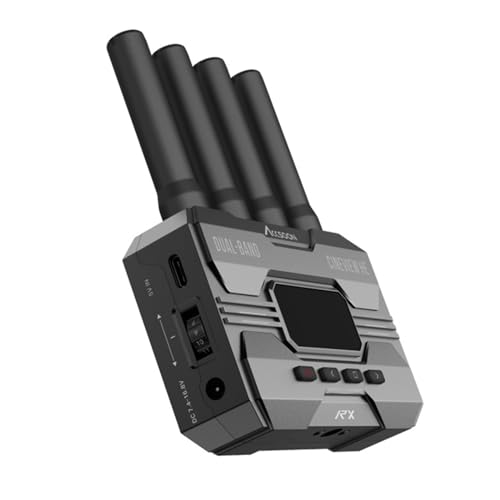
- UVC output for direct computer streaming
- Dual-band transmission with under 0.06-second latency
- Supports up to four receivers or mobile devices per transmitter
Best For: Livestreamers using OBS, YouTube, or similar computer platforms
Best Overall – Accsoon CineView HE Wireless Video Receiver
For home studios seeking flexible wireless video receivers, the Accsoon CineView HE stands out with dual-band 2.4GHz and 5GHz transmission, 1080p monitoring, and a receiver-side UVC output for computer-based streaming.
Best For: Home-studio livestreaming, multi-person monitoring, and HDMI camera setups that need long range and flexible power.
Pros:
- Dual-band transmission is designed to improve stability and reduce interference.
- Supports up to 1,200 feet of range with less than 0.06-second latency.
- UVC output can connect the receiver directly to streaming platforms such as OBS without a separate capture device.
- One transmitter can send video to up to four receivers or mobile devices.
Cons:
- Battery and charging cables are not included.
- Designed for HDMI sources rather than SDI camera inputs.
The CineView HE is a strong all-around choice when a home studio needs reliable monitoring, direct USB-C streaming, and support for several viewers. Its HDMI loop-out and multiple power options add useful setup flexibility.
Best 4K Option – Hollyland Mars 4K Wireless Video Receiver
The Hollyland Mars 4K is one of the more capable wireless video receivers for home studios that need higher-resolution monitoring. It supports UHD 4K at 30fps and 1080p at 60fps, with both HDMI and SDI outputs for broader equipment compatibility.
Best For: Home studios using 4K cameras, HDMI or SDI monitors, and workflows that require high-resolution viewing.
Pros:
- Supports UHD 4K at 30fps and 1080p at 60fps.
- Provides both HDMI and SDI outputs.
- Offers a stated 450-foot line-of-sight range and 0.06-second latency.
- Compact 7.9-ounce design is convenient for portable production setups.
Cons:
- Its stated range is shorter than several competing options in this roundup.
- The supplied information does not specify included power accessories.
Choose the Mars 4K when image resolution and output flexibility matter more than maximum range. HDMI and SDI connectivity make it especially useful for studios that mix consumer and professional video equipment.
Best Plug-and-Play Value – Lemorele R5000 Wireless HDMI Receiver
The Lemorele R5000 is a straightforward option among wireless video receivers for home studios. It delivers 1080p at 60Hz over 5GHz Wi-Fi, includes an HDMI loop-out, and supports USB-C or NP-F battery power for either fixed or mobile use.
Best For: Budget-conscious creators who want simple Full HD camera monitoring for livestreams, presentations, or home-theater setups.
Pros:
- Plug-and-play 1080p at 60Hz transmission with 50ms latency.
- 656-foot open-area range is useful for larger rooms or small production spaces.
- Transmitter HDMI loop-out allows simultaneous local and wireless monitoring.
- Includes HDMI and USB-C cables, with a two-year manufacturer warranty.
Cons:
- Supports Full HD rather than 4K video.
- Open-area range can be reduced by walls and other obstructions.
- NP-F batteries are sold separately.
The R5000 makes sense for creators who value easy installation and included accessories over advanced professional features. Its mobile-app preview and dual power options add convenience for home-studio and occasional on-location use.
Best Channel Control – Vrriis WL087 Wireless Video Receiver
The Vrriis WL087 gives home studios useful control over wireless congestion. Its 20 manually selectable channels, LCD signal information, UVC output, and 1080p/60 support make it a practical choice for streaming and monitoring in busier wireless environments.
Best For: Home studios that need manual channel selection, direct UVC streaming, and support for several receiving devices.
Pros:
- Offers up to 1,500 feet of stated line-of-sight range and 0.05-second latency in open conditions.
- 20 adjustable channels and an LCD display help identify and manage interference.
- UVC output supports streaming to platforms such as OBS without an additional capture device.
- One transmitter can connect with up to five receivers, and the package includes several HDMI cable types.
Cons:
- Walls, metal, brick, and glass can significantly reduce signal coverage.
- Transmission distance decreases as more receivers are added.
- NP-F batteries are not included.
The WL087 is appealing when wireless reliability depends on finding a cleaner channel rather than relying entirely on automatic selection. It is limited to 1080p, but its channel controls and UVC workflow suit many home-studio streaming applications.
Long-Range 4K Pick – Atomos TX/RX Wireless Video Set
For home studios that need professional connectivity, the Atomos TX/RX set is a versatile choice among wireless video receivers for home studios. It supports UHD 4K30 transmission, HDMI and SDI workflows, and a stated range of up to 985 feet.
Best For: Home studios using HDMI and SDI cameras for monitoring, gimbal work, or handheld production.
Pros:
- Supports up to UHD 4K30 video.
- Offers HDMI and SDI inputs on the transmitter, plus HDMI and SDI outputs on the receiver.
- Can transmit to up to four receivers and compatible Android or iOS smartphones.
- Supports DC, L-Series, and USB-C power options.
Cons:
- The listed wireless range is based on stated conditions and may vary in a studio environment.
- The supplied notes do not specify current software-update support.
Choose this set when your studio needs 4K capability and broad connection flexibility. Its HDMI/SDI support and multiple receiver capability make it especially useful for multi-display monitoring setups.
Dual-Band 4K Choice – Accsoon CineView SE 4K
The Accsoon CineView SE 4K is designed for home studios that prioritize detailed video and connection stability. It combines 4K30 transmission, H.265 encoding, USB-C video output, and dual-band 2.4GHz/5GHz wireless operation.
Best For: Camera-based studios needing 4K monitoring, low-latency transmission, and app-based camera control.
Pros:
- Supports end-to-end 4K30 video with H.265 encoding.
- Uses dual-band 2.4GHz and 5GHz transmission with Accsoon’s RTMS 4.0 protocol.
- Adds wireless camera control through the Accsoon SEE App.
- Includes USB-C video output for added monitoring flexibility.
Cons:
- The supplied details identify HDMI as the connector type but do not list the full port layout.
- The notes do not specify a wireless range.
- Its camera-control features depend on using the Accsoon SEE App and compatible equipment.
This is a strong fit for creators who want a modern 4K wireless workflow with dual-band transmission. The app control and USB-C output add flexibility beyond basic point-to-point monitoring.
Built-In Monitor Pick – Wireless HDMI System with 7-Inch Screen
This HDMI system stands out among wireless video receivers for home studios by including a built-in 7-inch monitor. It targets 1080p60 workflows and adds HDMI loop out, multi-receiver support, and several portable power options for filming, streaming, and monitoring.
Best For: Home studios and small production teams that want an integrated receiver display and shared multi-viewer monitoring.
Pros:
- Built-in 7-inch HD screen reduces the need for a separate receiver monitor.
- Supports 1080p at 60Hz with stated latency below 0.05 seconds and a range up to 1,312 feet in line-of-sight conditions.
- One transmitter can broadcast to up to five receivers.
- Offers HDMI loop out, a 3.5mm headphone jack, IR remote control, and NP-F, power-bank, or USB-C power options.
Cons:
- It is an HD system rather than a 4K solution.
- An HDMI cable for the external monitor is not included.
- Smartphone or tablet use requires a Type-C-to-HDMI cable.
Pick this system when convenience and collaborative monitoring matter more than 4K resolution. The integrated screen, expandable receiver setup, and loop-out connection make it practical for compact studios and small crews.
Best for Stable Dual-Band Monitoring – CineView SE Receiver
For creators comparing wireless video receivers for home studios, the Accsoon CineView SE emphasizes stable monitoring over a dual-band 2.4GHz and 5GHz connection. This receiver supports HDMI and SDI workflows, 1080p video at up to 60fps, and monitoring on up to four devices when paired with compatible transmitters.
Best For: Home studios that need low-latency camera monitoring across HDMI and SDI equipment.
Pros:
- Dual-band transmission combines 2.4GHz and 5GHz streams to help manage interference.
- Rated for 0.05-second latency and transmission distances up to 1200 feet.
- Supports HDMI and SDI, with a compact aluminum design and built-in OLED display.
- Works with the Accsoon GO app for sharing previews.
Cons:
- This listing includes only the receiver, so a compatible transmitter is required.
- Its listed video support is limited to 1080p at up to 60fps.
The CineView SE is a strong fit when connection stability, flexible HDMI/SDI compatibility, and responsive monitoring matter more than standalone convenience. Confirm that your existing transmitter and studio gear are compatible before buying.
Best Complete HDMI Kit – 1080p Wireless HDMI System
This transmitter-and-receiver kit is a practical option for wireless video receivers for home studios when you want a complete HDMI setup rather than a receiver alone. It supports 1080p at 60Hz, offers loop-out and dual receiver-side HDMI outputs, and includes IR control for compatible source devices.
Best For: HDMI-based studios that need flexible displays, local monitoring, and multiple power options.
Pros:
- Includes both a transmitter and receiver for a ready-to-use point-to-point setup.
- Supports 1080p at 60Hz with listed latency of 0.05 seconds.
- Transmitter loop-out and dual HDMI outputs on the receiver support multiple screens.
- Can use NP-F batteries, USB-C power, adapters, or compatible portable power banks.
Cons:
- Walls, metal, brick, and glass can reduce the stated 1300-foot transmission range.
- The system is HDMI-only and does not provide SDI connectivity.
- Batteries are not included.
Choose this Vrriis system if your studio is built around HDMI sources and you value setup flexibility. Its screen outputs and power choices are useful, but real-world range will depend heavily on the room layout and obstructions.
Best for Live Streaming – CineView HE Receiver
For home studios evaluating wireless video receivers for home studios with live production in mind, the Accsoon CineView HE stands out for its UVC output. It can send received footage to a computer over USB-C for platforms such as OBS or YouTube, while dual-band transmission supports 1080p at 60fps with listed latency below 0.06 seconds.
Best For: Livestreamers who want to connect a wireless camera feed directly to a computer without a separate capture device.
Pros:
- UVC output sends received video to a computer over USB-C for compatible streaming software.
- Dual-band 2.4GHz and 5GHz transmission is designed for stable, interference-resistant links.
- Supports 1080p at 60fps with less than 0.06-second listed latency and up to 1200 feet of range.
- One transmitter can send video and audio to up to four receivers or mobile devices.
Cons:
- This listing is for the receiver only; a compatible transmitter is needed.
- A USB-C cable for the UVC connection is user-provided.
- The supplied notes specify HDMI connectivity rather than SDI support.
The CineView HE is the most specialized choice here for computer-based streaming. Its UVC output can simplify a live setup, provided you already have the matching transmitter and a suitable USB-C cable.
How We Picked These Wireless Video Receivers for Home Studios
We compared the listed systems by the features that matter most in a home studio: supported resolution and frame rate, quoted transmission range, latency, connection options, monitoring flexibility, and streaming compatibility. HDMI is essential for many cameras, monitors, and capture devices, while SDI can be valuable when you use professional cameras or longer cable runs. UVC output is especially useful for sending a wireless camera feed directly to a computer or streaming setup without an additional capture workflow.
Advertised range and latency are typically measured in favorable conditions. Walls, neighboring wireless networks, antenna placement, and crowded 2.4GHz or 5GHz bands can reduce real-world performance, so treat manufacturer figures as reference points rather than guarantees.
Quick Comparison
- Best for 4K workflows: Atomos TX 4K/HD and Accsoon CineView SE 4K systems.
- Best for live streaming: Accsoon CineView HE or SE models with UVC output and HDMI or SDI connectivity.
- Best for straightforward HDMI setups: Lemorele and the other 1080p HDMI transmitter-receiver systems.
- Best for multiple displays: The system supporting one transmitter and up to five receivers with 7-inch monitors.
- Best for flexible studio monitoring: Hollyland Mars 4K, particularly when 4K source support is a priority.
Key Buying Factors for Wireless Video Receivers for Home Studios
Resolution, Frame Rate, and Latency
Choose 1080p if your cameras, monitors, and streaming platform use Full HD. Select a 4K-capable system if you need to monitor a 4K camera, preserve detail for production, or leave room for future upgrades. Low latency matters for directing, confidence monitoring, gaming, and live performance; even a small delay can become distracting when audio and video must stay closely synchronized.
Outputs and Equipment Compatibility
Check whether the receiver provides HDMI, SDI, UVC, loop-out, or a combination. HDMI is generally the easiest match for consumer and creator equipment. SDI adds professional flexibility, while UVC can make a receiver behave like a camera source for compatible computers and streaming software. Verify connector types, supported frame rates, HDCP requirements, and whether the transmitter and receiver are sold as a matched pair.
Range, Interference, and Power
For a small room, maximum range may matter less than stable performance through furniture or walls. Dual-band systems can offer more flexibility in busy wireless environments, but placement still matters. Also account for power adapters, batteries, mounting options, antenna orientation, and whether both ends can remain powered throughout a long recording or stream.
Who Should Buy Which Wireless Video Receivers for Home Studios?
Choose a 1080p HDMI system for a simple camera-to-monitor connection, basic presentations, or a budget-conscious home studio. Choose an Accsoon CineView HE model when UVC streaming and low-latency Full HD monitoring are central to your workflow. Choose CineView SE or Atomos 4K equipment when you need higher-resolution production and broader HDMI/SDI flexibility. Choose a multi-receiver system when several displays or monitored positions need the same feed. Before buying, confirm every device’s inputs, outputs, resolution limits, and wireless environment so the receiver fits your complete signal chain—not just your camera.