Choosing among the best MIDI interfaces under $300 depends on more than connector count. Your ideal setup may need reliable USB communication, multiple MIDI outputs, signal merging, hardware routing, wireless control, or simple keyboard-to-computer recording.
We selected 10 options covering compact cables, multi-port interfaces, MIDI thru boxes, splitters, filters, and wireless adapters. Use the guide below to match the right feature set to your studio, rehearsal rig, or live performance workflow.
Best 10 Midi Interfaces Under 300 Picks for 2026
Best All-Around Routing

- 3-in/3-out MIDI routing
- USB-C with broad OS support
- Router, merger, filter, and mapper
Best For: Producers managing several MIDI devices
Best for MIDI Merging

- Three MIDI inputs
- Hardware-direct signal combining
- Rugged aluminum construction
Best For: Combining multiple MIDI controllers
Best Simple MIDI Splitter

- One MIDI input, four outputs
- Multi-voltage splitter design
- Two-year warranty
Best For: Distributing one MIDI signal to four devices
Best USB Host Flexibility

- Standalone USB MIDI host
- Up to eight USB device ports via hub
- Preset-based routing and dual power
Best For: Hybrid USB and DIN MIDI rigs
Best for Large MIDI Rigs
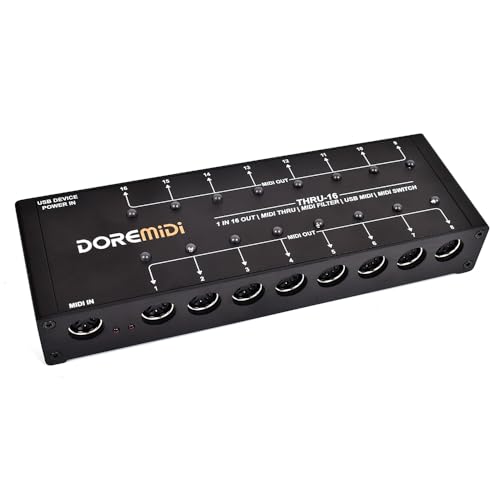
- Routes one MIDI input to 16 outputs
- Editable filters for each MIDI output
- Individual switches and indicator lights
Best For: Complex hardware MIDI setups
Best Simple Computer Connection

- Connects 5-pin MIDI gear to computers
- One MIDI input and one MIDI output
- Supports Windows, macOS, and mobile adapters
Best For: Basic keyboard-to-computer MIDI transfers
Best Plug-and-Play MIDI Splitter

- One MIDI input with six outputs
- Supports standard 16-channel MIDI
- USB-powered, plug-and-play operation
Best For: Connecting one controller to six MIDI devices
Best Plug-and-Play Pick

- 1-in/1-out MIDI connection
- Plug-and-play Windows and Mac support
- Power and signal LED indicators
Best For: Simple keyboard-to-computer MIDI setups
Best for Microcontroller Projects

- MIDI IN, OUT, and THRU ports
- UART-compatible microcontroller integration
- RUN/PGM switch for programming access
Best For: DIY MIDI hardware and board-based projects
Best Wireless Option
FORE K1 Wireless MIDI Interface

- Bluetooth MIDI for 5-pin DIN devices
- Works with iOS, Android, Mac, and Windows
- Up to 32 feet/10 meters of range
Best For: Cable-free mobile and compact studio setups
Best All-Around Routing – CME U6MIDI Pro 3-in-3-out
The CME U6MIDI Pro is a strong choice for shoppers comparing midi interfaces under 300 who need flexible routing in a compact, computer-friendly unit. It provides three MIDI inputs and three outputs, USB-C connectivity, and support for major operating systems.
Best For: Producers and keyboard players managing multiple MIDI devices, split zones, merges, or filtered MIDI data.
Pros:
- 3-in/3-out MIDI routing with split, merge, thru, filtering, and mapping options.
- Works with macOS, iOS, Windows, Android, Linux, and Chrome OS.
- Supports standard MIDI messages, including clock, SysEx, MIDI timecode, and MPE.
- Compact design and plug-and-play USB-C setup.
Cons:
- Advanced configuration requires the UxMIDI Tools software.
- It offers MIDI connectivity only, rather than audio inputs or outputs.
With broad operating-system support and unusually flexible routing for its size, the U6MIDI Pro is a versatile hub for hardware-based MIDI setups.
Best for MIDI Merging – MERGE-3 MIDI Interface
The MERGE-3 is a straightforward option among midi interfaces under 300 for combining signals from several MIDI sources. Its hardware-based design provides three MIDI inputs, one direct MIDI output, and USB power for a simple setup.
Best For: Players who need to combine multiple keyboards or MIDI controllers into one MIDI stream.
Pros:
- Three MIDI inputs for combining multiple sources.
- Hardware-direct operation is designed for no interference or delay.
- Supports MIDI clock, MIDI time code, SysEx, and other standard MIDI commands.
- Durable aluminum-alloy construction with nonslip silicone feet.
Cons:
- Provides one direct MIDI output, so it is less suitable for larger distribution setups.
- Its listed feature set focuses on merging rather than advanced filtering or mapping.
If your primary requirement is combining three MIDI inputs without adding complex routing features, the USB-powered MERGE-3 keeps the job focused and simple.
Best Simple MIDI Splitter – MIDI Solutions Quadra Thru
The MIDI Solutions MultiVoltage Quadra Thru is a practical pick among midi interfaces under 300 when the goal is distribution rather than computer control. This compact through box takes one MIDI input and sends it to four outputs.
Best For: Keyboard players and hardware rigs that need to feed the same MIDI signal to four destinations.
Pros:
- Simple 1-in/4-out MIDI signal splitting.
- Multi-voltage design for compatible MIDI equipment.
- Works with MIDI-capable software and keyboard setups.
- Includes a two-year warranty.
Cons:
- It is a thru box, not a USB computer interface or MIDI merger.
- It does not provide the advanced routing and filtering features found on more configurable units.
The Quadra Thru makes sense for a dedicated hardware rig where one MIDI source must reach four devices, without needing software or elaborate configuration.
Best USB Host Flexibility – CME H4MIDI WC
The CME H4MIDI WC stands out among midi interfaces under 300 for connecting USB MIDI gear directly to traditional MIDI hardware. It can host USB MIDI devices without a computer, while also offering USB-C computer connectivity and configurable routing.
Best For: Guitarists, producers, and performers combining USB controllers, pedals, synthesizers, and DIN MIDI hardware.
Pros:
- Standalone USB host supports up to eight USB MIDI device ports through a standard hub.
- Offers MIDI thru, split, merge, mapper, and filter functions.
- Supports USB-C computer operation across major desktop and mobile operating systems.
- Can run from 5V USB or 9V DC and stores four presets.
Cons:
- Some expansion features, including WIDI Bluetooth MIDI, require the optional WIDI Core module.
- Its advanced routing may require time with the HxMIDI Tools software.
- USB host operation may require a separate hub for multiple devices.
For hybrid rigs built around USB MIDI gear and conventional DIN hardware, the H4MIDI WC offers unusually broad connectivity and useful standalone control options.
Best for Large MIDI Rigs – THRU-16 MIDI Splitter
If you need midi interfaces under 300 for routing one controller to many instruments, the THRU-16 is built for expansive setups. It converts one MIDI input into 16 outputs and adds editable filtering plus individual output controls.
Best For: Musicians and studios managing multiple MIDI instruments from one source.
Pros:
- Provides 16 MIDI outputs from a single MIDI input.
- Allows editable MIDI filters for each output.
- Individual switches and indicator lights make outputs easy to control.
- Supports notes, CC, PC, clock, time code, and SysEx messages.
Cons:
- Its large output count may be unnecessary for simple one-device setups.
- Filtering and routing features may require more setup than a basic MIDI cable.
The THRU-16 stands out when flexibility and scale matter most. Its per-channel filtering and 16 individually switchable outputs make it a practical choice for complex hardware MIDI systems.
Best Simple Computer Connection – USB to MIDI Cable
For shoppers comparing midi interfaces under 300, this USB to MIDI cable offers a straightforward way to connect a compatible keyboard or piano to a computer. Its 5-pin MIDI input and output support recording and editing MIDI data on Windows and Mac systems.
Best For: Keyboard players who want a direct MIDI connection to a computer or compatible mobile device.
Pros:
- Connects compatible MIDI instruments to PCs, Macs, and laptops.
- Includes one MIDI input and one MIDI output with 16 MIDI channels.
- Supports Windows, macOS, and mobile use with the appropriate USB-C adapter.
- Its approximately 4.5- to 6-foot length offers flexible placement.
Cons:
- It is a cable-based interface rather than a multi-output MIDI hub.
- Some older audio equipment may require additional adapters.
- Mobile compatibility depends on using a suitable adapter.
This cable is best for uncomplicated MIDI transfers rather than advanced routing. It is a convenient choice when the goal is simply to connect a 5-pin MIDI instrument to a computer for music work.
Best Plug-and-Play MIDI Splitter – MIDI Thru-6 Box
Among midi interfaces under 300, the MIDI Thru-6 Box is a compact option for sending one MIDI source to several devices. It provides one MIDI input and six outputs, with USB-powered operation and support for standard MIDI channels and commands.
Best For: Performers and producers connecting one MIDI controller to up to six instruments.
Pros:
- Distributes one MIDI input to six MIDI outputs.
- Uses a high-speed optocoupler for wired MIDI transmission.
- Supports standard 16-channel MIDI communication and commands.
- Requires no batteries and runs from a 5V DC USB power supply.
Cons:
- It offers fewer outputs than a 16-output MIDI splitter.
- All MIDI messages are sent to all six outputs, limiting per-output routing control.
- A USB power source is required for operation.
The Thru-6 is a practical middle ground between a basic MIDI cable and a larger distribution system. Choose it when six simultaneous outputs are enough and simple, plug-and-play signal distribution is the priority.
Best Plug-and-Play Pick – LEKATO USB MIDI Cable
For shoppers comparing midi interfaces under 300, the LEKATO USB MIDI Cable is a straightforward wired option for connecting a keyboard or synthesizer to a Windows or Mac computer. Its 1-in/1-out design, built-in driver, and status indicators keep setup and troubleshooting simple for editing and recording.
Best For: Home studios and musicians who want an uncomplicated USB connection for a single MIDI instrument.
Pros:
- Plug-and-play operation with Windows and Mac systems.
- 1 MIDI input and 1 MIDI output with support for up to 16 channels.
- LED indicators show power and signal activity.
- Soft bare-copper cable and interference-resistant transmission support stable MIDI data transfer.
Cons:
- It is a cable-style interface rather than a multi-port MIDI hub.
- It uses a wired connection, so it does not provide wireless flexibility.
This is a practical choice when you need reliable basic MIDI connectivity without installing special drivers or configuring a larger interface.
Best for Microcontroller Projects – R3 AVI MIDI Interface Adapter
R3 AVI Digital Interface Adapter with MIDI IN/OUT/THRU Ports and RUN/PGM Switch
Check Price On AmazonAmong midi interfaces under 300, the R3 AVI Digital Interface Adapter is aimed at builders integrating MIDI with a board or microcontroller. It provides MIDI IN, OUT, and THRU connections, UART-oriented communication, and a RUN/PGM switch for programming access.
Best For: Electronics hobbyists and developers building MIDI hardware projects around a compatible board or microcontroller.
Pros:
- Includes MIDI-IN, MIDI-OUT, and MIDI-THRU ports.
- Designed to work with microcontroller UART pins and MIDI event messages.
- Optical isolation on MIDI input helps prevent ground loops.
- RUN/PGM switch allows serial-port programming without removing the board.
Cons:
- This is a development adapter, not a general-purpose USB computer interface.
- The three-hole MIDI connectors are included but require soldering to the board.
- Its listed operating-system support is limited to Windows.
The R3 AVI makes the most sense for a hands-on MIDI electronics project where direct board integration and access to IN, OUT, and THRU matter more than plug-and-play studio use.
Best Wireless Option – FORE K1 Wireless MIDI Interface
For musicians seeking midi interfaces under 300 with fewer cables, the FORE K1 Wireless MIDI Interface provides Bluetooth MIDI connectivity for compatible keyboards, synthesizers, drum machines, and other 5-pin DIN devices. It supports iOS, Android, Mac, and Windows setups, with a USB Type-A companion unit for computers without built-in wireless.
Best For: Mobile and compact studios that want wireless MIDI connections between 5-pin instruments, computers, and tablets.
Pros:
- Wireless Bluetooth MIDI connection with claimed latency as low as 3 ms.
- Supports iOS, Android, Mac, and Windows workflows.
- Works with MIDI devices using 5-pin DIN ports, including keyboards and electronic drums.
- Offers up to 32 feet/10 meters of wireless transmission distance.
Cons:
- iOS and iPad connections require using a compatible app rather than direct Bluetooth pairing.
- Computer use generally requires the paired MIDI B USB unit.
- Wireless setup is more involved than using a basic wired MIDI cable.
The FORE K1 is a flexible choice for reducing cable clutter, especially when working with GarageBand or other MIDI software, but buyers should account for its pairing and app requirements.
How We Picked the Best Midi Interfaces Under 300
We compared these Midi Interfaces Under 300 by looking at connectivity, routing flexibility, compatibility, power requirements, ease of setup, and the type of musician each design serves best. The lineup includes traditional USB MIDI interfaces, dedicated thru and merge boxes, keyboard adapters, and a wireless option.
Because MIDI systems vary widely, port count was not treated as the only measure of quality. A compact adapter can be the best choice for a single keyboard and laptop, while a multi-output splitter may be more useful for a hardware-heavy rig. We also considered practical details such as optoisolation, plug-and-play operation, editable filtering, USB host support, and whether the unit is intended for studio or stage use.
Quick Comparison
| Best For | Look For | Most Suitable Type |
|---|---|---|
| Connecting one keyboard to a computer | USB MIDI In/Out and broad device compatibility | USB MIDI cable or compact interface |
| Controlling several hardware instruments | Multiple MIDI outputs and dependable routing | Multi-port interface or thru box |
| Sending one controller to many devices | Several isolated MIDI outputs | MIDI splitter or thru box |
| Combining multiple MIDI sources | More than one MIDI input and merge support | MIDI merge interface |
| Reducing cable runs | Wireless connectivity and compatible host devices | Wireless MIDI adapter |
Key Buying Factors for MIDI Interfaces Under $300
Port Count and Signal Direction
Count the MIDI inputs and outputs you actually need, then leave room for expansion. One input and one output may handle a keyboard and DAW, but several synthesizers, drum machines, and effects processors often require multiple outputs or a dedicated thru box.
Routing, Merging, and Filtering
A basic interface passes MIDI data between devices. More advanced hardware can merge incoming streams, duplicate one input across many outputs, or filter channels and messages. These features are valuable when a single controller must operate several instruments without relying entirely on computer software.
USB Host and Compatibility
Check whether the interface connects directly to a computer, acts as a USB host for class-compliant MIDI gear, or requires a traditional five-pin MIDI connection. Confirm support for your operating system, mobile device, keyboard, and DAW before buying.
Power and Reliability
Some adapters draw power from USB, while others require an external supply or receive power through connected MIDI equipment. For live use, prioritize secure connectors, clear status indicators, dependable isolation, and a setup that will not depend on a fragile cable arrangement.
Wireless Convenience
Wireless MIDI can simplify short connections, but it may not be ideal for every performance rig. Verify pairing behavior, latency expectations, range, and whether both ends need compatible wireless adapters.
Who Should Buy Which Midi Interfaces Under 300?
For Laptop Recording and Basic Keyboard Control
Choose a USB MIDI cable or compact two-way interface if you mainly record a keyboard, edit patches, or play software instruments. A simple, plug-and-play design keeps the setup inexpensive and easy to troubleshoot.
For Hardware Synth and Drum-Machine Rigs
Choose a multi-port interface, merge unit, or MIDI thru box when several devices must share clock, notes, program changes, or controller data. Prioritize the number and direction of ports over unnecessary features.
For Complex Live Routing
A splitter with filtering or a high-output thru box is the better fit when one controller must reach many instruments. Channel filtering can prevent unintended devices from responding and make a live rig easier to manage.
For Minimal-Cable Setups
Consider a wireless MIDI interface for compatible keyboards and mobile or computer workflows. It is best for convenience-focused setups where modest range and wireless reliability meet your performance needs.