If you want a faster, more tactile workflow in your DAW, midi keyboards with motorized faders can make a big difference. They help you move from mouse-heavy editing to hands-on control for mixing, automation, and performance.
This roundup focuses on practical options for producers, beatmakers, and home-studio users who want better control without overcomplicating their setup.
Best 10 Midi Keyboards with Motorized Faders Picks for 2026
FL Studio Workflow Controller
Novation FLkey 49 with faders and pad sequencing

- Nine faders for direct FL Studio mixer control
- Pads map to the step sequencer for beat building
- Transport and edit buttons keep you in the flow
Best For: FL Studio producers who want fast hands-on mixing and sequencing
Compact Pad Beat Maker
Donner STARRYPAD pad controller with faders

- 16 backlit pads with three assignable banks
- Two faders, two knobs, and three buttons for control
- Includes music software and Melodics courses
Best For: Beat-focused producers who want portable pad control
Simple Full-Size Controller
Nektar SE61 with DAW integration

- 61 full-size keys for a wider playing range
- DAW integration supports many popular programs
- Includes Bitwig Studio 8-Track software package
Best For: Beginners who want a simple keyboard with broad software support
Compact Fader-Equipped Controller
37-key controller with 4 motorized faders

- Four motorized faders for DAW mixing and automation
- 16 RGB pads and 8 knobs for hands-on control
- Bluetooth MIDI and built-in sound engine add flexibility
Best For: Mobile producers who want a compact controller with motorized faders
Simple Starter Keyboard
M-AUDIO Keystation 49 MK3 USB MIDI Controller

- 49 full-size velocity-sensitive keys
- Single volume fader with transport controls
- Plug-and-play USB with bundled software
Best For: Beginners who want a compact keyboard-first controller with basic control
Compact Pad Controller
Vangoa Worlde 25-Key MIDI Controller

- 25 velocity-sensitive keys with 8 RGB drum pads
- 8 knobs and 8 reassignable faders
- Portable design with sustain pedal support
Best For: Beat makers and beginners who want compact, customizable control
Hands-On DAW Controller
M-AUDIO Oxygen 61 MKV USB MIDI Keyboard Controller
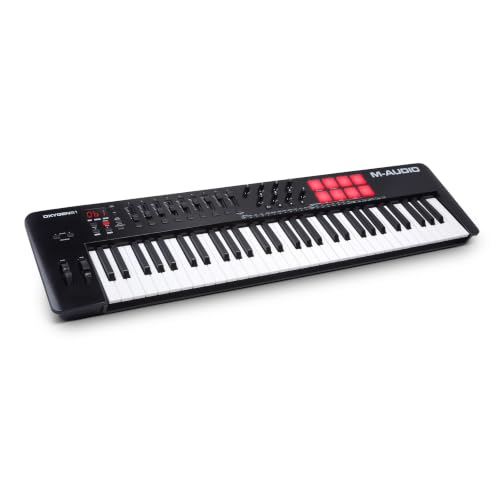
- 61 full-size velocity-sensitive keys
- 9 assignable faders, 8 knobs, and pads
- NKS integration with auto-mapping and DAW tools
Best For: Producers needing a full-size controller with lots of tactile DAW control
Full-Size Control Choice

- 49 full-size velocity-sensitive keys
- 9 assignable faders and 8 knobs
- 8 backlit pads with bundled software
Best For: Producers wanting a 49-key controller with broad DAW control
Portable Bluetooth Performer
DaierTek 25-Key Mini Controller

- Bluetooth plus USB connectivity
- Built-in battery for about 16 hours
- 8 RGB pads and 8 assignable encoders
Best For: Mobile producers who want a lightweight wireless mini controller
FL Studio Workflow Controller – Novation FLkey 49 with faders and pad sequencing
If you want midi keyboards with motorized faders for FL Studio-style workflow, the Novation FLkey 49 is built around fast, tactile control. It brings Mixer and Channel Rack control off the screen with nine faders, eight pots, and dedicated transport buttons, so you can tweak levels, record automation, and stay in the flow without reaching for the mouse.
Best For: FL Studio users who want immediate mixer control, step sequencing, and performance-oriented pads.
Pros:
- Nine faders and eight pots give you direct hands-on mixer control in FL Studio.
- Sequencer Mode maps pads to FL Studio’s step sequencer for quick beat programming.
- Scale Mode and three Chord modes help you play musical parts more easily.
- Includes transport, undo/redo, quantise, and metronome buttons for faster workflow.
Cons:
- Its standout workflow is centered on FL Studio integration.
- No motorized faders are listed in the supplied specs.
- Best suited to computer-based production rather than standalone use.
Overall, this is a strong pick if you mainly produce in FL Studio and want a controller that makes mixing, sequencing, and automation feel immediate. The hardware focus is practical rather than flashy, with enough hands-on control to keep you moving.
Compact Pad Beat Maker – Donner STARRYPAD pad controller with faders
For buyers comparing midi keyboards with motorized faders, the Donner STARRYPAD takes a different approach: it’s a pad-centric beat maker with 2 assignable faders, 2 knobs, and 16 backlit pads. It’s aimed at sample triggering, drum programming, and quick DAW control rather than full piano-style playing, so it makes sense if your workflow is built around pads and hands-on rhythm production.
Best For: Beat makers who want a compact pad controller with a few extra mixing controls.
Pros:
- 16 soft silicone pads with three banks provide up to 48 assignable pads.
- Two assignable faders, two knobs, and three buttons add useful control.
- Backlit pads with seven colors help visually organize your sounds.
- Includes Melodics courses and Cubase LE software kit for getting started.
Cons:
- It is not a keyboard-based controller, so it won’t suit players needing piano keys.
- The editor is for pad setup and does not record or arrange music.
- Requires DAW software to produce sound.
In practice, this is best viewed as a compact rhythm tool with a few mixer-style controls, not a full keyboard workstation. If your priority is pad performance and simple hardware control, it offers a lot of flexibility for the price.
Simple Full-Size Controller – Nektar SE61 with DAW integration
The Nektar SE61 is a straightforward choice if you want a no-frills MIDI keyboard for software-based music making. It focuses on broad DAW compatibility and core MIDI functionality rather than extra hardware features, which makes it a practical option for users who need a simple keyboard controller that works with many common programs.
Best For: Beginners and budget-minded producers who want wide DAW support and a full-size 61-key layout.
Pros:
- Nektar DAW integration supports many popular DAWs.
- Works with a broad list of MIDI music software applications.
- 61 full-size keys give you a larger playing range.
- Includes Bitwig Studio 8-Track license card and sound content package.
Cons:
- It does not list pads, faders, or knobs in the supplied details.
- No advanced performance controls are highlighted.
- It’s designed as a basic keyboard controller, not a feature-heavy production surface.
If you mostly need a dependable keyboard for entering notes and controlling software, the SE61 keeps things simple. It won’t replace a more elaborate mixing controller, but it delivers solid value for general MIDI work.
Compact Fader-Equipped Controller – 37-key controller with 4 motorized faders
If you’re shopping for midi keyboards with motorized faders, this 37-key controller stands out for packing in a lot of hands-on features in a compact format. It includes 16 RGB pads, 8 assignable knobs, and 4 motorized faders, plus Bluetooth MIDI and USB connectivity, making it a flexible pick for producers who want both portability and deeper DAW control.
Best For: Mobile producers and performers who want a compact controller with faders, pads, and wireless MIDI.
Pros:
- Four motorized faders provide tactile mixing and automation control.
- 16 RGB pads and 8 assignable knobs expand beat-making and parameter control.
- Bluetooth MIDI plus USB support works with Windows, Mac, iOS, and Android.
- Built-in sound engine lets you sketch ideas without a computer.
Cons:
- Only 37 keys, so it is less suitable for players who need a larger keyboard range.
- It’s a newer-style hybrid controller, which may be more than casual users need.
- Best results depend on using it with supported workflows like Ableton Live.
This is the most feature-packed option in the group if fader control is a priority and portability matters too. The combination of motorized faders, wireless MIDI, and built-in sound makes it especially appealing for sketching and lightweight production on the move.
Simple Starter Keyboard – M-AUDIO Keystation 49 MK3 USB MIDI Controller
If you’re comparing midi keyboards with motorized faders, the M-AUDIO Keystation 49 MK3 is a reminder that some controllers focus more on playing than on deep mixer control. It gives you 49 full-size velocity-sensitive keys, plus a single volume fader and basic transport controls, so it works best as a straightforward MIDI keyboard for writing parts, controlling a DAW, and keeping your setup compact.
Best For: Players who want a simple, portable 49-key controller with a basic fader and bundled software.
Pros:
- 49 full-size velocity-sensitive keys for a natural playing feel
- Includes a volume fader, transport buttons, pitch/mod wheels, and octave controls
- Plug-and-play USB connection with no drivers or power supply required
- Compact and lightweight for desks, studios, or stage use
Cons:
- Only one fader, so it is not a deep mixer-style controller
- No drum pads or multi-fader control for hands-on production workflows
- Best suited to keyboard entry rather than advanced surface control
For buyers who mainly need playable keys and a few essential controls, this model is practical and easy to live with. It is not the most flexible option for mixer-heavy production, but its simplicity and included software make it a solid entry point.
Compact Pad Controller – Vangoa Worlde 25-Key MIDI Controller
For shoppers looking at midi keyboards with motorized faders, this Vangoa Worlde controller is really about compact hands-on control rather than automated mixing. It combines 25 velocity-sensitive keys with 8 knobs and 8 faders, plus RGB drum pads and a pedal input, making it a portable option for beat-making, sketching ideas, and fast parameter tweaks.
Best For: Beginners and beat makers who want a small controller with lots of assignable hands-on controls.
Pros:
- 8 fully reassignable faders and 8 knobs for customizable control
- 25 velocity-sensitive keys plus 8 RGB drum pads for beat production
- Compact and lightweight for travel, small desks, and mobile use
- Supports a sustain pedal and works with major DAWs like FL Studio, Logic Pro, Ableton Live, and more
Cons:
- 25-key layout is limited for two-handed playing and larger arrangements
- Best for MIDI control, since it generates no sound on its own
- Designed around compact workflow, not a full-size keyboard experience
This is a practical pick if you want lots of assignable controls in a small footprint. It is especially appealing for beat-focused production, though players needing more keys or a more traditional keyboard feel may want something larger.
Hands-On DAW Controller – M-AUDIO Oxygen 61 MKV USB MIDI Keyboard Controller
If you want midi keyboards with motorized faders-style workflow control, the M-AUDIO Oxygen 61 MKV is the strongest fit here because it offers nine assignable faders, eight knobs, pads, and deep DAW integration. It is built for users who want a larger keyboard plus enough tactile controls to manage virtual instruments, plugin parameters, and session tasks without living entirely with a mouse.
Best For: Producers who want a full-size keyboard controller with multiple faders and strong DAW integration.
Pros:
- 61 full-size velocity-sensitive keys for more comfortable playing
- 9 assignable faders and 8 knobs for hands-on control
- 2 banks of 8 backlit velocity-sensitive pads with Note Repeat
- NKS integration, Smart Chord/Scale modes, arpeggiator, and auto-mapping
Cons:
- It uses assignable faders, not motorized faders
- Large size may be less convenient for very small desks or travel setups
- Windows-focused details in the supplied specs may matter for some buyers
For home studios and production setups that need real tactile control, this model offers the most complete feature set in the group. If your buying goal is specifically motorized faders, note that this keyboard delivers plenty of faders but not motorized ones.
Wireless DAW Control Pick – Vangoa 25-Key Bluetooth Mixer
If you want midi keyboards with motorized faders for hands-on DAW control, the Vangoa Wireless MIDI Controller Mixer is built around movement and access rather than piano-style performance. It pairs 25 keys with 8 channel faders, 8 assignable knobs, and 43 backlit buttons, so it works well as a compact control surface for tweaking mixes, triggering clips, and shaping sounds on the fly.
Best For: Beginners and portable producers who want a wireless, button-heavy controller for DAW mixing and quick performance control.
Pros:
- 8 faders with LED indicators for tactile mix control.
- 43 backlit buttons for triggering beats, melodies, and effects.
- 8 assignable knobs for EQ and effect adjustments.
- Bluetooth connectivity and portable build for mobile use.
Cons:
- Only 25 keys, so it is not ideal for players who need a larger keyboard range.
- Designed more as a MIDI mixer/controller than a traditional keyboard.
- Wireless setup may require extra tutorial help for some users.
Overall, this Vangoa unit is a practical choice if you care more about fast control and portability than full-size keys. It offers a lot of surface control for the size, making it a flexible starter controller for studio and stage workflows.
Full-Size Control Choice – M-AUDIO Oxygen 49 MKV
For buyers comparing midi keyboards with motorized faders, the M-AUDIO Oxygen 49 MKV stands out as a control-heavy keyboard with 9 assignable faders, 8 knobs, and 8 velocity-sensitive pads. Its 49 full-size keys, DAW auto-mapping, and bundled software make it a strong fit for users who want a more complete music-production workstation.
Best For: Producers who want a 49-key controller with deep DAW control, drum pads, and included software.
Pros:
- 49 velocity-sensitive full-size keys for a more natural playing feel.
- 9 assignable faders and 8 knobs for tactile parameter control.
- 8 backlit drum pads with Note Repeat for beat making and clip launching.
- Includes DAW auto-mapping plus bundled production software.
Cons:
- Uses USB connection only, so it is not a wireless option.
- Larger and heavier than compact mini controllers.
- No mention of motorized faders in the supplied details.
This is the most studio-oriented option in the group, especially if you want a keyboard that can cover playing, sequencing, and control duties at once. It is a good pick for users who need more keys and more hands-on mixing access.
Portable Bluetooth Performer – DaierTek 25-Key Mini Controller
If you need midi keyboards with motorized faders in a compact travel-ready format, the DaierTek 25-key controller focuses on portability and expressive control. It includes 25 velocity-sensitive keys, 8 RGB pads, 8 assignable encoders, and Bluetooth plus USB connectivity, making it a practical option for sketching ideas or producing away from the desk.
Best For: Mobile musicians and beginners who want a lightweight Bluetooth MIDI controller with pads and knobs.
Pros:
- Bluetooth and USB connectivity for flexible setup options.
- Built-in 2,000 mAh battery with about 16 hours of operation.
- 8 RGB backlit pads and 8 assignable encoders for hands-on control.
- Compatible with Windows, Mac OS, Android, and iOS.
Cons:
- Only 25 keys, so it is limited for more complex piano parts.
- No sound on its own; it must be used with software or a DAW.
- Bluetooth setup can depend on app-specific pairing steps, especially on Android and Windows.
As a portable MIDI controller, the DaierTek emphasizes convenience and quick creativity over a large keybed. It is a smart fit for users who want a lightweight controller with modern wireless support and enough hands-on controls for production basics.
How We Picked the Best Midi Keyboards with Motorized Faders
We focused on controller keyboards that offer useful hands-on control, strong DAW compatibility, and a layout that makes mixing or beat production easier. Because true motorized faders are uncommon in compact keyboard controllers, we also prioritized models with assignable faders, pads, knobs, and reliable software integration where that matters most.
Quick Comparison
For compact studios, smaller keyboards are easier to fit on a desk and often pair well with an external mixer or plug-in workflow. Larger models usually give you more keys and a more comfortable playing range, which can matter if you record chords, bass lines, or full performances. If your priority is control over mixing, look closely at the fader count, DAW mapping, and whether the controller supports deep transport and automation functions.
Key Buying Factors for Midi Keyboards with Motorized Faders
When shopping for Midi Keyboards with Motorized Faders, start with the level of control you actually need. Motorized faders are most valuable when you want automation to follow track changes and session recall without constant repositioning. If the model you’re considering uses standard assignable faders instead, check how responsive they are and whether they integrate cleanly with your preferred software.
Also consider key count, pad layout, knob count, and portability. A 25-key controller is easy to travel with, but a 49- or 61-key model is better for playing parts with both hands. Pads are useful for drums and clip launching, while knobs help with filter sweeps, effects, and instrument control. USB bus power, Bluetooth support, and bundled software can also improve day-to-day convenience.
DAW Compatibility
Make sure the controller supports your DAW well enough for transport, mixer, and track control. Better software integration can save time even if the unit has fewer physical controls.
Faders and Surface Layout
More faders are not always better if they feel cramped or are poorly mapped. Look for a layout that gives you accurate movement and easy access during sessions.
Who Should Buy Which Midi Keyboards with Motorized Faders?
If you are a beatmaker, a compact controller with pads and a few assignable faders is often the sweet spot. If you play keys more seriously, choose a 49- or 61-key model for better range. Mobile producers and laptop users may prefer portable mini controllers, while home-studio users who mix often should prioritize DAW control, tactile feedback, and a layout that supports automation-heavy work.
In short, the best choice depends on whether you value portability, performance, or mixing control most. Focus on the controller that fits your workflow now, not just the one with the most features on paper.