A first voice recorder should make it easy to capture clear audio, find a recording, and move the file when you need it. Extra storage and long advertised recording times matter less if the controls are confusing or the microphone struggles in your usual setting.
These 10 options cover straightforward playback models, higher-capacity recorders, and a transcription-focused choice. Use the buying guide below to match their features to classes, meetings, interviews, or personal notes.
Best 10 Voice Recorders for Beginners Picks for 2026
Best for Long Sessions
NEXTSIGNAL 160GB Voice Recorder

- 160GB total storage
- Stated 68+ hours of continuous recording
- One-click record and save
Best For: Long lectures, conferences, and daily notes
Best for Quick Starts

- Slide switch records from power-off
- 136GB total storage with included TF card
- Up to 68 hours of continuous recording
Best For: Quick lecture notes and interviews
Best for Everyday Carry

- Records from power-off with side switch
- Includes 64GB TF card
- 48-hour claim is for MP3 at 32kbps
Best For: Routine classes, meetings, and personal memos
Best for Organized Playback

- Dedicated record and save buttons
- Timestamp-based filenames
- A-B repeat and variable-speed playback
Best For: Reviewing and organizing lectures or meetings
Best for Easy Setup
Olympus WS-853 Stereo Recorder

- Stereo MP3 recording
- 8GB storage plus microSD slot
- Up to 110 hours of battery life
Best For: Long classes and meetings with computer-based file transfer
Best for AI Notes

- One-button recording
- 128GB storage; up to 33 hours per charge
- App transcription and summaries
Best For: Turning lectures and meetings into organized notes
Best for Simple Playback
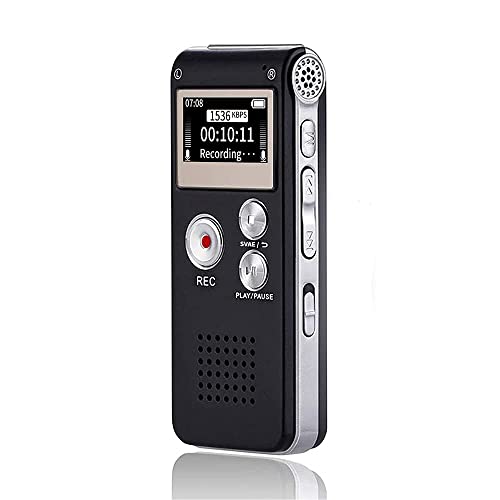
- Dedicated record, stop, and play buttons
- Built-in speaker with A-B repeat
- 16GB storage; over 30 hours of recording
Best For: On-device review of lectures and interviews
Easiest Start
Cappsu 32GB One-Click Voice Recorder

- One-click recording
- 32GB built-in storage
- Up to 20 hours continuous recording
Best For: Quick lectures, meetings, and everyday notes
Study Playback Pick
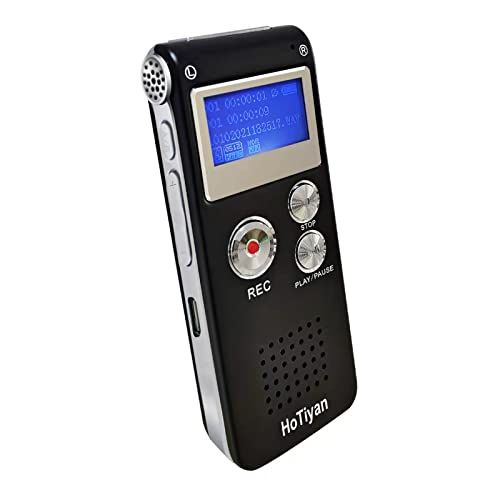
- Simple three-button controls
- A-B repeat and playback speed options
- Up to 20 hours continuous recording
Best For: Students reviewing lectures and interviews
High-Capacity Pick

- 128GB built-in storage
- Up to 54 hours continuous recording
- Four folders and six voice-activation levels
Best For: Frequent recording with organized file storage
Best for Long Sessions – NEXTSIGNAL 160GB Voice Recorder
Among voice recorders for beginners, this NEXTSIGNAL model stands out if you want to press one button and record a full day of lectures or meetings. It combines a stated 68-plus-hour recording battery life with 160GB of storage, including a 128GB memory card.
Best For: Beginners recording long lectures, conferences, or daily notes who want plenty of storage.
Pros:
- One-click recording and saving keeps basic operation simple.
- Dual microphones support stereo recording at up to 1536kbps.
- Offers playback tools including A-B repeat, bookmarks, and variable speed.
Cons:
- Multiple recording modes and scheduling may take time to learn.
- The stated 11,500-hour capacity is a storage figure, not continuous battery life.
This is a practical pick when long runtime matters most. Start with the one-click control, then explore its recording modes as your needs grow.
Best for Quick Starts – Tonfarb 136GB A20 Recorder
For shoppers comparing voice recorders for beginners, the Tonfarb A20 makes capturing an unexpected comment straightforward: slide its side switch up to record, even while the unit is off, then slide it down to save. Its 136GB total storage includes an 8GB built-in capacity and an included 128GB TF card.
Best For: Students or interviewers who need to start recording quickly and review audio later.
Pros:
- Side-switch recording works without first navigating a menu.
- Stated battery life reaches up to 68 hours of continuous recording.
- Includes voice-activated recording, A-B repeat, and a 1.44-inch screen.
Cons:
- The 9,775-hour storage estimate should not be confused with battery runtime.
- Voice activation and other settings add a learning step beyond basic recording.
Choose this model if fast access is your priority. The large stated capacity and USB-C file transfer also suit users who keep recordings for later review.
Best for Everyday Carry – Tonfarb 64GB A12 Recorder
The Tonfarb A12 is an approachable option among voice recorders for beginners who want a compact recorder for classes, interviews, or personal memos. Its side switch starts recording from the powered-off state, while the included 64GB TF card provides storage without a separate card purchase.
Best For: Beginners who want a pocket-size recorder for routine classes, meetings, and notes.
Pros:
- One-click record and save controls are quick to use.
- Voice activation and a 1.44-inch screen support day-to-day operation.
- Includes A-B playback, bookmarking, and password protection.
Cons:
- Its stated 48-hour continuous recording figure applies to MP3 at 32kbps.
- 64GB capacity is lower than the 136GB and 160GB models in this roundup.
Its straightforward switch is the main beginner-friendly draw. If you plan to record at higher-quality settings, do not assume the quoted low-bitrate runtime and storage figures will apply unchanged.
Best for Organized Playback – EVISTR L357 64GB Recorder
If reviewing notes is as important as capturing them, the EVISTR L357 deserves a look among voice recorders for beginners. Dedicated record and save buttons keep the first step simple, while timestamp-based filenames help you find a particular lecture or interview later.
Best For: Students and meeting attendees who regularly revisit and organize recordings.
Pros:
- Separate record and save buttons simplify basic use.
- A-B repeat, rewind, and variable-speed playback help with review.
- USB-C transfer works with Windows and Mac computers, according to the supplied notes.
Cons:
- The 1-inch screen is smaller than the 1.44-inch screens listed for the other models here.
- Voice activation and recording gain each have seven settings to learn if you want to customize them.
This recorder is especially useful when you need to locate and replay specific passages. The supplied description rates it for 32 hours of continuous recording, rather than the 4,660 hours quoted for file storage.
Best for Easy Setup – Olympus WS-853 Stereo Recorder
Among voice recorders for beginners, the Olympus WS-853 is a practical choice if you want stereo MP3 recording, straightforward file transfer, and room to expand storage. Its built-in USB connector lets you connect directly to a computer.
Best For: Students or meeting attendees who want a stereo recorder with long battery life and simple computer transfers.
Pros:
- True stereo microphones and MP3 recording.
- 8GB internal storage plus a microSD card slot.
- Rated for up to 110 hours of battery life; includes two AAA batteries.
- Playback speed adjusts from 0.5x to 2.0x.
Cons:
- Uses AAA batteries rather than a built-in rechargeable battery.
- No transcription feature is listed.
The WS-853 favors dependable recording and review tools over app-based extras. Its expandable storage and variable-speed playback are especially useful when revisiting lengthy recordings.
Best for AI Notes – EVISTR L359 128GB Recorder
The EVISTR L359 suits beginners who want more than an audio file. Of these voice recorders for beginners, it offers the most note-processing tools in its supplied specifications: transcription, summaries, mind maps, and speaker identification through the AI DVR Link app.
Best For: Students and professionals who want to turn recorded speech into searchable notes using a phone app.
Pros:
- One-button recording, a HOLD switch, and password protection.
- 128GB storage and up to 33 hours of continuous recording per charge.
- App supports transcription in 113 languages and smart summaries.
- Includes an OTG cable for wired phone transfers.
Cons:
- AI processing requires transferring recordings to the companion app.
- Phone syncing is wired rather than Bluetooth-based.
Choose the L359 if organizing recordings matters as much as capturing them. Its one-touch controls keep recording simple, while the app adds a separate step when you want AI-generated notes.
Best for Simple Playback – Sunlan 16GB Voice Recorder
If you are comparing voice recorders for beginners and mainly want to record, stop, and listen, this Sunlan model keeps those controls separate and easy to identify. Its built-in speaker and A-B repeat function make it useful for reviewing specific passages.
Best For: Beginners reviewing lectures or interviews who prefer dedicated buttons and on-device playback.
Pros:
- Separate REC, STOP, and PLAY controls with A-B repeat.
- 16GB storage and a rechargeable battery rated for more than 30 hours of recording.
- Voice-activated recording can pause during silence.
- Transfers files to a Windows computer over USB as a removable drive.
Cons:
- Recording format is listed as WAV only.
- The listed computer transfer instructions specify Windows.
This is a straightforward pick when immediate playback matters more than transcription or advanced file organization. Check that WAV files and the stated Windows transfer method fit your workflow.
Easiest Start – Cappsu 32GB One-Click Voice Recorder
For shoppers comparing voice recorders for beginners, the Cappsu keeps the first step simple: power it on and press the record button once to start, then again to save. Its built-in 32GB storage needs no separate memory card.
Best For: First-time users who want quick recording for lectures, meetings, or everyday notes.
Pros:
- One-click recording with an indicator showing when recording is active.
- Voice activation pauses during silence; the stated battery life is up to 20 hours continuously or 50 hours in voice-activated mode.
- Pocketable 1.6-ounce design; earphone and external microphone are included.
Cons:
- For more balanced recordings, it should be placed closer to the speaker.
- Built-in storage means there is no removable memory card to swap.
This is the straightforward pick when fast operation matters more than an extensive set of playback controls. Voice activation adds flexibility for longer sessions, but placement still matters for clear speech.
Among voice recorders for beginners, this HoTiyan model offers simple three-button recording, saving, and playback while adding useful study tools. A-B repeat and variable playback speed let you revisit parts of a lecture or interview.
Best For: Students who want straightforward recording plus more control when reviewing audio.
Pros:
- Three-button operation and built-in playback.
- A-B repeat, variable playback speed, and time-stamped file names aid review and organization.
- Built-in 8GB storage and a stated 20 hours of continuous recording per charge.
Cons:
- Recording is limited to 199 files according to the supplied specifications.
- File transfer uses the supplied Micro USB cable rather than USB-C.
Choose this one if listening back is as important as capturing audio. Its extra settings are helpful for study, though beginners seeking only a record button may not need all of them.
If storage is your priority while shopping for voice recorders for beginners, the EVIDA offers 128GB built in and selectable MP3 or WAV recording formats. Four folders help separate recordings, and the stated battery life reaches up to 54 hours of continuous recording.
Best For: Frequent lecture or meeting recording when generous storage and file organization matter.
Pros:
- 128GB capacity with four folders for organizing files.
- Up to 54 hours of continuous recording on a full charge.
- Voice activation offers six sensitivity levels; A-B repeat, bookmarks, and password protection add flexibility.
Cons:
- More settings may take time to learn if you only need basic recording.
- The supplied specifications list no headphone jack.
This is a stronger fit for someone expecting to build a large recording library than for someone who wants the fewest possible controls. Its playback and organization tools provide room to grow.
How We Picked the Best Voice Recorders for Beginners
We focused on features that affect everyday use: visible controls, onboard playback, storage capacity, battery claims, file transfer, and extras such as voice activation or transcription. The selected models span compact basic recorders, larger-capacity devices, and an established-brand stereo option. Advertised storage and maximum recording-hour figures are useful starting points, not guarantees of audio quality or runtime in every recording mode. Check current specifications and buyer feedback before purchasing, particularly when a listing does not clearly explain its file formats or controls.
Quick Comparison: Where to Start
For familiar physical controls and direct USB transfer, look first at the Olympus WS-853. The 16GB, 32GB, and 8GB models suit shoppers seeking a simpler recorder for occasional notes, provided their available space meets your needs. The 64GB EVISTR and Tonfarb models offer more room for frequent classes or meetings. Consider the 128GB EVISTR if AI transcription and summaries are central to your workflow, but check how those features work and whether they require an app, account, or payment. The 128GB EVIDA adds a listed password feature; the 136GB Tonfarb and 160GB model appeal primarily to shoppers prioritizing stated capacity.
Key Buying Factors for Voice Recorders for Beginners
Controls, Playback, and File Access
Choose a recorder whose record, stop, save, and playback steps you can understand quickly. A screen and clearly labeled buttons help when reviewing a lecture or checking that an interview actually recorded. Confirm how files reach your computer or phone; a USB connection does not necessarily mean direct phone compatibility.
Microphones and Recording Environment
For one-on-one conversations, convenient placement may matter more than a very large memory figure. In a classroom or meeting room, check the microphone arrangement and test a short recording from your expected seat. Stereo recording can help capture a wider space, but background noise and distance still affect intelligibility.
Storage, Power, and Extras
Recording time depends on file format, quality settings, and available memory. Rechargeable power is convenient, while long sessions call for checking stated battery runtime separately from storage-based recording-hour claims. Voice activation can reduce silent passages but may miss quiet speech; test its sensitivity before relying on it. If privacy matters, verify what a password feature protects. For AI notes, confirm the transcription language, accuracy expectations, data handling, and any recurring costs.
Who Should Buy Which Voice Recorders for Beginners?
Students who want straightforward lecture playback can start with a basic 16GB-to-64GB model, then choose more capacity if they rarely transfer files. Meeting organizers should prioritize audible speech across the table and easy file sharing over the biggest hour count. Interviewers should favor simple controls and make a test recording before the conversation. Buyers who regularly turn speech into written notes may benefit from the AI-enabled EVISTR, subject to its service requirements. If you need an established-brand option with listed stereo microphones and direct USB, compare the Olympus WS-853. Whichever you choose, practice recording, playing back, and exporting one file before an important event.