The right lighting controller can make a live set feel polished, responsive, and easy to manage. Whether you run DJ lights at small events or coordinate a larger stage show, the best DMX controller should match your fixtures, programming style, and performance workflow.
We compare 10 DMX controllers for live performances, including traditional 192- and 384-channel consoles, wireless systems, computer interfaces, and app-based options.
Best 10 Dmx Controllers for Live Performances Picks for 2026
Best Bank-and-Chase Console
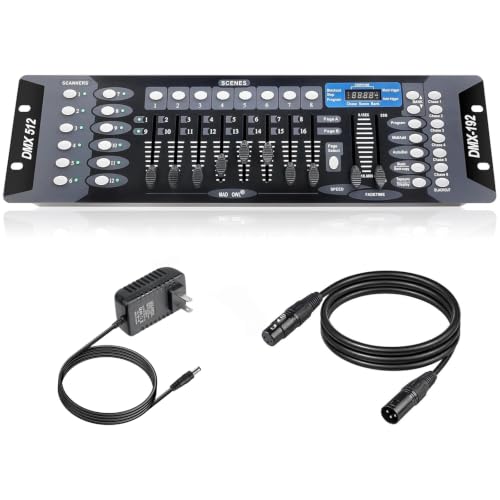
- Controls up to 12 fixtures
- 23 scene banks and six chases
- Includes 6.6-foot DMX cable
Best For: Hands-on stage and DJ lighting control
Best Software-Based Interface

- Compact USB-to-DMX interface
- Supports one DMX universe
- Includes three-month subscription
Best For: Computer-based DJ and live audio lighting
Best Portable Wireless Option

- 2.4G wireless and DMX512 control
- Manual and automatic modes
- Six banks with eight scenes
Best For: Mobile parties, weddings, and small events
Best Standalone Pro Console

- 37 backlit control buttons
- Four rotary encoders
- Supports up to four universes
Best For: Compact multi-universe standalone control
Best App-Based Option
ADJ MyDMX Go Wireless DMX Controller

- 256-channel tablet-based DMX control
- 15,000-plus fixture library
- Includes presets, automatic effects, and truss brackets
Best For: Mobile lighting setups using an iPad or Android tablet
Best for More Channels
DMX512 384CH DJ Lighting Controller

- Offers 384 DMX channels for expanded control
- Supports 24 fixtures and 30 banks of scenes
- Includes side handles and an LED gooseneck light
Best For: Clubs and stages running larger programmed lighting setups
Best Wireless DMX Link
Wireless DMX Set for Fast Mobile Rigs

- Wireless transmitter with two receivers
- Seven group IDs and 126-channel hopping
- Includes three power adapters; no built-in battery
Best For: Mobile DJs and event crews needing cable-free DMX512 connections
Best Full-Size Console

- Controls up to 12 fixtures with 16 channels each
- Supports up to 240 scenes
- Physical controls for scenes, channels, speed, and functions
Best For: Hands-on control of multi-fixture DJ and event lighting
Best Beginner Console
192-Channel DMX Stage Controller

- Controls 12 devices across 192 channels
- Supports 240 scenes and six programmable chases
- Eight sliders plus speed and fade-time controls
Best For: Beginners running small parties, shows, and event lighting
Best Bank-and-Chase Console – 192-Channel DMX Board
For shoppers comparing dmx controllers for live performances, this 192-channel console offers hands-on control for stage and DJ lighting. Its faders, programmable scenes, and chase functions suit setups that need direct, real-time adjustments.
Best For: Stages, clubs, and performance venues using up to 12 fixtures with 16 channels or fewer.
Pros:
- Controls up to 12 lighting fixtures with 16 channels or fewer.
- Provides 23 banks of eight programmable scenes.
- Supports 240-step scenes across six programmable chases.
- Includes a 6.6-foot DMX cable.
Cons:
- Designed for corded operation rather than wireless use.
- Its 22.44-inch width may require dedicated rack or console space.
This is a practical choice when tactile faders and deeper scene programming matter more than portability or automated software control.
Best Software-Based Interface – SoundSwitch Micro DMX
The SoundSwitch Micro DMX Interface is a compact option for dmx controllers for live performances when lighting is managed from a computer. It connects USB to DMX and works with SoundSwitch software for music-synchronized shows.
Best For: DJs, live bands, and computer-based lighting setups using one DMX universe.
Pros:
- Offers a compact USB-to-DMX XLR interface.
- Supports live audio BPM detection from a mic, USB, or live input.
- Works with compatible rekordbox and AlphaTheta setups when used as specified.
- Includes a three-month SoundSwitch subscription.
Cons:
- Requires a computer and SoundSwitch software.
- Subscription fees apply after the included trial period.
- Supports one DMX universe.
Choose this interface if software-driven synchronization and a minimal hardware footprint are more important than standalone physical controls.
Best Portable Wireless Option – Mini 512-Channel Controller
For mobile events, this mini console brings wireless flexibility to dmx controllers for live performances. It combines 2.4G wireless transmission with standard DMX512, manual dimming, and automatic scene playback.
Best For: Weddings, parties, clubs, bars, and small stage setups where portability is a priority.
Pros:
- Supports 512 channels through 2.4G wireless and standard DMX512 control.
- Offers both manual adjustment and automatic scene-loop playback.
- Includes six banks with eight programmable scenes.
- Provides smooth 0–100% master dimming and one-key blackout.
Cons:
- Requires an external 9V–12V DC adapter.
- Does not include a built-in battery.
- Its compact controls may be less suitable for complex large-scale programming.
This controller is a convenient fit for smaller mobile productions that need wireless operation and straightforward scene automation without a bulky console.
Best Standalone Pro Console – ADJ WMX1 Mk2
The ADJ WMX1 Mk2 is a standalone choice among dmx controllers for live performances, offering dedicated buttons and rotary encoders for direct fixture control. Its four output sockets support more extensive DMX system configurations.
Best For: Performers and lighting operators who want a compact standalone controller with multi-universe connectivity.
Pros:
- Provides 37 backlit silicone buttons for operation in darker venues.
- Includes four rotary encoders for hands-on adjustment.
- Supports up to four universes.
- Measures 10 by 9.25 by 3.5 inches and weighs 2.36 pounds.
Cons:
- The supplied notes do not specify included cables or detailed programming capacity.
- Its advanced multi-universe design may be more than small setups require.
With a compact footprint and four-universe architecture, the WMX1 Mk2 is worth considering when a standalone workflow needs more output capacity than a basic controller.
Best Manual Control – MINGJIE 192-Channel DMX512 Console
For live performances that benefit from hands-on operation, the MINGJIE DMX512 Controller provides 192 channels for managing up to 12 intelligent fixtures. Its faders, scene storage, sound-activated mode, and chase programming make it a practical choice among dmx controllers for live performances.
Best For: DJs, small stages, clubs, weddings, theatrical shows, and mobile event setups needing physical controls.
Pros:
- Controls up to 12 fixtures across 192 DMX channels.
- Stores 240 scenes in 30 banks and supports six chases.
- Includes a 4-foot, 3-pin DMX cable and supports 100–240V input.
- Rugged alloy chassis is designed for protection and heat dissipation.
Cons:
- Manual console operation may be less convenient than app-based control.
- Its 192-channel capacity is lower than some larger consoles.
The MINGJIE is a straightforward option when tactile faders and programmable scenes matter more than wireless or tablet operation. It offers useful storage and sound response without requiring a more elaborate control system.
Best App-Based Option – ADJ MyDMX Go Wireless DMX Controller
The ADJ MyDMX Go takes a tablet-centered approach to dmx controllers for live performances, offering 256-channel control through an iPad or Android tablet. With a large fixture library, automatic effects, and wireless connectivity options, it is suited to operators who want quick setup without traditional programming.
Best For: DJs, performers, and mobile production teams seeking compact, app-based lighting control.
Pros:
- Controls lighting through an iPad or Android tablet over Wi-Fi and USB.
- Includes a library of more than 15,000 fixtures.
- Offers 50 user presets and 21 automatic effects without programming.
- Supports up to two lighting universes and includes truss-mount O-Clamp brackets.
Cons:
- Requires a compatible iPad or Android tablet for app-based operation.
- Some additional upgrades are available separately.
- Its workflow may not suit users who prefer dedicated physical faders.
MyDMX Go is a strong fit for fast-moving setups where portability and simple effect creation are priorities. Its broad fixture library can also reduce the need to replace existing stage lights.
Best for More Channels – DMX512 384CH DJ Lighting Controller
For larger fixture arrangements, this 384-channel DMX512 console provides expanded capacity for programmed live shows. It includes 30 banks of eight scenes and supports 24 fixtures, making it one of the more capable dmx controllers for live performances in this roundup.
Best For: Bar, club, and stage operators programming multiple fixtures and synchronized lighting scenes.
Pros:
- Provides 384 DMX channels for detailed fixture control.
- Supports 24 fixtures and 30 banks of eight programmable scenes.
- Uses a compact, lightweight structure with side handles.
- Includes an LED gooseneck light for operation in darker environments.
Cons:
- Programming-oriented controls may require more setup than automatic systems.
- The supplied notes do not specify an included DMX cable.
- It is larger and heavier than the ADJ interface, at approximately 6 pounds.
This console makes sense when channel headroom and scene programming are the main buying priorities. Its 384-channel layout can accommodate more complex lighting plans, while the gooseneck light and side handles support show-day operation.
Best Wireless DMX Link – Wireless DMX Set for Fast Mobile Rigs
For mobile DJs and event crews comparing dmx controllers for live performances, this wireless DMX set focuses on reducing cable runs and setup time. It includes one transmitter, two receivers, power adapters, seven selectable group IDs, and a claimed range of up to 1,000 feet.
Best For: Mobile DJs, weddings, and stage events that need wireless DMX512 connections between lighting fixtures.
Pros:
- Wireless design can help eliminate messy XLR cable runs and speed installation.
- 2.4G frequency hopping with 126 channels is designed to reduce interference and signal delay.
- Seven independent group IDs can separate multiple lighting rigs in the same venue.
- Power adapters are included for the transmitter and both receivers.
Cons:
- It is not battery-powered and requires power adapters during operation.
- This is a wireless transmitter-and-receiver system, not a standalone lighting programming console.
This is a practical choice when the main challenge is distributing DMX512 signals without running long cables. Confirm that your fixtures and venue power setup are compatible before buying.
Best Full-Size Console – CO-Z 192-Channel DMX Mixer
The CO-Z 192 DMX console is a traditional option among dmx controllers for live performances, offering hands-on control for up to 12 intelligent lights with as many as 16 channels each. Its scene, channel, speed, and function controls support programmed lighting sequences for shows and events.
Best For: DJs, small venues, churches, weddings, and users who want a physical console for multiple DMX fixtures and scenes.
Pros:
- Supports up to 12 fixtures, 192 channels, and up to 240 scenes.
- Seven-section layout includes fixture selection, scene switching, channel controls, display, and speed/time controls.
- Compatible with a range of three-pin stage equipment, including fog machines, PAR lights, strobes, and moving-head fixtures.
- Voice control is listed for switching among lighting scenes.
Cons:
- The corded console is less portable than a wireless or software-based controller.
- Its controls and programming capacity may be more than needed for very simple setups.
Choose this model if you prefer dedicated faders and physical controls over a compact interface. Its 192-channel layout provides useful room for expanding a multi-fixture show.
Best Beginner Console – 192-Channel DMX Stage Controller
This compact 192-channel console is a straightforward pick for shoppers comparing dmx controllers for live performances in small venues and event setups. It can control up to 12 devices with 16 channels each, while programmable scenes and chases provide options for music shows, parties, and seasonal events.
Best For: Beginners and small-event operators who need manual channel control plus programmable scenes and chases.
Pros:
- Controls up to 12 intelligent devices across 192 total channels.
- Offers 23 programmable banks of eight scenarios and six programmable chases with up to 240 scenes.
- Eight sliders provide manual channel control, with speed and fade-time controls for automatic programs.
- Includes a 3-pin cable and can connect with compatible stage equipment such as moving heads, PAR lights, and fog machines.
Cons:
- It is a corded controller and requires the included power adapter.
- The product information lists differing warranty details, so verify current coverage before purchase.
- Its feature set is aimed at small gatherings rather than highly complex professional consoles.
With a beginner-oriented seven-part layout and broad scene capacity, this controller suits users learning DMX programming. It is worth considering when manual sliders and repeatable presets matter more than advanced automation.
How We Picked the Best Dmx Controllers for Live Performances
We focused on the features that matter during setup and a live show: DMX channel capacity, fixture compatibility, scene and chase programming, manual control, wireless connectivity, portability, and ease of use. We also considered whether each controller suits beginners, mobile DJs, bands, venues, or more involved stage productions.
Because these products use different control methods, the best choice is not necessarily the one with the highest channel count. A compact wireless interface may be more practical than a larger console for a mobile performer, while a conventional fader board can be faster for hands-on control.
Quick Comparison
- Traditional 192-channel consoles: Affordable and straightforward for basic fixtures, scenes, and chases.
- 384- and 512-channel controllers: Better suited to larger fixture counts and more complex programming.
- Wireless DMX systems: Useful when running cable is inconvenient, but transmitter and receiver compatibility is essential.
- Computer or app-based interfaces: Flexible and portable, with software features that can simplify programming.
- Standalone performance controllers: A strong middle ground for repeatable shows without relying on a laptop.
Key Buying Factors for Dmx Controllers for Live Performances
Channel and Fixture Capacity
Check both the controller’s total channel count and the number of fixtures it can address. A moving head may use many channels, so a 192-channel board can fill up quickly even with a modest number of fixtures. Leave room for future expansion.
Programming and Live Access
Look for dedicated faders, buttons, banks, scenes, and chase controls if you need quick changes during a performance. App and software systems may offer deeper editing, while physical consoles often provide more immediate tactile control.
Connectivity and Wireless Operation
Confirm the controller uses the DMX connectors and signal format your lights require. Wireless products can reduce cable clutter, but check range, line-of-sight expectations, latency claims, and whether receivers are included. Keep a wired backup plan for important shows.
Portability and Reliability
Mobile DJs and bands should consider weight, power requirements, mounting, and setup time. For regular venue work, prioritize durable controls, dependable power, clear displays, and a workflow you can operate confidently in low light.
Who Should Buy Which Dmx Controllers for Live Performances?
Beginners and occasional users should start with an affordable 192-channel console that supports basic scenes and chases. Mobile DJs may prefer a compact wireless or app-based controller that reduces cabling and packs easily. Bands and small venues should look for standalone control with enough banks and fixture capacity for repeatable show cues. Lighting operators and production teams will benefit from higher channel counts, more programmable scenes, and software or hardware that can scale as the rig grows.
Before buying, list your fixtures, count their DMX channels, decide whether you need wireless control, and test your preferred programming workflow. That checklist will narrow the options more reliably than channel count alone.