Desktop guitar effects processors give players an easy way to shape tones without building a full pedalboard. They are ideal for home practice, direct recording, and quick sound design at a desk or workstation.
In this roundup, we focus on compact, buyer-friendly options that balance amp modeling, effects variety, headphone use, USB recording, and overall ease of use.
Best 10 Desktop Guitar Effects Processors Picks for 2026
Desktop Studio Favorite
BOSS GT-001 Desktop Guitar Effects Processor

- Compact desktop unit for home studio use
- XLR mic input plus USB audio/MIDI interface
- Simple knobs and buttons for fast tone editing
Best For: Home studio players who want pro tones and easy recording hookup
Feature-Packed Rig
VALETON GP-200 Multi-Effects Processor

- 240+ effects with 140 amp and cab simulations
- XLR, line, headphone, FX loop, and MIDI connectivity
- USB-C interface with color screen and editor software
Best For: Players who want deep editing and broad connectivity
Budget Practice Pick
Zoom G1 Four Multi-Effects Processor
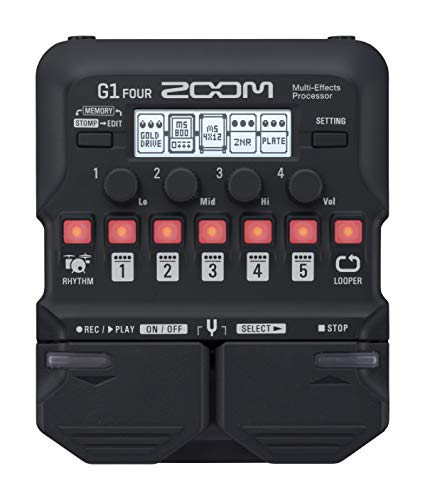
- 65 effects, 13 amp models, and a 30-second looper
- 68 built-in rhythm patterns for practice
- Battery-powered and easy to carry
Best For: Beginners and portable practice setups
Pocket Practice Unit
MOOER PE100 Desktop Guitar Processor

- Ultra-compact design that fits in a pocket
- 99 factory and 99 user presets with quick recall
- Drum machine, metronomes, and tap tempo for practice
Best For: Players who want a tiny practice processor with presets
Starter Tone Lab
Zoom G1X Four multi-effects with looper and rhythms

- 71 effects and 13 amp models
- 30-second looper for practice and songwriting
- 68 rhythm patterns plus Guitar Lab editing
Best For: Home practice players who want variety and loop-based creativity
Pocket Studio Pick
SK17 pocket processor with ANN modeling and USB recording

- 80 presets with customizable effect chain
- USB audio interface with OTG recording and loopback
- Supports 3rd-party IRs, Bluetooth audio, and battery power
Best For: Traveling players who want a tiny all-in-one practice and recording unit
Live Stream Workhorse
MOOER GE150 with amp modeling, IR loading, and looper
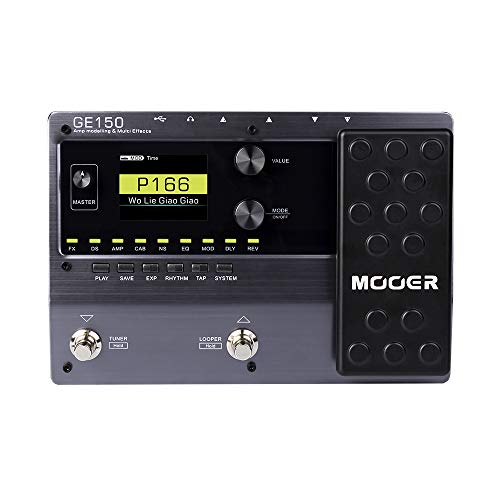
- 151 effects and 55 amp models
- 26 user IR slots and expression pedal
- USB-OTG streaming plus 80-second looper
Best For: Players who stream, record, and need broad tone flexibility
Desktop Practice Pick
LEKATO 36-Preset Multi Effects Pedal

- 36 presets with amp, MOD, delay, reverb, and IR cab options
- App editing plus preset sharing and IR loading on PC or phone
- Battery-powered with Bluetooth and multiple output options
Best For: Portable practice and easy tone editing at home
Performance Control Choice

- 200 presets with 55 amp models and 26 cab sims
- Four footswitches and an expression pedal for live control
- USB OTG, looper, drum machine, and tuner built in
Best For: Players who want deeper control and recording features
Compact Creator Pick
LEKATO Desktop Multi Effects Processor

- 80 preset slots with 6 modules, 20 amp sims, and 20 IRs
- OTG recording with loopback for backing tracks plus guitar
- Very light design with app-based drag-and-drop editing
Best For: Content creators and practice-focused players who value portability
Desktop Studio Favorite – BOSS GT-001 Desktop Guitar Effects Processor
If you want desktop guitar effects processors that feel built for recording and practice, the BOSS GT-001 is a strong studio-friendly choice. It packs the acclaimed amps and effects from the GT-100 Version 2.0 into a compact desktop unit, and the simple panel controls make it easy to dial in usable tones fast.
Best For: Home studio players who want pro tones, quick editing, and mic input for extra sources.
Pros:
- Compact desktop design fits easily on a workspace.
- Includes guitar input plus an XLR mic input for vocals or acoustic instruments.
- Built-in USB audio/MIDI interface supports direct DAW connection.
- Dedicated buttons and knobs make patch selection and tone shaping straightforward.
Cons:
- Uses a corded power setup instead of battery power.
- Desktop-focused layout may be less convenient for floor-based control.
Overall, the GT-001 stands out when your priority is polished tone in a compact unit with practical recording connectivity. It is especially appealing if you want a desktop processor that can handle guitar, voice, or acoustic tracking without adding much clutter.
Feature-Packed Rig – VALETON GP-200 Multi-Effects Processor
Valeton GP-200 Multi-Effects Processor for Guitar & Bass, Expression Pedal, MIDI, USB Interface
Check Price On AmazonAmong desktop guitar effects processors, the VALETON GP-200 is the most feature-heavy option here. It combines 240+ built-in guitar, bass, and acoustic effects with amp and cab simulations, plus a color screen and multiple I/O options for more flexible setups.
Best For: Players who want deep editing, stereo connectivity, and a broad effects library in one processor.
Pros:
- 240+ effects, 140 amp/cab simulations, and 100 stompbox models.
- Supports 20 third-party IRs and up to 11 simultaneous effect blocks.
- Includes FX loop, MIDI in, XLR, line, and headphone connections.
- USB-C audio interface and free editor software make preset management easier.
Cons:
- More complex than a basic practice unit.
- Likely more than you need if you only want simple plug-and-play tones.
The GP-200 is a strong pick if you want a desktop processor that can cover serious tone shaping and modern routing needs. It gives you plenty of room to build elaborate patches while still offering practical USB and mobile-device support.
Budget Practice Pick – Zoom G1 Four Multi-Effects Processor
The Zoom G1 Four is a compact choice for players shopping desktop guitar effects processors on a budget. It offers a useful mix of 65 built-in effects, 13 amp models, a looper, and rhythm patterns in a small battery-powered unit that is easy to move around.
Best For: Beginners and practice players who want a simple, portable multi-effects unit.
Pros:
- 65 effects and 13 amp models cover a wide range of basic tones.
- 30-second looper and 68 built-in rhythm patterns support practice.
- Battery-powered design adds portability.
- Free Zoom Guitar Lab software helps with editing on Mac and Windows.
Cons:
- Less advanced than higher-end processors in this roundup.
- Limited physical size means fewer onboard controls and routing options.
The G1 Four is a practical entry point if you want affordable effects, amp modeling, and practice tools without extra complexity. It makes the most sense when portability and value matter more than deep studio routing.
Pocket Practice Unit – MOOER PE100 Desktop Guitar Processor
If you need desktop guitar effects processors that can disappear into a gig bag or pocket, the MOOER PE100 is built for portability. It combines amp models, effects, presets, a tuner, and drum patterns in a very small desktop-style unit with touch-panel control.
Best For: Players who want an ultra-compact practice processor with presets and rhythm tools.
Pros:
- Very compact and pocketable design.
- 99 factory presets and 99 user presets with quick recall buttons.
- Includes 39 effect types across 6 effect blocks.
- Drum machine, metronomes, and tap tempo add practice flexibility.
Cons:
- Small format may feel limited for users who want a larger interface.
- Focuses on practice utility more than deep studio connectivity.
The PE100 makes sense if your priority is convenience, preset access, and built-in practice features over advanced routing. Its tiny footprint and touch controls make it an easy grab-and-go option for daily playing.
Starter Tone Lab – Zoom G1X Four multi-effects with looper and rhythms
If you want one of the more versatile desktop guitar effects processors for practice and tone shaping, the Zoom G1X Four gives you a lot to work with in a compact format. It packs 71 effects, 13 amp models, a 30-second looper, and 68 rhythm patterns, so it can cover everything from basic home practice to more creative jam sessions.
Best For: Players who want an affordable all-in-one processor for practice, looping, and experimenting with tones at home.
Pros:
- 71 built-in effects and 13 amp models for broad tone variety
- 30-second looper helps with songwriting and solo practice
- 68 rhythm patterns make practice feel more like playing with a band
- Works with Zoom Guitar Lab on Mac/Windows for patch editing
Cons:
- Battery-powered design and compact build may feel more practice-focused than studio-centric
- Not as feature-heavy as larger processors with deep routing options
Overall, the G1X Four is a practical pick if you want a desktop-friendly effects unit that balances tone variety with easy practice tools. It stands out most for players who value looping, rhythm support, and simple editing without a complicated setup.
Pocket Studio Pick – SK17 pocket processor with ANN modeling and USB recording
Among desktop guitar effects processors, the SK17 is built for players who want a tiny unit that still covers modern practice and recording needs. It offers 80 presets, 6 independent effect modules, ANN amp modeling, and support for 3rd-party IR files, plus USB audio recording and Bluetooth input for backing tracks.
Best For: Guitarists who want a pocket-sized processor for travel, silent practice, and direct recording to phone or PC.
Pros:
- ANN modeling aims for a more natural, touch-sensitive amp feel
- 80 presets with 6 modules and customizable signal-chain order
- USB sound card supports OTG recording and loopback at 44.1KHz/24bit
- Very compact, rechargeable, and built for portable use
Cons:
- Small size and clip-on design are less traditional than a standard pedalboard processor
- Not the most extensive preset count compared with larger floor units
The SK17 makes sense if your priority is portability without giving up recording features. It is especially appealing for players who want a grab-and-go processor that can handle practice, busking, and quick direct capture.
Live Stream Workhorse – MOOER GE150 with amp modeling, IR loading, and looper
If you are comparing desktop guitar effects processors for live streaming, home studio work, and practice, the MOOER GE150 is built to do a lot in one box. It combines 151 effects, 55 amp models, 26 user slots for 3rd-party IR files, an expression pedal, and an 80-second looper with drum rhythms and metronome settings.
Best For: Players who want a feature-rich processor for streaming, recording ideas, and flexible amp-and-IR tone shaping.
Pros:
- 151 total effects and 55 amp models for wide tonal coverage
- 26 user slots for loading 3rd-party IR files
- 80-second looper plus drum rhythms and metronome settings for practice
- USB-OTG support helps with smartphone recording and live streaming
Cons:
- At 1.11 kg, it is less pocketable than smaller portable processors
- Uses a more traditional pedal format, so it may take more space than mini units
The GE150 is the strongest all-rounder here if you want a balance of tone depth, practice tools, and sharing features. Its IR support and USB-OTG recording make it especially useful for players who move between home playing, content creation, and live use.
Desktop Practice Pick – LEKATO 36-Preset Multi Effects Pedal
If you want desktop guitar effects processors for practice, recording, and quick tone shaping, this LEKATO unit packs a lot into a compact battery-powered design. It gives you 36 presets, editable modules, IR cab options, Bluetooth playback, and multiple outputs, so it works well as an all-in-one home setup.
Best For: Players who want a portable desktop-friendly processor for practice, tone editing, and simple home recording.
Pros:
- 36 presets with editable modules for amp, chorus, delay, reverb, and IR cab tones
- App support for editing, preset sharing, and IR loading on PC or phone
- Multiple connection options including headphone, USB, XLR, and Bluetooth playback
- Built-in 3000mAh battery for up to 12 hours of use
Cons:
- Best suited to practice and home use rather than a floorboard-style performance setup
- Single compact unit may feel more limited than larger processors with deeper hands-on control
This is a practical pick if you need a desktop guitar effects processor that is easy to carry and flexible enough for everyday playing, editing, and recording. The feature set is broad without getting complicated, which makes it appealing for players who want convenience first.
Performance Control Choice – MOOER GE150 Pro Processor
For players comparing desktop guitar effects processors with more live-control features, the MOOER GE150 Pro stands out for its four footswitches, expression pedal, and large preset library. It also adds amp and cab modeling, sample loading support, USB OTG recording, and built-in rhythm tools for practice or performance.
Best For: Guitarists who want a feature-rich processor for preset switching, recording, and hands-on control.
Pros:
- 200 factory presets with 55 amp models, 26 cab sims, and support for NAM/MNRS sample files
- Four multi-purpose footswitches plus an expression pedal for flexible control
- Built-in looper, drum machine, tuner, and metronome modes for practice
- USB Type-C and OTG connectivity for tone editing and phone or computer recording
Cons:
- More complex than a basic desktop practice unit
- Standard GE150 Pro is corded, so battery portability requires the Li version
This model makes sense if you want a processor that can handle practice, looping, and recording while still offering hands-on switching control. It is the most performance-oriented option in this group and has the deepest control layout.
Compact Creator Pick – LEKATO Desktop Multi Effects Processor
This LEKATO model is aimed at players who want desktop guitar effects processors that are light, portable, and easy to manage from an app. With 80 preset slots, 20 amp simulations, 20 IRs, OTG recording, and Bluetooth backing-track support, it is especially useful for practice and quick content creation.
Best For: Players and content creators who want a lightweight processor for practice, editing, and phone recording.
Pros:
- 80 preset slots with 6 effect modules, 20 amp sims, and 20 cabinet IRs
- OTG USB audio interface and loopback support for recording with backing tracks
- App-based drag-and-drop editing on mobile or desktop
- Very light at 145 grams with about 9 hours of battery life
Cons:
- Touch controls may not suit players who prefer traditional knobs or footswitches
- Less built for live performance switching than larger floor processors
As a desktop-friendly processor, this one prioritizes portability and simple content-making workflows. If your main goal is practice, tone exploration, and fast phone recording, it offers a very practical feature set in a small package.
How We Picked These Desktop Guitar Effects Processors
We looked for models that make sense on a desk or small setup, with a strong mix of sound quality, usability, and practical features. Priority went to units that offer usable amp and cab simulation, silent practice support, preset flexibility, USB connectivity, and straightforward editing.
Because Desktop Guitar Effects Processors are often used for both practice and recording, we also favored products with headphone outputs, drum machines, expression control, MIDI or FX-loop support where relevant, and enough preset memory to cover multiple styles.
Quick Comparison: What Matters Most
At a glance, the main differences come down to control depth and workflow. Some units are built for simple plug-and-play use, while others are better suited to players who want detailed editing, broader amp libraries, or more studio-friendly connectivity.
If you want the fastest setup, look for fewer menus and clear preset switching. If you want a more complete rig replacement, prioritize IR loading, USB audio, stereo operation, and flexible routing.
Key Buying Factors for Desktop Guitar Effects Processors
Effects and Amp Modeling
Check how many effects blocks and amp models are included, but also consider whether those sounds are useful in real playing situations. A smaller set of well-voiced tones is often better than a huge library you will never use.
Cab Sims and IR Support
For direct recording and headphone use, cab simulation is essential. IR loading can add more realistic speaker response and help the processor sound more polished through headphones, monitors, or audio interfaces.
Editing and Preset Management
Desktop Guitar Effects Processors vary a lot in how easy they are to edit. Some allow quick module changes and preset saving, while others offer deeper parameter control for custom tones. Choose based on how much tweaking you actually want to do.
Connectivity and Practice Features
USB audio, stereo outputs, MIDI, expression pedals, tuner functions, and built-in drum machines all improve day-to-day usefulness. Home players may value silent practice tools most, while recording users should focus on interface compatibility and direct-out quality.
Who Should Buy Which Desktop Guitar Effects Processors?
Beginners should usually choose a simple unit with presets, a tuner, and basic amp modeling so they can start playing quickly. Players who practice quietly at home should prioritize headphone-friendly Desktop Guitar Effects Processors with drum patterns and easy editing.
If you record often, look for USB audio, IR loading, and strong cab simulation. For more advanced players, models with expression control, MIDI, FX loop support, and larger preset libraries offer more room to grow.
In the end, the best choice depends on whether you want convenience, tone depth, or studio flexibility. The right desktop processor should fit your playing habits first, not just its feature count.