Modern conference rooms often combine SDI cameras, HDMI displays, presentation systems, and professional video equipment. The right converter can connect those formats cleanly while preserving resolution, audio, and dependable signal flow.
We selected 10 practical options for different room layouts and workflows, from compact camera adapters to bidirectional converters and SDI distribution tools. Use the guide below to match features, signal requirements, and installation needs to your setup.
Best 10 Sdi Converters for Conference Rooms Picks for 2026
Flexible Cross-Conversion
Decimator MD-LX Bidirectional Converter

- Bidirectional HDMI and SDI conversion
- Auto-selects active inputs
- Supports 3G Level A and B
Best For: Rooms with mixed HDMI and SDI sources
Format Flexibility
Blackmagic Mini Converter UpDownCross HD

- Converts SD and HD SDI formats
- Automatic SD/HD/3G-SDI detection
- Two re-clocked SDI outputs
Best For: SDI systems needing standards conversion
Audio and Scaling Control
Lumantek ez-MD+ Cross Converter

- HDMI-to-SDI and SDI-to-HDMI conversion
- Scaling from 480i to 1080p60
- Audio delay and genlock support
Best For: Mixed-signal rooms needing processing control
Multi-Display Distribution
Blackmagic Mini Converter SDI Distribution

- Eight re-clocked SDI outputs
- Supports SD, HD, and 3G-SDI
- Handles embedded audio and ASI
Best For: Splitting one SDI source across multiple devices
Best Scaler Pick
Lumantek SDI to HDMI Converter

- Built-in display and scaler
- HDMI output for monitors
- Compact monitor-focused design
Best For: SDI-to-HDMI conference displays needing scaling
Best Bidirectional Pick
Blackmagic Micro Converter 12G

- Bidirectional SDI/HDMI conversion
- HDMI 2.0 connectivity
- Universal power supply included
Best For: Flexible camera and presentation-source switching
Best Long-Run Pick
Anber-Tech SDI to HDMI Converter
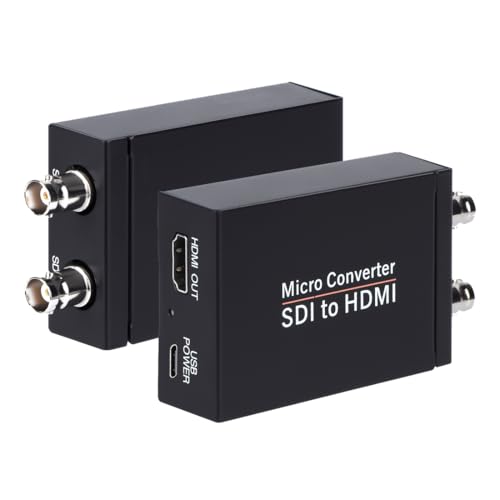
- Supports 3G, HD, and SD-SDI
- SDI loopout plus HDMI output
- Long cable-run support
Best For: Long-distance SDI feeds to HDMI displays
Premium 12G Signal Conversion
Micro Converter SDI to HDMI 12G
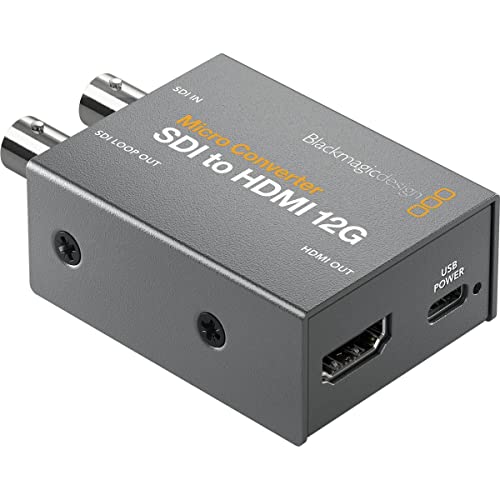
- 33-point 3D LUT for display calibration
- 3D LUT output through SDI loop
- Compact, robust metal enclosure
Best For: Color-sensitive SDI-to-HDMI conference room setups
Practical Full HD Conversion
SDI to HDMI Converter with Loop Out

- Supports SD-SDI, HD-SDI, and 3G-SDI
- 1080p Full HD output
- SDI loop out and plug-and-play design
Best For: 1080p conference rooms using BNC SDI sources
HDMI-to-SDI Distribution
Micro Converter HDMI to SDI 12G

- Two SDI video outputs
- Automatic HDMI input matching
- Supports SD through 12G SDI rates
Best For: Routing HDMI room sources into SDI infrastructure
Flexible Cross-Conversion – Decimator MD-LX Bidirectional Converter
For conference rooms that connect both HDMI laptops and SDI video equipment, the Decimator MD-LX provides a compact, bidirectional conversion option. Its auto-select behavior can route active inputs to the available outputs, supporting several practical signal-flow combinations.
Best For: Conference rooms, live events, and production spaces that need flexible HDMI-to-SDI and SDI-to-HDMI conversion.
Pros:
- Supports bidirectional HDMI and SDI conversion.
- Automatically selects an active input when configured accordingly.
- Supports 3G Level A and Level B, including conversion between both.
- Can route signals to HDMI and SDI outputs in several input configurations.
Cons:
- The supplied listing specifies no warranty.
- Its Type I, three-pin power plug may require compatibility checking for your region.
The MD-LX is a strong fit when a conference-room system must accommodate changing HDMI and SDI sources without committing to a single conversion direction.
Format Flexibility – Blackmagic Mini Converter UpDownCross HD
The Blackmagic Design Mini Converter UpDownCross HD is designed for conference rooms and video systems that need to work across different SDI standards. It automatically detects SD, HD, and 3G-SDI formats while providing standards conversion and two SDI outputs.
Best For: SDI-based conference-room systems that need automatic format detection and SD, HD, or 3G conversion.
Pros:
- Up-, down-, and cross-converts SD and HD SDI formats.
- Automatically detects SD, HD, and 3G-SDI signals.
- Includes reference-in functionality.
- Provides two SDI outputs with SDI re-clocking.
Cons:
- The supplied notes identify an HDMI interface, but do not describe HDMI-to-SDI conversion.
- It is focused on SDI standards conversion rather than general-purpose room connectivity.
Choose this model when SDI format compatibility is the main concern and your installation benefits from automatic detection plus dual re-clocked outputs.
Audio and Scaling Control – Lumantek ez-MD+ Cross Converter
The Lumantek ez-MD+ is a versatile choice for conference rooms where HDMI and SDI sources may need both conversion and signal adjustment. Along with HDMI-to-SDI and SDI-to-HDMI conversion, it offers scaling, aspect-ratio control, audio handling, delay adjustment, and frame synchronization.
Best For: Conference rooms requiring mixed-signal conversion with resolution scaling, audio control, and synchronization options.
Pros:
- Converts HDMI to SDI and SDI to HDMI.
- Scales incoming video from 480i through 1080p60.
- Supports XLR balanced audio, audio mux/demux, and adjustable delay.
- Offers free-running, input-lock, and genlock synchronization modes.
Cons:
- Its listed weight of 1.6 pounds is greater than that of some compact converters.
- Scaling and synchronization features may be more than a simple conversion setup requires.
The ez-MD+ stands out for rooms where signal conversion alone is not enough and installers need practical control over resolution, screen ratio, audio timing, and synchronization.
Multi-Display Distribution – Blackmagic Mini Converter SDI Distribution
For conference rooms that need to send one SDI source to several destinations, the Blackmagic Design Mini Converter SDI Distribution functions as an SDI distribution amplifier. It accepts SD, HD, and 3G-SDI signals and provides eight re-clocked outputs for displays or other connected equipment.
Best For: Conference rooms and facilities that need to split one SDI feed across multiple devices.
Pros:
- Distributes one SDI input to eight re-clocked SDI outputs.
- Automatically switches among SD, HD, and 3G-SDI formats.
- Supports ASI, ancillary data, and embedded audio.
- Includes a redundant SDI input for critical applications.
Cons:
- It is an SDI distribution amplifier rather than an HDMI-to-SDI cross-converter.
- The supplied notes list coaxial connectivity, so HDMI device compatibility should not be assumed.
This model is best when the room already uses SDI and the installation requires reliable one-to-many signal distribution rather than format conversion between HDMI and SDI.
Best Scaler Pick – Lumantek SDI to HDMI Converter
For conference rooms that need to display an SDI source on an HDMI monitor, the Lumantek EZ-SHV+ is a practical choice with an integrated display and scaler. Its single HDMI connection and monitor-focused design suit straightforward presentation setups.
Best For: Conference rooms connecting an SDI source to an HDMI monitor while needing scaling and on-device display information.
Pros:
- Combines SDI-to-HDMI conversion with a built-in scaler and display.
- Designed for monitor use with an HDMI connector.
- Compact 3.5 x 6 x 4-inch form factor.
Cons:
- Provides one listed port, which may limit more complex room systems.
- The supplied notes specify SDI-to-HDMI functionality but do not indicate bidirectional conversion.
The EZ-SHV+ makes sense when a room needs a focused SDI-to-HDMI path rather than a multi-format hub. Confirm that its single-port configuration and supported signal direction match your installation.
Best Bidirectional Pick – Blackmagic Micro Converter 12G
The Blackmagic Design Micro Converter is a flexible option for conference rooms that connect SDI cameras, HDMI computers, projectors, or displays. Its bidirectional SDI/HDMI design and included 5V universal power supply make it useful when room sources may change between presentations.
Best For: Conference rooms needing compact SDI and HDMI connectivity for cameras, computers, monitors, projectors, or displays.
Pros:
- Supports bidirectional SDI/HDMI conversion.
- Includes one SDI input and HDMI 2.0 input/output connections.
- Comes with a 5V universal power supply and international socket adapters.
- Compact 3.54 x 2.32 x 0.98-inch design.
Cons:
- Its listed 5V power requirement means a suitable power source is needed at the installation point.
- The supplied specifications identify one SDI video input, so larger SDI routing needs may require additional equipment.
Choose this model when flexibility matters more than having a dedicated one-way converter. It is particularly well suited to rooms where both SDI cameras and HDMI presentation devices may share the same display infrastructure.
Best Long-Run Pick – Anber-Tech SDI to HDMI Converter
The Anber-Tech converter is a strong fit for conference rooms that must carry SDI over longer cable runs before feeding an HDMI display. It supports 3G-SDI, HD-SDI, and SD-SDI with automatic format detection, plus an SDI loopout for passing the signal onward.
Best For: Conference rooms using long SDI cable runs, HDMI displays, and systems that benefit from SDI loopout and audio de-embedding.
Pros:
- Automatically detects 3G-SDI, HD-SDI, and SD-SDI formats.
- Supports stated cable distances up to 300 feet for 3G-SDI, 500 feet for HD-SDI, and 1,000 feet for SD-SDI.
- Provides both HDMI output and SDI loopout.
- Supports eight channels of 48 kHz digital audio and stereo audio de-embedding.
Cons:
- This is not bidirectional; it does not convert HDMI to SDI.
- Its supported video formats are limited to the listed SD, HD, and 3G-SDI standards.
For rooms with distributed SDI infrastructure, the long-run support and loopout are the main advantages. Verify the source format and remember that this unit is intended for SDI-to-HDMI conversion only.
Premium 12G Signal Conversion – Micro Converter SDI to HDMI 12G
Blackmagic Design Micro Converter SDI to HDMI 12G (no Power Supply) BMD-CONVCMIC/SH12G
Check Price On AmazonFor conference rooms that need to display an SDI source on a monitor, projector, or television, the Blackmagic Design Micro Converter SDI to HDMI 12G provides a compact SDI-to-HDMI connection. Its metal body and 33-point 3D LUT support make it a strong option for color-sensitive presentation and video workflows.
Best For: Conference rooms using SDI sources with HDMI displays where color calibration and a durable compact enclosure are useful.
Pros:
- Supports a 33-point 3D LUT for monitor, projector, or television color calibration.
- Can output the 3D LUT through the SDI loop output.
- Uses broadcasting technology in a compact, robust metal body.
- Designed for SDI-to-HDMI conversion with a monitor-compatible interface.
Cons:
- The supplied notes do not specify supported video resolutions or frame rates.
- The notes list portable mounting rather than a dedicated installation mount.
This is the more specialized choice among these SDI converters for conference rooms, especially when display calibration matters. Verify the room’s required signal format and power arrangement before deployment.
Practical Full HD Conversion – SDI to HDMI Converter with Loop Out
This SDI-to-HDMI converter is a practical fit for conference rooms that need to connect an SDI camera or other SDI source to an HDMI monitor, HDTV, or projector. It supports SD, HD-SDI, and 3G-SDI inputs, with synchronous audio and video transmission up to 1080p.
Best For: Full HD conference room, multimedia presentation, command-center, or projector systems using BNC-connected SDI sources.
Pros:
- Converts HD-SDI, 3G-SDI, and SD-SDI to HDMI.
- Supports up to 1920×1080, or 1080p Full HD.
- Includes SDI loop out and synchronous audio/video transmission.
- Metal shell, heat dissipation design, and plug-and-play operation support straightforward installation.
Cons:
- Does not support 4K.
- Converts SDI to HDMI only; it does not support HDMI-to-SDI conversion.
- Requires a coaxial cable with a BNC male connector and does not support RF, CVBS, AHD, TVI, or CVI signals.
For standard 1080p conference room displays, this model offers the clearest stated compatibility and a useful loop output. It is not the right choice for 4K systems or rooms that need bidirectional conversion.
HDMI-to-SDI Distribution – Micro Converter HDMI to SDI 12G
Blackmagic Design Micro Converter HDMI to SDI 12G (no Power Supply) BMD-CONVCMIC/HS12G
Check Price On AmazonConference rooms that need to send an HDMI presentation or computer source into SDI infrastructure can use the Blackmagic Design Micro Converter HDMI to SDI 12G. It provides two SDI video outputs, automatically matches the HDMI input, and supports SD through 12G rates for flexible signal distribution.
Best For: Conference rooms that route HDMI sources into SDI displays, production equipment, or other SDI-connected systems.
Pros:
- Provides two SDI video outputs for signal distribution.
- Automatically matches the HDMI input.
- Supports 270Mb, 1.5G, 3G, 6G, and 12G SDI rates.
- Supports automatic detection of SD, HD, 2K, Ultra HD, and 4K formats, with reclocking.
Cons:
- This is an HDMI-to-SDI converter, not an SDI-to-HDMI model.
- The supplied notes do not specify the included power accessories or mounting hardware.
This model is best when the conference room signal flow starts with HDMI and ends in SDI. Its dual outputs and broad rate support make it more suitable for distribution-oriented setups than a simple single-display conversion.
How We Picked the Best Sdi Converters for Conference Rooms
We focused on converters that address common meeting-room requirements: SDI-to-HDMI and HDMI-to-SDI conversion, support for widely used video formats, reliable connectors, audio handling, scaling, and loop-through or distribution capabilities. We also considered whether each model fits a portable presentation kit, a fixed conference-room installation, or a more advanced production workflow.
Because conference rooms vary significantly, there is no single best converter for every system. A simple camera-to-display connection has different needs from a room with multiple sources, embedded audio, and long cable runs.
Quick Comparison
- Best for flexible routing: A bidirectional converter can handle HDMI-to-SDI and SDI-to-HDMI duties as your room configuration changes.
- Best for format mismatches: A standards converter with scaling or frame-rate conversion can help connect sources and displays that do not share the same format.
- Best for multiple destinations: An SDI distribution converter is designed to send one source to several SDI outputs.
- Best for camera feeds: A compact SDI-to-HDMI model with loop-out can feed a display while continuing the signal to another device.
- Best for professional 4K workflows: A 12G-SDI model provides more bandwidth for supported Ultra HD formats.
Key Buying Factors for Sdi Converters for Conference Rooms
Direction and Signal Format
Confirm whether you need SDI to HDMI, HDMI to SDI, or both. Check the exact SDI standard—SD-SDI, HD-SDI, 3G-SDI, 6G-SDI, or 12G-SDI—and verify that the converter supports your camera, switcher, display, and resolution.
Scaling and Format Conversion
Basic converters may pass compatible signals without changing them. If a presentation source and room display use different resolutions or frame rates, choose a model with scaling or up/down/cross-conversion. This can prevent blank screens and reduce dependence on separate processors.
Audio Support
Determine whether audio is embedded in SDI, carried through HDMI, or needs to be extracted or inserted. Audio de-embedding and multiplexing are especially useful when a conference-room DSP or mixer handles sound separately from the video display.
Power, Cabling, and Installation
Look for the included power supply, USB power options, locking or secure connections where available, and suitable BNC cabling. For long SDI runs, use properly rated 75-ohm cable and confirm the supported distance for your chosen data rate.
Who Should Buy Which Sdi Converters for Conference Rooms?
Choose a compact SDI-to-HDMI converter when the main goal is connecting an SDI camera or professional source to an HDMI monitor or projector. Select an HDMI-to-SDI model when an HDMI laptop, camera, or presentation device must feed an SDI switcher or infrastructure.
For rooms that change between events, a bidirectional unit offers the most flexibility. Choose a scaler or cross-converter when mixed resolutions are likely. A distribution model is the better fit for sending one SDI source to several endpoints, while a 12G-SDI converter makes sense for newer high-bandwidth video systems rather than basic HD installations.